2010/02/14

Audacity


First of all, I would like to thank Anak IT’s founder for making me part of contributors. Even though the article editor interface is not that easy to learn, but it is an honor for me to give contribution to Anak IT.P/S: Jan lupa lanja ah hehe
For my first article, I would like to share with you guys about a software that I usually work with for audio editing. It is called Audacity. It is an open source software a.k.a FREE to use. For those yang memerlukan this software untuk edit mp3 or wav, you may go to http://audacity.sourceforge.net/download/ and download it based on your Operating System. It is now widely used in education in most of multimedia courses around the globe for learning audio editing.
Currently, Audacity works with these Operating Systems:
  • Windows (xp/vista/7)
  • Mac (OS X)
  • Linux
Audacity's User Interface
I use Audacity to:
  • Trim a song or memanggal-manggal lagu untuk jadikan short ringtone
  • Bagi effect to any audio file especially fade-in and fade-out effect
  • Combine tracks into a song
  • Removing noise (hiss sound)
  • Basarkan the volume of the song
Effects available in Audacity
Here are further elaborations on its built-in effects:
  • Amplify - Membasari volume lagu
  • Bass Boost - Membasari bunyi bass or labuk-labuk
  • Change Pitch - Menukar suara jadi Chipmunk or Low-tone
  • Change Speed - Melajukan or memperlahankan lagu
  • Change Tempo - I think kurang labih sama macam Change Speed
  • Click Removal - Membuang "click" and "pop" sounds?
  • Compressor - What I can tell is that it reduces the "quality" unrecognisably
  • Echo - Bagi effect macam dalam gua
  • Equalization - Ala-ala equalizer dalam keta or arah set karaoke
  • Fade In - Make the sound timbul perlahan-lahan
  • Fade Out - Make the sound hilang perlahan-lahan
  • FFT Filter - Usulnya macam Equalizer jua but this one has more controls
  • Invert - I think... Hmmm swapping the right channel to left channel and vice versa?
  • Noise Removal - Buang bunyi noise "ssssssssss" or bunyi aircond
  • Normalize - Kurang labih macam Amplify but this one control the frequency supaya inda "pacah"
  • Nyquist Prompt - It requires us to code-in something but I won't bother since it doesn't "taste" so useful
  • Phaser - Making the sound goes kiri ke kanan and kanan ke kiri (only in Stereo mode and only works with Stereo Speaker)
  • Repeat - "Copying and pasting" the highlighted area with "number of times to repeat" feature
  • Reverse - Terbalikkan bunyinya
  • Wahwah - Bagi bunyi "UFO" effect haha bunyinya macam Phaser effect but its a bit faster
You may experiment the effects on your own and try to analyse what each effect does to your audio file (mp3, wav, aif, au, ogg). I've produced many tracks with this software (to be precised, "combination of softwares which INCLUDES Audacity" hehe) and you may download one of my samples below:
MenjunjungDuli.mp3 Produced in 2006
- End -

2010/02/09

FileZilla FTP Client


Salam Anak IT. FileZilla FTP Client is one of the most popular FTP client available on the internet. It is used to upload and download files to/from server (usually web server). Click here to read further on FTP.
You may download FileZilla FTP Client for free on their website http://filezilla-project.org/ or simply clickhere if you would like to have a test drive. Once installed and opened, the following window will appear:
Then you may go to File>Site Manager or simply press CTRL+S keys on your keyboard.
To connect to the FTP Server using your account (if you have one), enter the given hostname (e.g websiteku.info) or it can be the Server's IP Address (if you know it). The default port for FTP is 21. Choose "Normal" for Logontype, enter your username and password then click on Connect button. If you have entered valid FTP account information, you will be connected to the server and ready to transfer files from your computer (client) to the server or vice versa.
Hope it gives you basic understanding on FTP (File Transfer Protocol). You may contact me if thing goes wrong with your FTP-ing attemp. Sekian.

2010/02/07

Sehari Sepatah Kata


Sehari sepatah kata:
PENGDRIVE
Contoh penggunaan ayat:
Admin: "bos. do u have notes DB yg latest? i mean yg bukan from cd..."
Azarina: "ada, dalam pengdrive"
Admin: "PENGdrive?"
Azarina: "au. pengdrive"
Sekian.

2010/02/06

Local Bandwidth Meter


Salam Anak IT.
Today, I will "reveal" one of the must-know tools I used for network-related troubleshoot. Well, not exactly "troubleshooting" perhaps more into "checking".
How do you feel when you drive your car, your speed meter is not working? Hahahaha you will surely feel "pelahan jua mutuka ani ah misidis saja" but the speed meter is actually 180kmph? Or maybe the other way round... This only goes to those who always look at their speed meter while driving.
So, for those who are not really care about their speed meter, it is just like MOST of us when we browse the internet. Would you actually check your internet bandwidth speed right before you open up your internet browser? Hehehe napa takidum? "Of course la inda kan bhapa jua ku cek".
It might not be as useful as it sounds but particular people like "us" would DEFINITELY check the bandwidth for certain cases. "Haha yeka?.. Untuk apa saja?" Have you ever wonder when suddenly your internet is not as swiftly as it used to be? Well maybe ada urang download torrent or streaming videos but how are you going to check for that? Nda jua kan masuk dalam mutuka then liat speed meter nya? Bwauhwuhauhwa one good tip is check your router if the "active" link from other network user kalap-kalap dengan pantasnya and inda merunggai.
As you can see at the bottom of this page, there is a button named "SPEED TEST" where it will lead you to http://speedtest.net/ website and that server is not located in our country. There is a service provided by TelBru's BruNet named "speedometer". You need to enter their address "http://www.brunet.bn" from your web browser and then look for "speedometer" button on the right hand side. It would not be working properly for web browsers which do not have flash player properly installed. For people like us, it is "assassinating" our precious time especially when the browser doesn't have flash player.
So, for those who are using e-speed connection or any local Internet Service Provider, you may type "202.160.12.27" directly on your web browser or simply click here. Only a small group of people know about its existence. It is not very "word-friendly" and "luan-sanang-kan-ingati" since it is an IP address but for us, it is a must to memorise it (well we are already immune to remember a lot of IP addresses especially 202.160.8.2). Hopefully BruNet will not put the service out of action in the near future as it might be useful especially for some anak-anak IT kitani. Sekian.
My first test...
Second/re-test...

2010/02/05

Anti-Virus? Barang mainan kanak2?


Salam Anak IT.
My first question would be, "what is your anti-virus?" and it goes with "does it genuine or patched/cracked?". Well, based on my research, for the past few years, most people in Brunei would probably use "cracked" anti-virus. Due to certain virus and spyware issues happened to us nowadays, the level of security awareness in our country has been increased dramatically and this is when then people usually asked "apa anti-virus mu? ok kah?" hahaha...
Have you ever heard of "rogue anti-virus"? Basically, ianya adalah apa nya urang kitani "talam dua muha" as in "iblis bertopengkan manusia makai jubah putih"? Hehehe luan deep kalie words atue but it is an anti-virus or anti-spyware which contains virus/spyware itself. Yang lebih teruknya, it will download more viruses/spywares into your machine and may lead to corrupting your harddisk. Bad, isn't it?
One of the most famous rogue sofwares available in the internet. It looks professional, right? People with less awareness would probably fall for it.
Another "Antivirus 2010"? Mana satu yang lurus tue? Hahaha read further about it here. There is stated "The most annoying feature of Antivirus 2010 is its ability to crash a computer". Ragat nyanta? Nasib baik inda menanam bomb dalam komputer hahaha
Most of rogue softwares I've met was sourced from "CRACKED" anti-virus/spyware installed into the machine. If you would like to protect your house, would you hire an ordinary worker without paying him/her money for the job or hire a certified security personnel with payment? What I meant is that, in order to protect something valuable, you need to INVEST something into it. Unfortunately, anak kitani ane luan paaayaaahh kan adapt with this kind of "investment". Semuanya kan mau "free".
One day, a person asked me "Jeng, ada antivirus da bomb? Ada crack nya jua? Minta ku. Kan ku pasang arah laptop ku ah" then I replied "Bali bah di kadai ah" and guess what apa ia balas... "MAHAL KALIE AH $35 atu"... So... I imagined if something happen to his/her valuable data due to virus/spyware, I would probably say "I think your data only has a value less than $35 so why don't you buy that lost data arah kadai?"... This is one of the things that I really feel "ish ish ish" about our people. Telling the truth, I've been facing people CRYING on their corrupted harddisk and said "harddisk ku bervirus".
Back to our topic, if you value your data, I STRONGLY RECOMMEND you to use GENUINE Security Software (anti-virus/anti-spyware). In the past, it is hard for us to get the genuine anti-virus since we did not have access to the product but now it is widely available in our country (same goes to genuine Operating Systems) with lots of varieties. Every each day, there is at least one virus/spyware has been created. You would not realise it unless you experience it yourself.
The conclusion is, why bali laptop mahal-mahal if anti-virus yang ori pun payah-payahan kan bali? If you have something valuable, you need to protect it (unless you feel that it does not have any values at all). This article especially goes to those people who approached me asking for cracked antivirus, with LOVE. Sekian.

2010/02/04

Hello World!


"Selamat Datang Ke Programming Laboratory. Tekan 1 untuk Bahasa C++, Tekan 2 untuk Bahasa Visual Basic, Tekan tekan untuk tekan tekan..."
Hello world! *hahaha tarus-tarus* Salam Anak IT.
For those who have done any basic programming, I believe the phrase "Hello World!" is not a new thing for you. But the question is... Why "Hello World!"? Inda dapat word lain kah?
Anyway, the sentence "hello world" was first introduced around 1970's and has been used up until now especially in Programming Language tutorial. The first and the most important part in programming is DISPLAYING TEXT. In real life, you need to speak out or even write on a piece of paper to COMMUNICATE with each other. In cyber world, the most used media for communication is using text.
Anyone using MSN right now? I am pretty sure you would type words using your keyboard in order to communicate with other MSN users unless you are not in a mood to type things and prefer to use your voice through microphone-speaker medium to communicate with them. But, in human-computer communication, can you really do it that way? *pasang microphone then mengeriak "START" basar-basar rah komputer* hahahaha who knows in the future, speech recognition will be applied to control our machine (I heard that it is now has been applied but only to type characters, not controlling the system).
So back to our topic, in order for human-computer to communicate, there must be TEXT just like how we communicate with people. All beginners in programming need to know how to display words in their programs depending on what Application and Operating System they are using.
Here, I will show you how to display "Anak I.T" on different examples of most-used application:
Java:
Javascript:
PHP:
VisualBasic6:
VisualBasic.net:
SQL:
P/S: The coding here is only for demonstration. When you write real coding, DO NOT FORGET to indentyour code. It is the best practice.
Until next time, sekian. Wabillahitaufiq Walhidayah.

2010/02/01

How a picture may affect your design


Salam Anak IT.
"How a picture may affect your design" or actually I could say it "How IMAGINARY picture may affect your design".
If you want to design something, first you must have good imagination how the design would be. But for those yang inda dapat imagine atue miana?
Here I would like to share a basic concept on designing.
  • WHAT is it all about?
  • WHY do you need to design it?
  • WHERE do you want to put the design?
  • WHEN the design takes place?
  • And the most important part is, WHO is your target audience?
If you have compiled everything, you may have certain points which you would like to include in your design.
As example, when I created ANAK I.T's logo, I was thinking on certain points...
  • WHAT is it all about?
    • Aaaaa... It is... mmmm... paaasaaaall.... IT? haha ok any computer related...
  • WHY do I need it?
    • To author the http://anak.it la... every product NEEDS a logo kalie ah... It shows the people the product itself... Mustahil jua keta liksus or even misidis inda ada logo masing-masing...
  • WHERE I will place the logo?
    • Mainly arah http://anak.it which the site's objective is to give anak Brunei kitani basic knowledge on certain computer-related issues...
  • WHO is my target audience?
    • The readers which I BELIEVE, most of them will be computer-literated or the best way to put it "pandai menaip arah MS Word or OpenOffice" or even worse "buka pisbuk tiap ari"
So... Hmmm... It is about computer-related?... Hmmm... Let me see... *liat sekeliling apa yang kena mengena sal IT/Computer*
GOTCHA! I've locked my eyes on something... My DELL LCD Monitor's on/off switch button's symbol... I took a picture of it...
Alright... I got the first point... On/Off Switch button... Every people knows that it is usually used by computer hardware to switch it ON and OFF... *now even mobile phones use the same symbol*... Then... Apa lagi?... *subuk dalam computer* ahahaha I've got my second point... Every machine uses motherboard nowadays... Then... Hmmm... *selak buku komputer pasal Computer System* Alright... ZEROs and ONEs... "Computer only understand 0 and 1" or I called it On and Off... That is the only way how human can interact with computer... It is called "machine language" or in general people named it as "Binary"...
Tapinya kan... Usually every organisation ada motto bisdia sendiri... Should I put it?... "The site's objective is to give anak Brunei kitani basic knowledge on certain computer-related issues" so it is basically a learning place kah?... Since it is mainly for anak Brunei kitani, why not I use Perambahan Brunei as the motto which is related to learning?... Oh! I got it...
When I compile everything, I have these points with me to be included in the logo designing development:
  • ON/OFF Switch symbol
  • Motherboard and of course the colour of green
  • Binary
  • Perambahan Brunei as motto
After the development process, here is what I've got,
ANAK I.T's logo
If you remember in my previous post regarding design, the design should not include "I, Me, We, Us, My BF/GF". The logo was created based on the points listed before and bukannya "aku mau cani... yang ani bisai..." . During the development, I've asked certain IT-related people which is also my target audience regarding the logo design and based on their opinions, I've changed certain elements and finished up the logo development process.
Here are some example of my products with given points:
Acara: Pertandingan Akhir Drama Bahasa Melayu...
Tempat: Dewan Bahasa dan Pustaka
The word "DRAMA" makes me imagine a stage or apa nya kitani as pentas. When I further my imagination, I picture a stage of Sekolah Menengah Berakas (back when I was in secondary school) which has red curtain as tutup/buka pentas masa persembahan drama. So, here is what I've done. Around 10 minutes punya kraja including planning/analysis and development processes.
Next,
Acara: Persembahan Malam Juara-Juara Pertandingan Kesenian dan Kebudayaan
Jam: 7:30 Malam
Bertempat: Ruang Legar The Mall Gadong
The points are:
  • Pasal Kesenian dan Kebudayaan
    • Corak Aing Mulih (Kesenian Brunei), warna Hijau (Kebudayaan Islam Brunei), warna Keemasan (Warna Seni Pertukangan Brunei)
  • Acara berlangsung waktu MALAM
    • Dark design
  • Arah Mall Gadong
    • Gambar to be filled at the back of the programme book. The PICTURE shows that the event is held at The Mall Gadong.
Im sorry that maybe arah sini the text for the title may hardly readable since I compressed and resized the image to be viewed on this site but the original is in A4 size paper (Borderless) lipat dua.
Another one,
Acara: Walkaton Hari Guru
Lokasi: Pantai Seri Kenangan
The points will be:
  • Acara Walkathon
    • Tapak kasut
  • Berlangsung di pantai
    • Pasir
Jika dicantumkan menjadi "Tapak Kasut di atas pasir",
Sekian. Wabillahitaufiq walhidayah.

2010/01/29

It is there but INVISIBLE


Salam Anak IT. Al-kisah...
Pada suatu hari, ada penjual kupi-take-away or nya urang kitani kupi-tapau yang bernama Buajah Lintuk. Setiap pagi, beliau akan menyiapkan kupi-tapau nya dan pergi kerumah-rumah untuk menjual kupi tersebut. Buajah Lintuk akan pergi dari kampung ke kampung untuk menghabiskan jualan beliau.
Pada suatu hari *balik-balik jua* beliau ternampak satu rumah yang agak besar dan "attractive" dengan puluhan mutuka misidis itam bacilat bejuritan dihalaman rumah tersebut. Beliau menghampiri rumah itu dan mendapati pintu utama rumah melayah-layah. Beliau memberi salam namun tiada yang menjawabnya. Beliau berkata di dalam hati "sah inda hada bejelama ni rumah ani..." dan terus melangkah masuk ke dalam rumah tersebut. Beliau ternampak kunci mutuka bertanda "misidis BAA1024.768" di atas mija dapur dan terus mengambilnya. Dengan rasa "gagau ati", beliau terus mencari mutuka misidis yang berdaftar BAA1024.768 diperkarangan rumah itu. Apabila terjumpa, Buajah Lintuk terus membuka pintu mutuka tersebut dan "hooraaayyy inda jua ku lalah bejalan batis menjual kupi ku ane".
Selepas kejadian itu, Buajah Lintuk tidak lagi menjual kupi-take-away dan kini beliau menjual Cappucino-style-melayu di laman jaringan "eBay".
Buajah Lintuk pada waktu sekarang
So... Cuba sama-sama tani pikirkan... If kami yang empunya misidis, apa yang patut disalahkan?...
  • Pasal inda menutup and mengunci pintu rumah?
  • Pasal ampaikan kunci mutuka atas mija?
  • Pasal inda bejalama?
  • Pasal namanya Buajah Lintuk?
Mmmm mungkin... But in my opinion pasal RUMAH ATUE PAMPANG-PAMPANG DAPAN MATA... And yes the second reason is pasal rumah atue attractive and melagau-lagau... hahaha "bah miana jua? inda jua kan di gulung kalie rumah atue masukkan dalam pukit seluar?" haha yeah that is true but face the fact that the main reason is pasal Buajah Lintuk nampak rumah atue IN THE FIRST PLACE... Imagine if ia INDA NAMPAK rumah atue... Is she going to enter it? Obviously its a NO... Just imagine peradian kamu cakap "agatah makan nasi katuk atas mija rah dapur ah" then kamu cek INDA ADA. Are you still going to sit down and baca doa sebelum makan? Hahahaha *imagine* and yes in real life, you can't make things INVISIBLE unless kamu ada selimut Harry Potter hehe but what I am going to write today is in CYBER WORLD.
If you want to steal a thing from someone's house,
  • First, ambil alamat rumah atue
  • Second, aga rumah atue
  • Third, masuk rumah atue
  • Fourth, cari barang atue
  • Fifth, pigang barang atue while liat kiri kanan
  • Sixth, ambil barang atue
This method is just the same basic method used by "crackers" or I should say "hackers with bad intentions" in order to steal things from your machine through network,
  • First, find victim's machine's IP Address
  • Second, connect to the victim' machine through IP Address
  • Third, infiltrate the machine
  • Fourth, browse the files in the machine
  • Fifth, transfer the files to attacker's machine
  • Sixth, remove any possible traces and close connection
Understood now? So... First, find victim's machine's IP Address. In my previous post, I have wrote on how to check or even tracing IP Addresses using a software named Angry IP Scanner. The software is basically using "ping" method (or other relatively-close technique) to see whether the IP address is alive or not. Actually there are tons of software available on the internet with the same capabilities. If the attacker have got your IP Address and found that it is active and alive, the attacker will proceed to the next stage. So, is there a way to hide our machines from the network? In my case, YES there is.
Original picture was taken from here
This tutorial is specifically for those who runs on Windows XP Operating System. For those who are not using Windows XP, you may just read to understand the technique and then do a research on it based on Operating System that you are using.
Go to Control Panel and click on Windows Firewall,
Click on the "Exceptions" tab and select "File and Printer Sharing",
Click on "Edit..." button,
Select "TCP 445" and click on the box next to it to DISABLE it then click "OK" button
Tadaaaa~ *haha malar* use Angry IP Scanner from other computer within the same network to scan your machine.
BEFORE
AFTER
That is it for today and I hope you gain at least a bit of extra knowledge and awareness. Until next time, sekian. Wabillahi taufiq walhidayah...

2010/01/28

Angry IP Scanner


Salam Anak IT.
Today, I would like to write about a software which has close relation with my previous post regarding IP Address (inda jua luan rapat la kira bejiranan saja haha). Different network administrator use different tools based on different skills and here I would like to share one of my must-have software tools for networking diagnosis.
Pernah abiskita mendangar "ANGRY IP SCANNER"? If alum, biskita aga arah website bisdia tapinya if biskita kan muat-turun or download slajur, click ja rah sini. Basically what it does is scanning IP range whether "hidup" or "inda". For example, if my computer inda dapat connect to internet but every cable is connected, first thing I would do is to check my internal IP address. If sekiranya my IP address is 192.168.1.123, I will usually aga arah komputer urang lain under the same network and use "ping 192.168.1.123 -t" right from command prompt.
But this Angry IP Scanner is a bit special sedikit. "Ping" command may only be used to check one IP address while this software can check more than one IP address. We can even specify the IP range dari mana hingga kemana. So, in my case, since my IP address is 192.168.1.123, I would probably just check all IP addresses between IP range 192.168.1.0 to 192.168.1.255 (you have to know that it could not be more than 255. Well even the 255 itself could not be used for personal IP address since it is a RESERVED or I should say a special one haha). From here I can monitor if other computers in the same network have the same problem like my machine does.
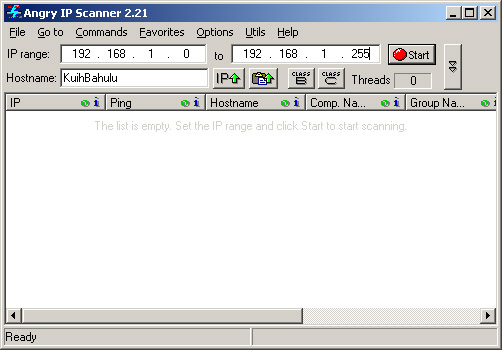
Let us do the practical part. Make sure you have downloaded the software and run the program. The window should be look like on the picture below:
Arah "IP range", type 192.168.1.0 (it depends on your DHCP service provided by router or dedicated gateway). If you are still not sure what is your IP address, go to Start>Run or simply press CTRL+R and the type "cmd" to open Command Prompt. Then type "ipconfig /all" without quote. Look for "IP Address........" and there you are. In my case, it is 192.168.1.123
Ignore the last byte (mine is 123) and you will get 192.168.1.* ;) easy? and now we will check the IP addresses ranged from 192.168.1.0 to 192.168.1.255. Type that in and click on Start button.
Tadaaa~ the software is scanning the entire network. The active IP address will have BLUE coloured circle next to it and those which is "dead" will have RED coloured circle as shown below:
At the end of the scanning process, the program will print out number of active/alive hosts. I got 2 active hosts under my home network right now *subuk router di luar checking arah siapa yang kalap2nya luan cakah* hahaha apa yang kan di liat jua OF COURSE the other one is my ROUTER hehe so I am the only user currently in our home network...
Well yeah that's about it... This is actually very useful for those yang makai GO! or ZOOM! broadband... If usulnya maliging or apa nya urang kitani "unggai-unggai", baik check pakai this software mana tau active/alive hosts nya limpar hehehe so goodluck!
InsyaAllah tomorrow I will post how does it work and a way to make your machine "invisible" to others for security measurement... (so under category Security la tue...)
Sekian.
P/S: Bisai-bisai makai software ane... Pemarah kalie ha... Baca basmalah jua...

2010/01/25

Key Logger


Salam Anak IT.
As I promised in the last post regarding Virtual Keyboard under Security category, here is the key logger that I was writing about. Gambarnya inda berubah tue purely RAW dari camera hahaha and yes warna purple since the international colour standard for PS/2 keyboard is purple and green for PS/2 mouse. If inda paham jua, cuba silak belakang computer biskita ada tue port warna purple sama hijau bersebelahan or bejiranan nya urang kitani. But nowadays PS/2 socket type jarang lagi kana gunakan pasal mostly mouse and keyboard zaman sekarang menggunakan USB sudah.
Hehe but I am STILL using PS/2 type of keyboard and mouse. The reason is to reserve the USB ports for other USB devices. Inda jua kan mouse sama keyboard yang memajak USB slot atue, inda ja? Hahaha so since masih ada PS/2 ports, penuhkan saf-saf yang kosong.
So... Miana gayanya kan makai tue?... Sanang ja... Just place the key logger IN BETWEEN the keyboard and the PS/2 keyboard port di belakang komputer biskita. OK tia! hehe inda payah install any software. Plug-and-Forget *aiseh*... The key logger has memory built-in inside to record any key stroked and you do not have to worry if your Random Access Memory (RAM) rendah or maybe takut komputer jadi lagging since this device inda ada kena mengena sama system's operation.
The best part is that you can use it ANYWHERE and you can unplug it ANYTIME. In order to retrieve the stored data inside key logger, you will just need a typing program such as Notepad, Wordpad or even MS Word. Simply enter your password and menu-driven interface will be typed out. Simple?
As I mentioned earlier in the "Virtual Keyboard" post under Security category, this device is usually used by those anak-anak IT with BAD intentions. Again, it depends on you on how are you going to use it. If biskita "ajar" anak damit biskita berbuat baik, then ia mengikut. But if biskita "ajar" untuk membuat perkara yang tidak baik, paham-paham biskita la tue aa...
In my case, I write programs and even website and so I need a BACK-UP if something happen to the machine mana la tau temparik mengajut inda lagi sampat di"save" so I'll just retrieve it from the device *yes it happened once haha but bukan pasal temparik*
Other than that, it also act as my personal protection mana la tau one day ada "urang" makai my computer tanpa izin so that I could monitor their activities easily ;) hehe but those yang membaca ani and saying "ohhh panyaaa... nanti mun ku makai ku cabut dulu benda atu belakang komputer nya then abis pakai pasang balik" think twice pasal this is only the HARDWARE solution to that. I haven't mention about the SOFTWARE alternative hehe apa nya urang jaman dahulu "pandai-pandai baidup".
Sekian. Wassalam.