Showing posts with label Hardware. Show all posts

2023/08/16

Exploring Software Architecture: Microarchitecture vs. Standard Architecture

Software architecture serves as the foundation for any software application, determining its structure, scalability, and maintainability. Two prominent approaches to software architecture are microarchitecture (also known as microservices architecture) and standard architecture (monolithic architecture)

In this article, we'll explore the intricacies of each approach and highlight their key differences.

Microarchitecture:

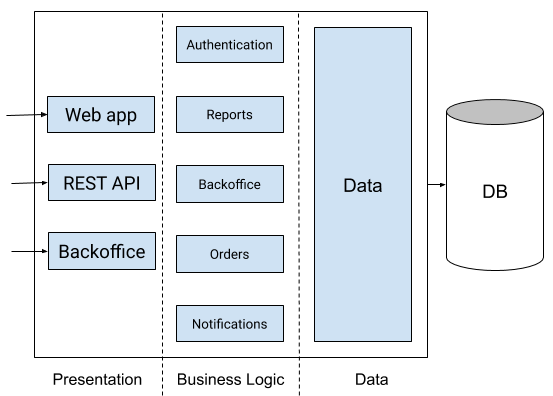
Microarchitecture, often referred to as microservices architecture, is a design approach that emphasizes breaking down an application into smaller, loosely coupled services. Each service handles a specific functionality and communicates with other services via well-defined APIs.

Microarchitecture Illustration

Advantages of Microarchitecture:

  • Scalability: Microarchitecture allows services to scale independently, accommodating varying levels of demand for different parts of the application.
  • Flexibility: Each service can use different technologies and programming languages, enabling the use of the best tool for each task.
  • Modularity: Services can be developed, tested, and deployed independently, facilitating continuous delivery and updates.

Challenges of Microarchitecture:

  • Complexity: Managing multiple services can lead to increased complexity, requiring robust monitoring and management tools.
  • Network Communication: Services communicate over a network, which may introduce latency compared to in-process communication.

Standard Architecture (Monolithic):

Standard architecture, often referred to as monolithic architecture, involves building an application as a single, self-contained unit. All components of the application are tightly integrated and run within the same process.


Standard Architecture Illustration
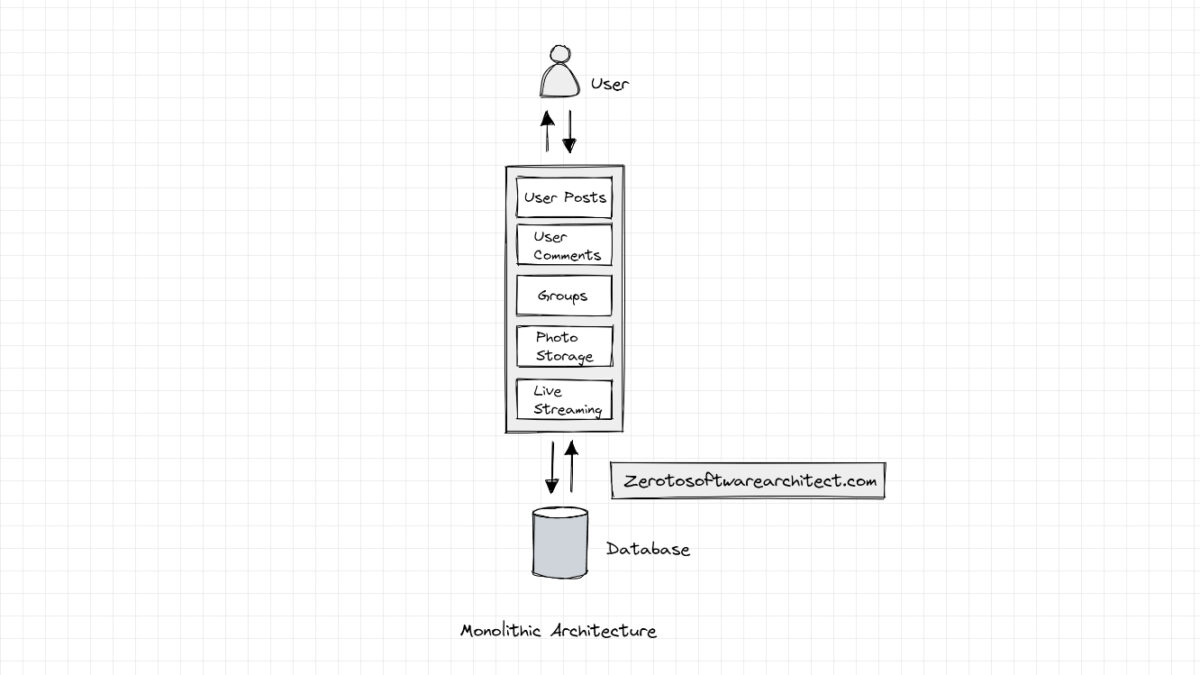


Image: An illustration of monolithic architecture. Source: Monolithic Architecture Simplified - Scaleyourapp

Advantages of Standard Architecture:

  • Simplicity: Monolithic applications are often simpler to develop, test, and deploy due to their cohesive nature.
  • Single Deployment: Since the entire application is deployed together, managing deployment is relatively straightforward.

Challenges of Standard Architecture:

  • Scalability: Scaling a monolithic application usually involves scaling the entire application, even if only a specific component requires more resources.
  • Technology Lock-in: All components of the application must use the same technology stack, limiting flexibility.

Choosing the Right Approach

The choice between microarchitecture and standard architecture depends on the project's requirements and goals. Microarchitecture is suitable for complex projects that demand scalability, flexibility, and independent deployment. On the other hand, standard architecture is preferable for smaller projects with simplicity and easier deployment as priorities.

To conclude whether you opt for microarchitecture or standard architecture, understanding the differences between the two will help you make informed decisions about designing and building your software application. Consider the project's scale, complexity, and long-term goals to select the architecture that aligns best with your needs.

2010/05/22

Broadband Modem


Salam Anak IT.
Al-kisah...
Pada suatu hari... Hajah Kilala meminta bantuan daripada Awang Nitwok...
Hajah Kilala: Wang... Minta tulung ku...
Awang Nitwok: Mengapa ya kajah?...
Hajah Kilala: Atue bah... Modem Broadband ku ani baru jua ku membali kelmarin dari urang arahBruDirect... Ia cakap baik masih... Tapinya ani langsung inda mau...
Awang Nitwok: Oh... Prepaid kah? Line kita DST or B-Mobile?
Hajah Kilala: Line ku DST...
Awang Nitwok: Barang kali inda berisi kredit pakah...
Hajah Kilala: Berisi eh... Kelmarin jua ku recharge... Cuba ko miskol...
Awang Nitwok: Miskol?... Apakan?...
Hajah Kilala: Mubail ku bah... Cuba ko talipaun... Ada kredit tu masih...
Awang Nitwok: Kita ani kan online makai mubail kah ataupun modem kita anie? *sambil menunjuk arah modemnya*
Hajah Kilala: Modem ani lah... Iatah ku bali untuk ku kan online ni... Padah anak ku ada urang bejual kain lawa-lawa arah apa namanya tue?? Pisbuk??... Yetah kan meliat nie...
Awang Nitwok: Modem biskita ani ada SIM card sudah?
Hajah Kilala: SIM Card?? Untuk apa lagi tue? Bukan selajur dapat online kah?...
Awang Nitwok: ... ... ... -_-"
Yes... Untuk biskita yang masih alum tau cana makai Broadband melalui Modem yang makai USB atue, mesti ada 3G-type SIM card either from DST or B-Mobile (if di Brunei)...

Sekian, harap maklum...

2010/05/02

Replacing new Thermal Grease


Assalam Anak IT Readers,
Do you have a computer? laptop? If ada, brapa lama dah biskita memakai? Setahun? Dua tahun? Have you ever wonder after a certain period of time, computer biskita mikin skajap hangat rasanya? If yes then you need to read the rest of this article..
Pernah biskita melaha Processor biskita? If yes, apa yang biskita nampak in between the processor sama heat sink processor? Something yang usulnya macam chewing gum? Hahaha well that is what we call Thermal Grease.
What does this thermal grease do is basically untuk menulung "menyiruk" panas dari processor naik ke heat sink yang biasanya disimpan di atas processor. If biskita masih "blur" pasal thermal grease, cuba biskita fahami this site.
So... Masalahnya pasal thermal grease ane, ia dapat jadi karing and MALFUNCTION sudahnya lama-lama hahaha as in ia inda lagi tekarih untuk "menyiruk" panas dari processor naik ke heat sink... Then ia menjadi "blocker" ta plang which is panas atue inda naik ke heat sink and BEPARAM arah processor. This actually same goes to video chip, not only processor. I've heard a lot of stories (especially laptop HP) where the motherboard inda lagi dapat dipakai after 1-2 years. This is because of the video chip "kana salai" oleh heat yang ia sendiri produce...
Then... How to avoid this? For my case, I personally need to check on my processor's condition every 4-5 months. Last time I did a check-up and found that my thermal grease is "inda lagi bermaya" nya urang kitani hahaha so I think it is good to share this with you... I will elaborate further on the pictures below:
This is my heat sink... As you can see, the thermal grease (grey compound) karing udah... So I need to replace it with new thermal grease...

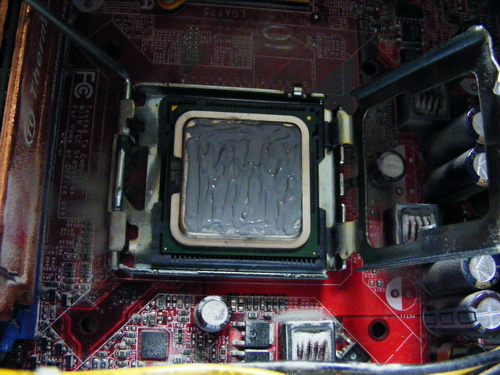
That is my Dual Core Processor... Can you see the thermal past atasnya?

First, remove the current thermal paste from both heat sink and processor (in my case I used minus type screw driver so kira dikikis-kikis sampai licin)

Tadaaa~ hehehe bacilat selajur... And I forgot to take a picture of my processor yang abis bekikis dah...

Then, prepare your Thermal Grease... I used ThermalTake's TG-2 Thermal Grease

This thermal grease can be found arah any kadai computer but biasanya yang bisdia jual atue bukannya jenis "standard" thermal grease... Yang biasa ja... So if you want to buy Thermal Grease, I recommend you to buy any brand from ThermalTake, Cooler Master or even better Arctic Silver (Arctic Silver usually comes with remover as well). Try to look for it arah kadai computer Chong Hok (if na salah la) Kiulap berdepanan dengan C.A Mohammad and sebaris Minuman EasyWay...

Apply the thermal grease on top of your processor (or video chip)

Make sure biskita ratakan the thermal grease. The important point is jangan biskita bagi luan tabal. Nipis is better but jangan jua luan nipis. After you are done, pasang balik the heat sink CAREFULLY and switch on computer biskita seperti biasa.

Oh... Another thing... Jangan lupa buang habuk (dust) rah kawasan berhampiran processor (if rajin clean the entire motherboard). Use a brusher.

There you go... If dapat, try to monitor your cpu's temperature from time to time... You may read this "How to monitor CPU temperature" article...
Sekian, wabillahittaufiq walhidayah, harap maklum.

P/S : This activity requires your concentration and precautions since you are dealing with the "brain" of your computer a.k.a processor. You don't want to spoil the processor and bali baru... Unless harganya 30sen hahahaha ;)

2010/03/25

Windows Login with RFID


Salam Anak IT readers~
Another continuation from RFID Card and RFID Tag articles. Due to positive feedbacks given by some Anak IT readers, I would like to show you one of my many ways on how do I use my RFID Card/Tag in my daily life.
For today's example, I would like to show you a simple video how I log-on to Windows using my RFID Card/Tag (I actually can use either my fingerprint or my RFID card/tag to log-on to windows or I can configure it as both or "dual-layer-verification" nya omputih). You may download the video here (2.72mb).
I think that is it for today. Semoga ianya dapat menjadikan biskita "gagau ati" serta "gerigitan" untuk mencubanya sekaligus mendorong biskita untuk lebih mendalami ilmu teknologi yang ada pada masa sekarang. Selamat mencuba! =)
Sekian.

2010/03/24

RFID Tag


Salammm~
Just yesterday, I post an article regarding RFID Card and guess what, I forgot to mention about RFID Tags as well and so this article could be continuation from previous article on RFID Card.
Basically, RFID Tag has the same function like RFID Card ganya bentuk dan juga warna ganya berbeza. I wouldn't say much for this article but for those who doesn't know about RFID Card, make sure you readthis previous article.
My RFID Card and RFID Tags. I know that i've post my RFID Card in previous article but the one on this picture is a bit "special". I will tell you why.

RFID Tags

Inside the RFID Tag =) Thanks to the sunlight, I could "X-Ray" this RFID Tag

Just an ordinary RFID Card

The "special" part is that I could easily "X-Ray" this RFID Card =)
So, hopefully you can differentiate between RFID Card and RFID Tag especially the component inside them. As for the reading range, the RFID Card may beat RFID Tag but RFID Tag is more ACCURATE than RFID Card. That is based on my experience and not from Technical Research. For those yang ada idea or extra points untuk dikongsikan mengenai RFID, you may go here ;)
Wassalam.

2010/03/23

RFID Card


Assalamu'alaikum wbt...
RFID (Radio Frequency Identification) adalah salah satu teknologi TERKINI yang digunakan khusus bagi mengenali identiti individu yang menggunakannya. If sekiranya biskita kan mau tau lebih lanjut pasal RFID, click kemari pakai mouse biskita.
Apa yang ingin disampaikan buat hari ini adalah khusus untuk RFID Card or nya urang kitani "Kad RFID". Ianya bertindak as "Identification data sender" and it contains uniqe identification. Just imagine IC kitani, urang lain inda kan pernah dapat Nombor Kad Pengenalan Pintar exactly sama macam Nombor Kad Pengenalan Pintar yang kami ada. Ianya bersifat unik serta "unique" hahaha yang penting nya Nombor Identiti yang kami ada atue, urang lain inda tedapat. Namun begitu, I heard RFID Card mampu diubahsuai dengan menggunakan "RFID Writer" but alum tau how it works. I should have that "RFID Writer" device then I would know hehehe =)
Radio Frequency Identification Card
Pada waktu sekarang, terdapat tiga jenis Kartu RFID yang biasa digunakan:
  1. Low frequency of 125Khz
  2. High frequency of 13.56Mhz
  3. Dual frequency (125Khz & 13.56Mhz)
Actually banyak sebenarnya. Lain lagi yang jenis aktif ataupun pasif tue... The one with battery and the one without battery. Every type of RFID Card will have different price as well. E.g, 125Khz RFID Card would only cost me around seringgit labih (if bali in huge quantity dapat jadi less than seringgit) whereas 13.56Mhz RFID Card might cost me doubled the price of 125Khz RFID Card. Yang dual frequency atue lain lagi harganya tue. If mau murah, bali banyak-banyak hahaha but untuk biskita apa jua kan unless biskita develop RFID-based system then you may invest that much. Imagine biskita punya pintu bilik inda lagi ada tempat masukkan kunci but semua flat and yang ada cuma RFID Reader ganya bepacak sebalah pintu ;) that would be cool but if tutup karan hangat tia~
So... Apa sebenarnya isi kandungan yang terdapat dalam RFID Card ane? Last day, I sacrificed one of my 125Khz RFID Cards for the sake of this article hehehe I wouldn't dare to sacrifice my 13.56Mhz RFID Card since harganya macam harga easi kad huhu =P
Ya ibu-ibu didapur, mula-mula kita cincang halus untuk membangkitkan bau resepi kita pada hari ini

Kemudian kita ceraikan bahagian-bahagiannya untuk digulai dengan tepung secukup rasa

Hahaha I can't cook well and would probably <cough>depending on my future wife to cook foods for me</cough> haha and yeah... Nampak biskita isi kandungannya?

If inda nampak, how about this one? Ada ternampak warna keemasan? If yes, yetah sudah tue RFID chip inside the RFID Card (sebenarnya niiiiiiipis berabis tue but I have to zoom beraaaaaabis jua)
And yeah that was my sacrificial 125Khz RFID Card especially for Anak IT's readers... Hopefully I didn't chop it for nothing =)
Cara penggunaannya is basically swipe the card onto RFID Reader device and it will automatically catch the identification number which belongs to the RFID Card yang biskita swipe. If the identification number is listed in the system's database, then it would give you access to certain thing or else it will give you error message or "Kad RFID biskita jenis murah lagi kuno yang bejual arah kadai biskal and so sistem kami inda dapat menerima kad biskita" dan yang sewaktu dengannya...
For this example, I would like to show you how I used my 13.56Mhz RFID Card when I was visiting iCentre last Friday. Obviously my RFID Card's identification is not registered in their database so I would expect "Haaahahaha inda mauuu~" kind of error or something similar.
RFID Reader @ iCentre (actually consist of 3 layers of security feature; RFID, FingerPrint & Manual Password Numbering Keys)

"Door is closed". In order to enter the building dari belakang, registered RFID users would need to swipe their RFID Card onto the reader.

As you can see, when I swiped my 13.56Mhz RFID Card, the screen berubah into "Verify PIN Card"

The RED light indicator showed up and "No Enroll!" message appeared since I am not registered user. If only my RFID Card is registered into their system, the GREEN light indicator would show up instead and might probably ada message "Bah masuk tah! Buat macam rumah sendiri" or even "Akhir jua datang atue?! Kan solah juma'at dah ne!"
Hopefully you already get an idea how does the RFID Card work. In real life, I use the RFID Card to park my car on the "reserved" parking area at office (bukan dalam upis but perkarangan bangunan upis echewah~). Other than that, I use the SAME RFID Card to access certain restricted room such as Server Room etc. so that only registered personnel may access the area/site/room.
Sekian saja resepi masakan yang dikongsikan untuk hari ini. Hingga bertemu di hari yang akan datang pada hari dan waktu yang sama, sekian. Wassalam. Selamat mencuba =)

2010/02/16

Hard Disk - IDE or SATA?


This is my 1st article for anak.it… I’m honored for anak.it for giving me the chance to give a contribution to it. So... here it goes…
Inda kita pernah terpikir kan membali hard disk external untuk menyimpan data biskita? Seperti document-document kraja, gambar, lagu, movies, series and etc… Sekali kan membali... ada kana bagi choice… sama ada kita mau hard disk yang IDE atau SATA? Apa tah biskita buat tu? Sama ada pilih IDE atau SATA? Apa yang bagus? IDE atau SATA? Bisai atau inda membali saiz Hard disk basar? Walaupun kita tanya arah penjaga kadai, tatap jua decision arh kitani…. So, cemana tah nie?
Pernah terasa dilemma cemani? To be honest, I’ve even experienced this kind of dilemma a few years back… maybe all the people have as well… so I’m going to write an article about the difference between IDE and SATA, and my recommendations on what kind of hard disk to get nowadays…
Mari tah kitani melihat gambar Hard disk IDE sama SATA dulu ye…

Hard disk IDE

This picture was taken from here

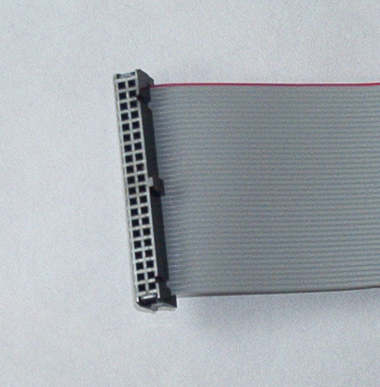
Cable IDE

This picture was taken from here

IDE power cable

This picture was taken from here

SATA hard disk

This picture was taken from here

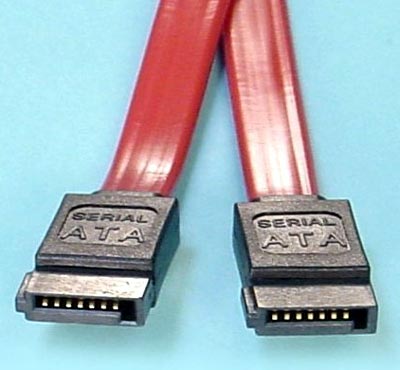
SATA cable

This picture was taken from here

SATA power cable

This picture was taken from here
Can you see the difference between IDE and SATA? Well... the hard disk cable and the hard disk itself is different… and for performance-wise SATA is faster than IDE. Pasal SATA model baru daripada IDE… hehehe… okay... That doesn’t really explain why it is faster than IDE...
IDE’s transfer rate is 100MB/S, meaning how fast you can access your files in your computer… To be put in a much simpler term. If biskita kan mentransfer movie dari hard disk kita ke arah kawan biskita, then hard disk kita is IDE… berapa lama kita mentransfer 5 GB or more ke arah kawan biskita? Sometimes the hard disk cannot even support such high capacity data, which results in you having to transfer it one by one. How do I know? Well... I learned it from experience...
Few years back, I transferred 15GB worth of movies/series to my friend’s external hard disk. I leave it alone for it to finish and went to get some rest... when I woke up... It wasn’t moving… So yeah… the data is too large for the hard disk to handle... I have to transfer it one by one.
Sekali, pasal SATA lagi... SATA’s transfer rate starting at 150MB/s. eh wait... did I mention about “starting”. Yes it true... starting at 150MB/s. the current SATA specification detail data transfer rate are as high as 6.0GB/s per device, depending on the hard disk’s RPM though… the higher the RPM, the higher the transfer rate is, while IDE’s max transfer rate are 100MB/s.
My recommendations for getting a new hard disk is……. *drum roll*….. SATA. Because of the high transfer rate it is advisable to get SATA. Data capacity are rising from 300mb to I don’t know. Well all I can say that it is getting bigger. And if you get an IDE hard disk, it is so hard to look for the external hard disk casing because nowadays most hard disk being sold is SATA. And the very latest laptops nowadays are using SATA hard disk.
Owh yeah, if you are planning to get a SATA hard disk for desktop biskita, please check whether motherboard kita support atau inda ah…. If your desktop are new… well... most probably.. ada pulang SATA port arah motherboard biskita tu.
If you are planning to get a hard disk, the size capacity is 1TB which means 1000GB... remember… hard disk ani sensitive sikit ni… gugur saja hard disk ani… rusak tia… menangis tua wah tu hehehe... and hard disk ani ada jua nyawa nya… if you plug in your hard disk... and you hear a clicking sound... and your hard disk is 2 years old… backup your stuff… all your datas… your hard disk is at its end already.
Ok… that’s the end of my article for now. I hope that you all gain a bit more experience on hard disk. Until next time… Sekian… Wabillahi taufiq walhidayah...