Showing posts with label Network. Show all posts

2023/08/22

Unleashing Cybersecurity Skills: The World of Capture The Flag (CTF)

In the realm of cybersecurity, there's a game that isn't just about fun, but also about learning, challenges, and honing your hacking skills. It's called Capture The Flag (CTF). 

In this article, we'll delve into what CTF is, how it works, and why it's a crucial training ground for aspiring cybersecurity professionals.

1. Understanding Capture The Flag (CTF)

Capture The Flag (CTF) is a cybersecurity competition that simulates real-world hacking scenarios. Participants solve puzzles, decode messages, exploit vulnerabilities, and ultimately retrieve hidden "flags" to earn points. Flags are unique strings that prove a challenge's completion.

Image: A visual representation of a CTF flag being captured

2. Categories of CTF Challenges

CTF challenges are divided into distinct categories, mirroring the diverse aspects of cybersecurity:

Image: 6 common categories of Cyber Battle: Capture The Flag

2.1 Cryptography:

Cryptography challenges involve deciphering encoded messages, cracking codes, and understanding encryption techniques. You'll encounter various types of cyphers, substitution methods, and algorithms. Participants often need to apply analytical and mathematical thinking to break the encryption.

2.2 Web Security:

Web security challenges are focused on identifying and exploiting vulnerabilities present in web applications. These challenges mimic real-world scenarios where hackers attempt to bypass security mechanisms, execute code injection, or manipulate URLs to gain unauthorized access. 

2.3 Forensics:

Forensics challenges involve analyzing digital artefacts, logs, and files to extract hidden information. Participants may recover deleted files, decipher hidden messages in images, or reverse-engineer malware to understand its behaviour. These challenges test your attention to detail and analytical skills.

2.4 Reverse Engineering:

Reverse engineering challenges require participants to dissect compiled programs or binaries to understand their functionality. You'll explore executable files, disassemble code, and identify vulnerabilities. This category is particularly useful for understanding how malware operates.

2.5 Binary Exploitation:

Binary exploitation challenges involve exploiting vulnerabilities in compiled programs. Participants find ways to manipulate input data to trigger buffer overflows, code execution, or privilege escalation. This category focuses on understanding software vulnerabilities and crafting exploits.

2.6 Network Analysis:

Network analysis challenges focus on analyzing network traffic to uncover vulnerabilities or hidden information. You might examine packet captures, identify potential security flaws, and reconstruct network activities to understand their implications.

3. How Does CTF Work?

CTF participants engage in a variety of challenges:

3.1 Challenge Discovery

Participants select and tackle challenges based on their expertise. (You can refer to heading 2 "Categories of CTF Challenges").

3.2 Problem-Solving 

Image: Cyber Battle participants Source: itpss.com

Once participants choose a challenge category, they dive into solving challenges within that domain.

These challenges simulate real-world scenarios and require participants to:
  • Analyze Code: Examine source code, binaries, or other files for vulnerabilities and hidden information.
  • Reverse Engineer: Disassemble and understand the inner workings of compiled programs.
  • Decipher: Decode encrypted messages, cyphers, and codes using cryptography principles.
  • Examine Artifacts: Analyze digital artefacts like images, logs, or packet captures to extract relevant information.
Challenges require diverse skills, from coding to cryptography.

3.3 Flag Retrieval 

Solving a challenge leads to the discovery of a "flag," a unique piece of text that confirms successful completion. 

Flags are often in the format of alphanumeric strings. They're usually embedded within challenge files, hidden in code, or even transmitted within network packets.

3.4 Scoring

Image: Scoreboard sample of Cyber Battle: Capture The Flag, Source: haxf4rall.com 


For every successfully retrieved flag, participants earn points. The difficulty of the challenge determines the number of points awarded. 

Complex challenges with intricate solutions yield higher points. The participant or team with the most points wins the competition.

4. Importance of CTF Competitions

Capture The Flag (CTF) competitions are more than just challenges; they provide a rich learning experience and numerous benefits that contribute to personal and professional growth. 

Here's an in-depth exploration of the importance of CTF competitions:

4.1 Skill Enhancement and Practical Application:
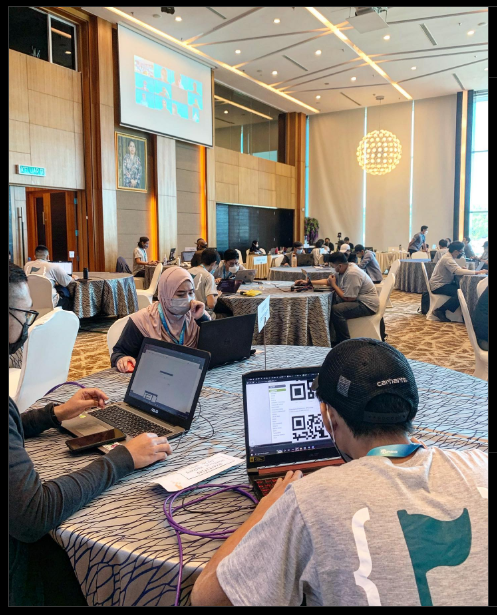
Image: Participants of the Cyber Battle: Capture The Flag. Source: BruCert instagram

CTF challenges mirror real-world cybersecurity scenarios. By actively participating in challenges across various domains, participants enhance their technical skills and apply theoretical knowledge to practical situations. These experiences equip individuals with the ability to identify vulnerabilities, develop exploits, and defend against attacks.

4.2 Problem-Solving and Critical Thinking:
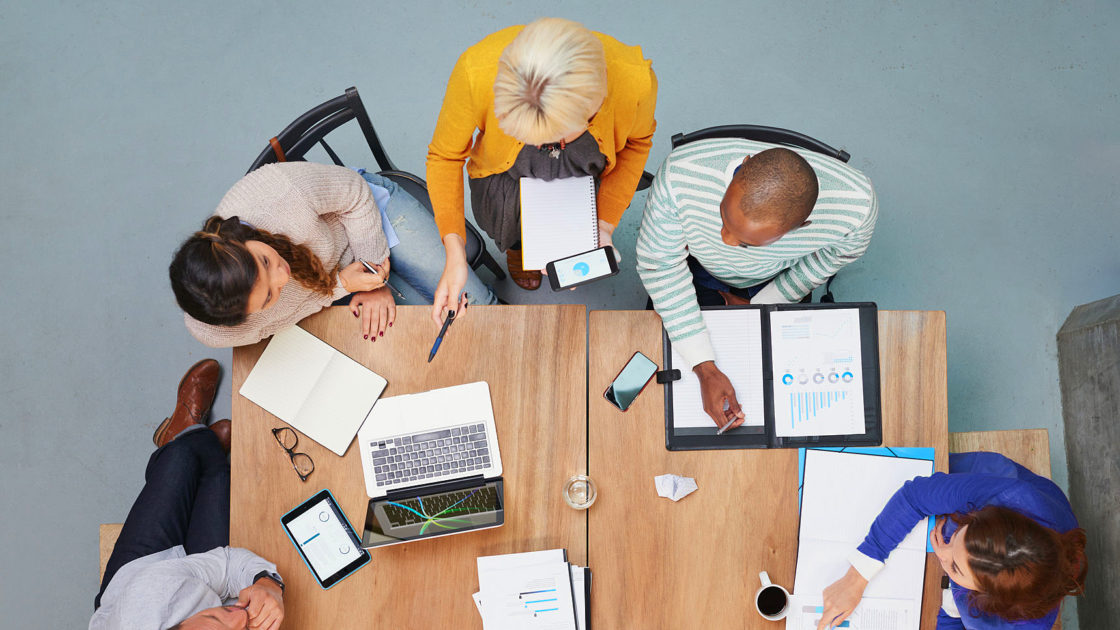

Image: Brainstorming session. Source: wework.com

Each CTF challenge presents a unique puzzle that requires analytical thinking, creativity, and problem-solving skills. Participants learn to dissect complex problems, break them down into manageable components, and develop systematic approaches to find solutions. This cultivates a mindset that's essential for tackling intricate cybersecurity challenges.

4.3 Exposure to Diverse Domains:

Image: Representation of diverse into cybersecurity domains. Source: evelynlim.com

CTF competitions cover a broad spectrum of cybersecurity domains, including cryptography, web security, forensics, and more. This exposure allows participants to explore different areas of interest and expertise. It encourages them to become well-rounded cybersecurity professionals with versatile skill sets.

4.4 Hands-On Learning and Active Participation:

Image: photo of 2016’s Cyber Battle: Capture The Flag competition, Source: itpss.com

Traditional learning methods are valuable, but CTF competitions offer a hands-on and immersive learning experience. Participants actively engage with challenges, experiment with tools, and observe immediate outcomes. This hands-on learning approach accelerates skill development and knowledge retention.

4.5 Teamwork and Collaboration:

Image: representing teamwork and collaboration. Source: quietrev.com

Many CTF competitions emphasize teamwork, fostering collaboration and communication among participants. Joining or forming teams allows individuals to share insights, strategies, and solutions. Collaborative efforts mirror real-world cybersecurity operations, where a diverse skill set is essential for success.

4.6 Competitive Spirit and Motivation:

CTF competitions add an element of competition that fuels motivation. Participants strive to earn points, solve challenges, and achieve a high rank on leaderboards. This competitive spirit drives individuals to continuously improve their skills, explore new techniques, and push their boundaries.

5. Preparing for CTF Success

Successfully participating in CTF competitions requires a combination of knowledge, skills, and strategies. Here's a detailed breakdown of how to prepare effectively:

5.1 Learn Key Concepts

  1. Cryptography: Familiarize yourself with encryption algorithms, decryption methods, and common cryptographic attacks.
  2. Web Security: Understand web vulnerabilities like SQL injection, cross-site scripting (XSS), and request forgery.
  3. Forensics: Learn techniques to analyze digital artefacts, recover deleted data, and reconstruct events.
  4. Reverse Engineering: Study assembly language and understand how to reverse-engineer compiled programs.
  5. Binary Exploitation: Learn about buffer overflows, format string vulnerabilities, and binary analysis.
  6. Network Analysis: Gain insights into network protocols, packet capture analysis, and network attacks.

5.2 Practice Regularly

  1. CTF Platforms: Explore CTF platforms like PicoCTF, Hack The BoxTryHackMe and PentesterLab Engage with challenges of varying difficulty levels to improve your skills.
  2. Wargames: Participate in cybersecurity wargames that simulate real-world scenarios and test your problem-solving abilities.
  3. Online Tutorials: Follow online tutorials that cover CTF-related topics and provide step-by-step guidance on solving challenges.

5.3 Joining Communities

  1. CTF Forums: Participate in CTF forums and communities to connect with like-minded individuals, ask questions, and share insights.
  2. Online Platforms: Join CTF-related Discord servers, Reddit communities, and social media groups to stay updated and interact with experts.

5.4 Team Collaboration

  1. Team Formation: Consider forming or joining a CTF team. Diverse skills and expertise within a team can enhance problem-solving and strategy development.
  2. Knowledge Sharing: Collaborate with team members to share insights, solutions, and tactics for tackling challenges effectively.

Stay Updated with Trends

  1. Cybersecurity News: Follow cybersecurity news, blogs, and websites to stay informed about the latest vulnerabilities, techniques, and trends.
  2. CTF Write-Ups: Read CTF write-ups and walkthroughs to understand different solution approaches and expand your toolkit.

Embrace the CTF Journey

Image: Top 3 teams of Cyber Battle: Capture The Flag 2016 Source: itpss.com

In the realm of cybersecurity, Capture The Flag (CTF) competitions emerge as a transformative journey that transcends traditional learning approaches. The path to becoming a proficient cybersecurity professional involves more than textbooks and theoretical knowledge—it's about immersing oneself in practical challenges, fostering problem-solving abilities, and embracing a community of like-minded enthusiasts.

CTF competitions provide a gateway to skill refinement, critical thinking, and continuous learning. As you navigate through various challenges—deciphering cryptographic puzzles, analyzing network traffic, dissecting binaries, and more—you embark on a journey of cybersecurity mastery. Every challenge solved, and every flag captured, contributes to your growth and expertise.

But it's not just about individual achievement. CTF thrives on collaboration and teamwork, reflecting the collaborative nature of cybersecurity operations in the real world. Forming teams, exchanging insights, and collectively unravelling complex challenges fosters camaraderie and mutual growth.

As you prepare, practice, and engage in CTF competitions, you're not just preparing for a challenge; you're preparing to contribute to a field that's critical to our digital landscape. Your efforts in understanding vulnerabilities, refining solutions, and fortifying defences are essential to safeguarding digital environments and information.

So, whether you're a newcomer intrigued by the world of cybersecurity or a seasoned professional seeking to expand your horizons, embrace CTF as a dynamic avenue of growth. With each challenge, you're not only capturing flags but also capturing opportunities to sharpen your skills, collaborate with peers, and contribute to the ever-evolving landscape of cybersecurity.

As you embark on this journey of mastering the art of CTF, remember that the thrill of solving challenges and capturing flags is matched only by the satisfaction of becoming a stronger and more adept cybersecurity practitioner. Let the flags you capture become badges of honour in your pursuit of excellence in the fascinating realm of cybersecurity.

Image: Reaching the summit. Source: zermatt.ch

May your journey through CTF competitions be exhilarating, enlightening, and transformative—a voyage that shapes not just your skills but also your perspective on the intricate dance between technology and security.

With flags in hand and knowledge at heart, venture forth on your path of cybersecurity discovery. The world of CTF awaits your exploration and contribution.

2023/08/16

Exploring Software Architecture: Microarchitecture vs. Standard Architecture

Software architecture serves as the foundation for any software application, determining its structure, scalability, and maintainability. Two prominent approaches to software architecture are microarchitecture (also known as microservices architecture) and standard architecture (monolithic architecture)

In this article, we'll explore the intricacies of each approach and highlight their key differences.

Microarchitecture:

Microarchitecture, often referred to as microservices architecture, is a design approach that emphasizes breaking down an application into smaller, loosely coupled services. Each service handles a specific functionality and communicates with other services via well-defined APIs.

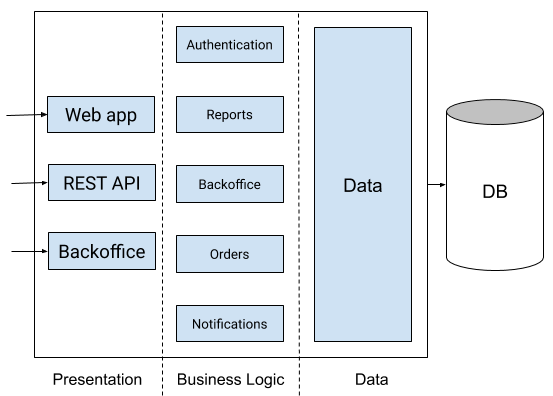
Microarchitecture Illustration


Advantages of Microarchitecture:

  • Scalability: Microarchitecture allows services to scale independently, accommodating varying levels of demand for different parts of the application.
  • Flexibility: Each service can use different technologies and programming languages, enabling the use of the best tool for each task.
  • Modularity: Services can be developed, tested, and deployed independently, facilitating continuous delivery and updates.

Challenges of Microarchitecture:

  • Complexity: Managing multiple services can lead to increased complexity, requiring robust monitoring and management tools.
  • Network Communication: Services communicate over a network, which may introduce latency compared to in-process communication.

Standard Architecture (Monolithic):

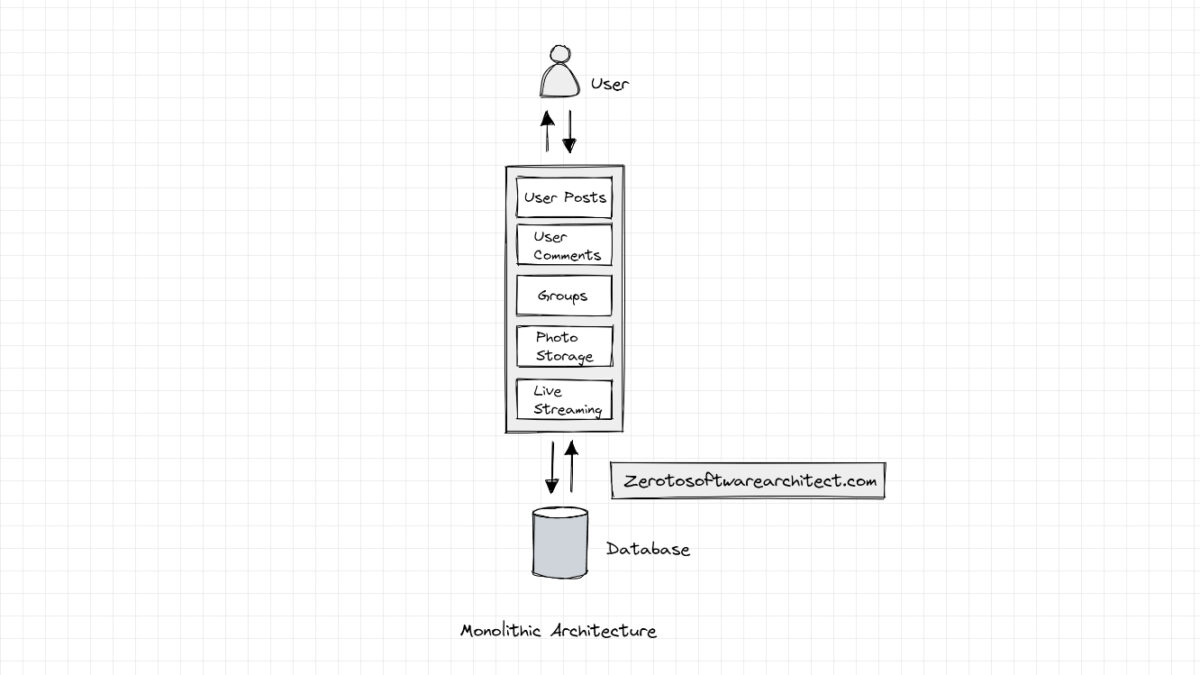
Standard architecture, often referred to as monolithic architecture, involves building an application as a single, self-contained unit. All components of the application are tightly integrated and run within the same process.


Standard Architecture Illustration


Image: An illustration of monolithic architecture. Source: Monolithic Architecture Simplified - Scaleyourapp

Advantages of Standard Architecture:

  • Simplicity: Monolithic applications are often simpler to develop, test, and deploy due to their cohesive nature.
  • Single Deployment: Since the entire application is deployed together, managing deployment is relatively straightforward.

Challenges of Standard Architecture:

  • Scalability: Scaling a monolithic application usually involves scaling the entire application, even if only a specific component requires more resources.
  • Technology Lock-in: All components of the application must use the same technology stack, limiting flexibility.

Choosing the Right Approach

The choice between microarchitecture and standard architecture depends on the project's requirements and goals. Microarchitecture is suitable for complex projects that demand scalability, flexibility, and independent deployment. On the other hand, standard architecture is preferable for smaller projects with simplicity and easier deployment as priorities.

To conclude whether you opt for microarchitecture or standard architecture, understanding the differences between the two will help you make informed decisions about designing and building your software application. Consider the project's scale, complexity, and long-term goals to select the architecture that aligns best with your needs.

2010/08/10

SEA-ME-WE 3 CABLE


Salam Anak IT readers.

SEA-ME-WE 3 cable or also known as South-East Asia - Middle East - Western Europe 3 cable is an optical submarine telecommunications cable linking those read further...
This article especially goes to "anonymous" asking kenapa internet down everytime ada natural disaster on the news especially yang baru-baru anie... So by looking at the picture alone, I hope you will get a bettteeer picture... Especially masa ada earthquake... These long cable is lying on the seabed and so there is a high possibility that the cable eventually "tepunggal" and disconnecting the network semasa gegaran di bawah lautan berlaku...
That is the path of SEA-ME-WE 3 which includes Brunei Darussalam... Visit the cable's official site...There is another submarine cable which connecting Brunei to other part of the world especially U.S named Asia-America Gateway or AAG... I will post about it tomorrow insyaAllah but you may also try togoogle it now =) Until next time~

2010/06/21

How To Find Your MAC Address in Ubuntu?


Salammmmm readers~
As promised from my yesterday's post on "How to find your MAC Address in Windows (XP)", today I will continue the tutorial on how to find your MAC address in Ubuntu Operating System. Straight forward ja k...
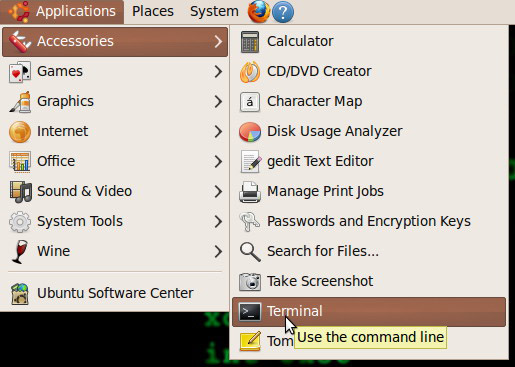
Go to Applicaions>Accessories>Terminal

Terminal in Ubuntu OS is just like Command Prompt in Windows OS. As mentioned in my previous article, you need to type "ipconfig /all" in the Windows OS's Command Prompt. In Ubuntu, bunyinya kan sama tapi inda serupa. In the Ubuntu's Terminal, type the following string:
ifconfig
and then press Enter key on your keyboard.

Information regarding your network's configuration will show up. If in Windows OS you need to look for "Physical Address", in Ubuntu OS you need to look for "HWaddr" which I believe stands for "Hardware Address". MAC address' standard format is 00-00-00-00-00-00.

Any questions or additional points you want to share, kindly use the comment section on this article =)

Until next time~ Wabillahittaufiq walhidayah...

2010/06/20

How To Find Your MAC Address in Windows XP?


Salam readers...
Media Access Control address or best known as MAC address, is an address uniquely assign to any network physical device adapter such as Network Interface Card (NIC), Wireless Router, even Smartphone (with Wi-fi capable) have one...
Other than MAC address, it is also known as:
  • Ethernet Hardware address
  • Network Hardware address
  • Physical address
We do not usually bother to know what is the MAC address for the network device that we are using as long as "dapat dipakai". However, there are certain cases where you need to know your network device's MAC address. One of good examples will be when you deal with "MAC filtering" on your wireless router.
So follow these few steps to look for your machine's (not exactly machine, but network adapter) MAC address...
First, go to Start>Run or simply press WINDOWS+R keys on your keyboard. When the "Run" window appears, type "cmd" and click OK button.

On the command prompt, type the following string:
ipconfig /all
and then press Enter key on your keyboard.

You will see information regarding your networking configurations. One of them will be "Physical Address". The string next to it with 00-00-00-00-00-00 string format is your adapter's MAC address.

There you go... That is how you find your MAC Address in Windows (XP) Operating System... Tomorrow I will post a short article on how to find your MAC address in Ubuntu Operating System InsyaAllah...
Until next time~ wassalam...

2010/06/17

Networking Cable


Salam~
In computer networking, there are 3 major types of networking cable:

1. Coaxial Cable
(Courtesy of Wikimedia.org)
Coaxial cable... Pernah dangar? Biasanya kana gunakan untuk aerial TV. Urang jaman lama kilala banar nie warai ah barang pemainan bisdia lagi dulu nie hahaha urang jaman ane betukar astro dah atue pun kana pasangkan kalie yetah jarang meliat warai miani ane... So... In computer networking, cable ani pun inda jua ketinggalan kana gunakan... In my previous article on "Common Network Topology", there is one topology called Bus Topology. This topology uses Coaxial Cable as its main transmission media which is also called as Thinnet or Thicknet.

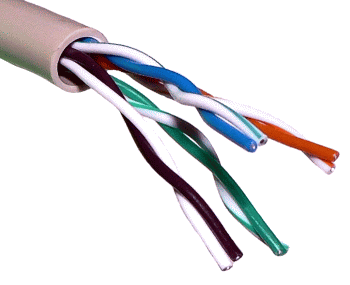
2. Twisted-pair Cable
(Courtesy jmu.edu)
There are two types of Twisted-pair Cable: Unshielded Twisted-pair (UTP) and Shielded Twisted-pair (UTP)
The one in the picture above is Unshielded Twisted-pair. Click here if you want to see Shielded Twisted-pair Cable.
When cramped to its socket, the cable looks like telephone cable but wider. If you are using e-speed through cable connected to your router right now, cuba cabut dan liat berapa warai biskita dapat kira. If 8 semuanya, iatah udah tue...
Unshielded Twisted-pair (UTP) is divided into certain categories:
  • Category 1 - Traditional telephone cable. Carries voice but not data
  • Category 2 - Certified UTP for data transmission of up to 4 megabits per second (Mbps). It has four twisted pairs
  • Category 3 - Certified UTP for data transmission of up to 10 Mbps. It has four twisted pairs
  • Category 4 - Certified UTP for data transmission of up to 16 Mbps. It has four twisted pairs
  • Category 5 - Certified for data transmission of up to 100 Mbps. It has four twisted pairs of copper wire
  • Category 6 - Offers transmission speeds up to 155 Mbps
  • Category 7 - Category 7 is a proposed standard that aims to support transmission at frequencies up to 600 MHz

3. Fiber Optic Cable
Last but not least, Fiber Optic Cable. Right now, It is considered as the most secure networking cable due to minimum interference and hard to "vampire tapped". It uses light to transmit data and can deliver high bandwidth. This cable is the one which links us to other part of the world through "kabel dasar laut" or Submarine Cable System. Brunei is connected to other part of the world through Asia-American Gateway (AAG) and South-East Asia - Middle East - Western Europe 3 (SEA-ME-WE3). I heard there is another one but is not "publicize".

Until next time~ Sekian.
P/S: Since Anak IT is now "open to public" haha so do drop comments or suggestions alright =) Thank you.

2010/06/04

Common Network Topology


Assalam Anak IT Readers...
There are several types of Network Topology:
(Image from KnowledgeRush.com)

You may not be familiar with some of the topologies above. For this article, I will only briefly explain the common network topologies in bullet points.

Bus Topology
  • An old topology (maybe inda lagi tedapat masa anie)
  • Menggunakan Coaxial Cable (lebih dikenali sebagai Thinnet. Ada jua yang menggunakan Thicknet) with BNC connector
  • Each terminal connects to the continuous cable which connect them all in straight line
  • Each cable end is "terminated" with terminator device which it "absorbs" all the current signal so that it would not bounce back to where the signal came from... *imagine*
  • If something happen to that straight line cable, most certainly it will affect the entire bus network or at very least, having communication problems between workstations

Ring Topology
  • Just like namanya, this network topology looks like a ring or nya urang kitani "membulat" haha
  • Some network professionals says that it is just like a linear topology, it is just that ujungnya bebalik rah the first workstation instead of kana terminated like in bus topology
  • You may call it "Loopology Network" since the signal goes in circle and looping
  • Token Passing method is the method used to transmit the data from a workstation to the next workstation in circle
  • Cable used? Coaxial cable (Thicknet) and ada yang makai Fiber Optic

Star Topology
  • Bintang punya shape where the workstations are not directly connected to each other but through a "special" device or apa nya kitani as "Postmen", makai urang tangah =)
  • This is the most common network in a small Office/Home Local Area Network (LAN). If biskita makai e-speed dirumah, cuba peratikan banar-banar computer biskita connect ke mana... Router? Switch? Yetah namanya "urang tangah" tue... Your other siblings' computers are also connecting to the same "urang tangah" device. Most of us use router since we directly connect to internet through a modem. So imagine if biskita kan transfer lagu arah laptop adi beradi biskita yang lain through "File Sharing", data lagu atue inda directly mengaga arah laptop adi beradi biskita atue but ia mesti melalui "urang tangah" which is router biskita. (unles biskita makai P2P with Crossover Cable)
  • If satu cable inda working, it will not affecting the entire network
  • Uses Cat5/5e/6 cable with RJ45 connector

Mesh Topology
  • Mesh is usually connect to more than one workstation in order to communicate with another workstation
  • One to Many connection?
  • Internet uses this topology
  • If one connection broke down, no problem pasalnya ada another connection still exist =)

Hopefully that will at least help you to understand basic computer networking. If biskita ada kan ditanya, simply send your enquiry here.
Sekian, Wassalam...

2010/05/16

Network+ Certification


"The CompTIA Network+ certification is the sign of a competent networking professional. It is an international, vendor-neutral certification that proves a technician’s competency in managing, maintaining, troubleshooting, installing and configuring basic network infrastructure.

Since its introduction in 1999, more than 235,000 people have become CompTIA Network+ certified. Microsoft includes CompTIA Network+ in their Microsoft Certified Systems Administrator (MCSA) program, and other corporations such as Novell, Cisco and HP also recognize CompTIA Network+ as part of their certification tracks.

Although not a prerequisite, it is recommended that CompTIA Network+ candidates have at least nine months of experience in network support or administration or academic training, along with a CompTIA A+ certification.
" - CompTIA
CompTIA Network Certification Path
Network+ (N10-004 v2009) Certificate
For further information on the Network+, go to CompTIA's website at http://www.comptia.org/certifications/listed/network.aspx or simply click here. Those who need some guidance on the certification, you may approach me.
As Anak IT's motto, "Mun rotan ganya sejangkal, jangan mendaluh lautan dalam" encouraging you to improve and further your skills.
Sekian, semoga biskita mendapat inspirasi dan juga manfaat. Wassalam.

2010/05/12

Test Your Understanding On Computer Network


Without any aids from books and google, I got 62% and I did not pass. Hahahaha... How about you? Find it out yourself here.

2010/03/25

Laptop As Backup Server


Salam Anak IT. I'll just post a short and simple article for today.
Any readers who run/maintain a server? If yes, do you have a back-up just in-case your main server beulah? Purchasing another server might sounds good but I would like to share my other alternative.
In office, (becerita ta plang nah...) I have layers of Server Back-Up and one of them is using an extra laptop yang "inda bepakai". It might sound "irrelevant" but as I said I am just sharing my ideas. For this purpose, the laptop needs to run 24/7... But... Ok kah tue? Inda melatup kah?
So far, the longest period that I didn't switched off (not even restarting) the LAPTOP was about 6 to 7 months? Hahaha it is a LAPTOP; not an ordinary PC. For those yang satu kepala with this title, I would like to share certain points with you.
Facts on usage:
  1. Act as a BACK-UP server (at the office)
  2. Also act as SECONDARY Web Server
  3. A tool for me to troubleshoot my office's network from remote location (outside office)
  4. A tool to troubleshoot network locally (within office's building)
Kebaikan:
  • Semua yang tertera di atas
  • It is compact (portable) rather than having another PC for such purpose
  • Less power consumption compared to ordinary PC/Server
  • Only need ONE power cord
Tips & Recommendations:
  1. Make sure you lift the laptop up a little bit for ventilation
  2. Heat is the worse enemy for any electronic devices and so make sure the room is always air-conditioned
  3. Never use Wi-fi connectivity for this purpose.
  4. Secure its FTP access (for Back-Up through FTP)
Well... As I said, nothing much sebenarnya but I appreciate your time for reading this (even if you don't understand) hahaha but yeah... That is another thing that you could do with your extra laptop. Until the next post.
Wassalam...

2010/02/21

Internet Connection Problem


For the past few weeks, it has been a pain in the neck for most of us to browse the internet. These are my bandwidth reading last night. I am using e-Speed's 512kbps service.
My average speed
After "Retest" for so many times, this would be the highest speed I could get
My other friends were also facing the same problem where the connectivity is "undulating". B-Mobile's Zoom! Broadband user also told me that the broadband usually "putus-putus" and they need to reconnect "balik-balik".
Some of the possible reason for this are:
  • May have relation to cyberwar that is going on this week. See this article to find out.
  • Our Internet Service Provider (ISP) is currently doing maintenance? Who knows? But surely BruNet's Website is currently under maintenance.
  • Natural disaster that has been broke out recently e.g. earthquake
  • Dan yang sewaktu dengannya
Oleh itu, para pengguna Internet dinasihatkan agar lebih bersabar dan menggunakan Internet yang ada dengan sebaik mungkin. Sekian.

2010/02/06

Local Bandwidth Meter


Salam Anak IT.
Today, I will "reveal" one of the must-know tools I used for network-related troubleshoot. Well, not exactly "troubleshooting" perhaps more into "checking".
How do you feel when you drive your car, your speed meter is not working? Hahahaha you will surely feel "pelahan jua mutuka ani ah misidis saja" but the speed meter is actually 180kmph? Or maybe the other way round... This only goes to those who always look at their speed meter while driving.
So, for those who are not really care about their speed meter, it is just like MOST of us when we browse the internet. Would you actually check your internet bandwidth speed right before you open up your internet browser? Hehehe napa takidum? "Of course la inda kan bhapa jua ku cek".
It might not be as useful as it sounds but particular people like "us" would DEFINITELY check the bandwidth for certain cases. "Haha yeka?.. Untuk apa saja?" Have you ever wonder when suddenly your internet is not as swiftly as it used to be? Well maybe ada urang download torrent or streaming videos but how are you going to check for that? Nda jua kan masuk dalam mutuka then liat speed meter nya? Bwauhwuhauhwa one good tip is check your router if the "active" link from other network user kalap-kalap dengan pantasnya and inda merunggai.
As you can see at the bottom of this page, there is a button named "SPEED TEST" where it will lead you to http://speedtest.net/ website and that server is not located in our country. There is a service provided by TelBru's BruNet named "speedometer". You need to enter their address "http://www.brunet.bn" from your web browser and then look for "speedometer" button on the right hand side. It would not be working properly for web browsers which do not have flash player properly installed. For people like us, it is "assassinating" our precious time especially when the browser doesn't have flash player.
So, for those who are using e-speed connection or any local Internet Service Provider, you may type "202.160.12.27" directly on your web browser or simply click here. Only a small group of people know about its existence. It is not very "word-friendly" and "luan-sanang-kan-ingati" since it is an IP address but for us, it is a must to memorise it (well we are already immune to remember a lot of IP addresses especially 202.160.8.2). Hopefully BruNet will not put the service out of action in the near future as it might be useful especially for some anak-anak IT kitani. Sekian.
My first test...
Second/re-test...

2010/01/24

File Transfer Protocol


Salam Anak IT.
File Transfer Protocol or nya bisdia FTP is a service to transfer or receive barang in electronic/digital form from one machine to another. Mengikut sejarahnya, FTP wujud lebih awal dari WWW (World Wide Web). It works by means of client-server architecture or apa nya urang kitani mesti ada penghantar dan juga penerima or else hukumnya tidak sah.
In real life, just imagine ada seorang pembuat sambal padas yang bernama Buajah Kembayau. Beliau tinggal di kediaman No. 10, Simpang Kiri, Jln. Kedapan, Kg. ABC. Pada suatu hari beliau menyuruh anaknya yang bernama Awang Lamat (bukan nama sebenar) untuk menghantar Nasi Katuk buatan tangannya kepada adik kandungnya iaitu Tangahnya Laki yang tinggal di alamat No. 6, Simpang Kanan, Jln. Belakang, Kg. XYZ.
Moral of the story is *echewah luan awal* biskita dapat fahami something kana antar dari satu tempat ke satu tempat yang lain. So cuba kumpul semua information yang ada...
  1. Nama Pemilik Rumah (Penghantar)
    • Buajah Kembayau (tapi suruhnya anaknya ngantarkan sal ia inda telarat bejalan batis)
  2. Alamat Penghantar
    • No. 10, Simpang Kiri, Jln. Kedapan, Kg. ABC
  3. Barang yang dihantar
    • Nasi Katuk (sambal padas)
  4. Laluan yang digunakan untuk menghantar barang
    • Laluan berjalan kaki (Siring jalan raya)
  5. Nama Pemilik Rumah (Penerima)
    • Tangahnya Laki
  6. Alamat Penerima
    • No. 6, Simpang Kanan, Jln. Belakang, Kg. XYZ
Cuba bayangkan if anaknya ane inda tau alamat Tangahnya Laki? Of course ia inda kan mengantar Nasi Katuk or pasingnya arah adinya then sambung main game. Or maybe babunya cakap "lai, antati rah tangahmu laki" tapi nada barang yang kan diantar. Yang lebih teruk if nada jalan raya or bisdia tinggal tangah lautan inda lagi tedapat perahu tue. Yetah tue segala informasi yang tertera di atas mesti ada in order to make it happen.
So, untuk mengantar barang in computing/digital/cyber life, we also must have those information. Inda jua kan biskita talipaun urg UPS or even Pos Laju kalie ganya kan mengantar gambar melalui email hahaha bah adang... Straight to the point:
  • Nama Pemilik Rumah (Penghantar) = Client Hostname
  • Alamat Penghantar = Client's IP Address
  • Barang yang dihantar = Data/information/file in electronic form (e.g HTML file)
  • Laluan yang digunakan = Internet
  • Nama Pemilik Rumah (Penerima) = Server Hostname
  • Alamat Penerima = Server's IP Address
Here is the example of sending file through internet (digital form):
But FIRST! You need to understand between CLIENT and SERVER. Client is the one yang MENGHANTAR (SENDING) while server is the one yang MENERIMA (RECEIVING). To transfer data/file through FTP, we need FTP Server as well as FTP Client but here I will only write on how to use FTP Client to transfer data/file. Click here to learn further on client/server.
Siapa saja yang menggunakan FTP ane?...
  • Web developer yang tedapat Web Hosting arah lain (external hosting)
  • Users who need to send bigger files to other users
  • Users who work outside and need to retrieve their files from personal computer located at home
  • People yang inda tau apa FTP but kan belajar-lajar
  • Students yang kana suruh oleh teacher/lecturer bisdia untuk belajar FTP
  • Dan yang sewaktu dengannya
One of the most famous FTP Client (pasal ia free kalie haha) is FileZilla FTP Client. You may click hereand read further about it.