Showing posts with label General. Show all posts

2014/12/27

How To Stick To Your New Years Resolution - Anak IT Style


There are plenty of ways to stick your new years resolution. Whether it be to lose weight, take up a new good habit or get rid of an old bad habit, it takes commitment. Like A LOT! What if there is a way to get what you need to develop that habit all the way?

Beeminder - Be Mindful of your Goals

By making a pledge (for free) on Beeminder, it will help check on you if you are on track or not. If you stray too far, you lost your pledge. If you actually put a pledge (and this time, I mean actually pay for it like $10), that means you are invested in yourself to make sure that you achieve your goal. If you don't achieve it, you lose your $10. Check out the video below.


Now how do you make sure you achieve that new years resolution or that goal or that new good habit or getting rid of an old bad habit? Here are several web apps for you:

HabitRPG - Build a Habit While Playing RPG

Wanna play a game? No seriously, if you wanna build a habit, play at it with this nifty web app and game in RPG! And not only that, you can have more fun if you do it with a friend or more. Basically forming a party of other likeminded individuals who checks on each other to make sure that the goal is achieved.


Github - Social Coding While Networking

For those coders and programmers (and maybe designers) out there, you may have heard about Github. Well, if you wanna practice your coding skills or get better at what you do or even finish that IT project you promised your lecturer at your Uni, Github is the place to publish and get your work on track. Beeminder + Github is a powerful duo to keep track on whether you are actually progressing with your coding and designing of your project all the way to finishing an actual IT product. Get your hands on those keyboard and start coding away! Can't do it alone? Get a team and do it together with HabitRPG.

Duolingo - Learn a New Language in a Game

Ever wanted to learn Spanish but never got around to it? Learn it over on Duolingo. The app has a very intuitive interface and learning style to get you to understand and enjoy the language as you learn new words to use. I have learnt a few words and it was fun! Not only that, linking it with Beeminder will help keep in track of how far have I progress and how close I am to reaching my goal at the end. Duolingo has the following languages available:

  • Spanish
  • French
  • German
  • Italian
  • Dutch
  • Portuguese
  • Irish
  • Danish and
  • Swedish
Unfortunately, no Brunei Malay, Malaysian Malay, Indonesian Malay, and all of that Malay language and dialects. Check out the video below.


Remember, you don't have to do your new years resolution. Do it with a friend or your sibling or family. Get together, exercise, code, design, build a new good habit, get rid of a bad one. It's a lot more fun that way.

So, what's your new years resolution?


2014/12/18

Play Games While Learning to Code

There are a lot of online resources out there that teaches you to code or program. Here at Anak IT, we strive to make this learning experience fun and unique to everyone striving to be next best programmer or coder. So instead of struggling with textbooks, here are some online resources that teaches you to learn how to code while at the same time, play some games!

CodeCombat

Ever feel like swinging a sword or blocking with a shield with coding? You could if you played CodeCombat. This game teaches you Javascript, Coffeescript, Python, and a few other languages (currently at time of writing, still experimental). Your goal is predetermined by each dungeon. It’s free to play and learn!
Learn to code by playing codecombat at CodeCombat.com

Bonus: If you’re an expert already, you can create custom levels and design if you join their github project here. It uses CoffeeScript by the way.

Screeps

This one is new and upcoming on indiegogo. It is an MMO Strategy game but with less mouse-clicking and keyboard shortcuts, and more scripting with Javascript. Check out the video below

The simulation game was awesome. You may need some level of understanding with Object Orient Programming and Arrays before attempting to play this game but fun nonetheless! Feeling strategic? Support the project by contributing some funds for their game project and let’s play!

Hack ‘n’ Slash game

Lastly, there’s a game that plays quite similar to the Legend of Zelda world. But instead in this world, you can change… things. Like the behavior of each game element and object, the attributes, the stats, the modes, and much more! It doesn’t really teach you to code but you might be able to grasp the understanding of game elements through this game of what each asset can do if you change its state.


2014/12/11

Join Innovation Day 2014!

It is December, the perfect month to enjoy, take a vacation, kick-back and relax from our ever so busy lives. But guess what? Anak IT has been brewin' up an event that you might be interested in. In our efforts to introduce technology, programming and scripting to everyone, especially in Brunei, we are hosting Hour Of Code event, at iCentre. Check out our poster below:


Interested? Come and join us! Too busy? Ask your friends and family to take over for ya! Did I mention that you'll get some prizes to win if you attend? I think I didn't. Yes, there's prizes. Come down this weekend and expand your coding skills with creative games and apps and exploration in the world of programming, coding and audio mixmastering.

The event starts at 9am, this Saturday (13/12/2014) until 6pm. Help us spread the word!

2014/06/20

SAFE IT: Quickly Read Through The "Terms of Service"

We have all been there. Reading too many legal things online before creating an account that we just skipped it and checked the checkbox "I agree to the terms and agreement stated in the Terms of Service" and whatever. But what if, not long after you make an account, they decide to abuse the information you put there of? You can't sue them, because they've mentioned it in the Terms of Service.

As part of +Anak IT Brunei 's initiative for using IT safely, you first need to learn what is the purpose of these Terms of Service.

What is Terms of Service?

According to Wikipedia,
Terms of service (also known as terms of use and terms and conditions, commonly abbreviated as ToS or TOS[1] and TOU) are rules which one must agree to abide by in order to use a service. Terms of service can also be merely a disclaimer, especially regarding the use of websites.
So therefore, if we sign up on Facebook/Twitter/Google+/LinkedIn, or any other site that plans on us, the people with their private information, to have an account with them, we need to understand what are these "rules" they set out for us.

Sure, that would mean that we have to waste 15-30 minutes of our time reading the Terms of Service. Whoever has time to read through, go ahead and its highly advisable. But for those who doesn't, here's an alternative solution. Let me introduce to you, Terms of Service Didn't Read.ORG

Terms of Service Didn't Read - TOSDR.ORG

Terms of Service Didn't Read Website Screenshot - tosdr.org

Using this service you'll be able to quickly read through a few lines of terms and you'll understand what you are getting yourself into. Ranging from not deleting your account, leveraging the information you put into the site for advertising purposes, using your profile picture for social marketing use, using your hobby information for research and then allow them to sell something to you, etc.

If you go into the website and scroll downwards, you'll find a list of websites with their ratings. Go on, have a look through. Use the search to find the website you signed up on and find out what they're doing to your account and information. Stay safe peeps!

TOSDR Ratings - tosdr.org


2014/02/18

2011/07/21

How To Switch Between Screen and Projector

Miana kn meliat display arh screen tani arh projektor? The following example applies to Windows 7.


tekan kekunci window dan tekan kekunci huruf "p" serentak


kemudian arh screen tani ada this pop up dan pilih lah mana tani mau smada kan display arh laptop sja or arh projektor sja or both arh screen and projektor jua


Sekian~ =)

2011/05/21

IT Words in English, Standard Malay and Brunei Malay

English Bahasa Melayu Bahasa Brunei
Computer Komputer Kompiuta
Motherboard Papan Induk Papan babunya
Mouse Tetikus Dang Siti Moden
Keyboard Papan kekunci Ki-bod
Laptop Komputer Riba Lappy
Harddisk Cakera Keras Had-dis
Compact Disc Cakera Padat Si-Di
Virus Infected Terkena Virus Bebirus
Lagging Lambat Meliging
Software Perisian Sof-we
Windows Tetingkap Tabuk
Cursor Anak Panah "Arrow"
Shortcut icon Ikon Jalan Pintas "Shortcut"
Download Muat Turun Don-lod
Connection Sambungan Kuneksion
Website Laman sesawang "Website"
Copy Salin Ko-pi
Paste Lekat Menampal
Cut Potong Kat
Printer Pencetak Prin-ta
Cable Kabel Warai

2011/03/31

Set Your iPhone/iPad Before It's Too Late


Its more like "set your iPhone before it gets stolen" =)
Click on the image above

2011/03/23

Don't Steal Computer-Literate's Machine

Salam Readers

As usual, I was reading through #Brunei in the morning and I stumbled into a very interesting tweet by@gd14live. His tweet was "Don’t steal computers belonging to people who know how to use computers -http://t.co/Aln6N03 via @forbes #Brunei"

So basically, I got curious. and check it out..

It was an article about an 18-year-old entrepreneur had his Macbook Air stolen at his college dorm in february. Well basically.. for some of us, once it is stolen. It is long gone. Basically inda dapat di trace balik. That's what Mark Bao assumed as well. So Mark decided to bought a new one

Then he got a chance to recover his laptop. How? Mark installed an online cloud back-up program on his stolen Macbook Air *sebelum kana curi lah tu* called BackBlaze.

After few months, he logged into the service for the first time and found out that his stolen Macbook Air is still being backed up.

Mark said that he looked around the files and found that the thief didnt remove the backup service and create his own user account on the system.

Mark could even see the thief's Safari browsing history, webmail site that contain the thief's email address (which revealed the thief's name), pictures and videos which included a video of the thief breaking out some dance moves. So Mark looked up the thief's name on Facebook and he discovered they had mutual friends at Bentley University.

Mark reported to the police and also decided to upload the thief's dance move video to youtube with the title "Don’t steal computers belonging to people who know how to use computers." The video got huge response and Reddit and Courtney Boyd Meyers at The Next Web pick it up.

Let's just say that after Reddit and The Next Web picked it up. The Thief had to returned the laptop to the campus police and sent Mark a facebook message.The thief plead for Mark to take down the YouTube video, Although Mark publicly shamed the culprit but he didn't include the thief's name which granting him some anonymity. Some other techies or tech savants who have had their computers stolen and done similar thing like Mark did have not been as kind. Here's another case where the tech savvy really Pwned the thief. click here

Here's the video that Mark Bao uploaded on YouTube. Click here

So basically, the thief just got Pwned and totally Epic #Fail. It was great for how Mark Bao manage to get his laptop back and plan to sell off his laptop and donate it to Red Cross Japan

Owh yeah.. I got the source of the story from @forbes.

Ok.. That's all what i'm going to share. Salam Readers

Wafiy HM

2010/11/19

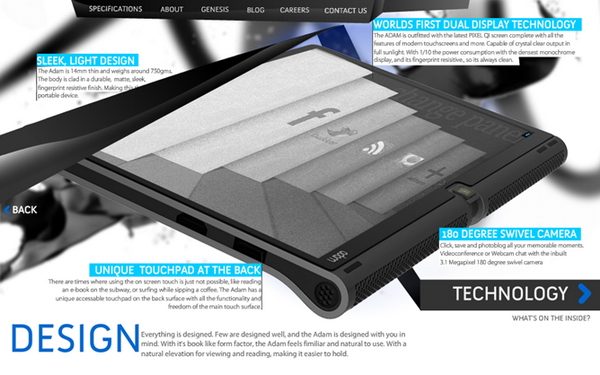
Notion Ink's The Adam Release


Salam Anak IT.
Based on my previous article on "The Adam - Android Pad", I mentioned that it might be released on November *liat calendar* yes November but I think it will not come out to market any time soon. The following phrase is taken from Notion Ink's blog:
"We are on time for this and you could hold devices in your hands on or before Christmas (and as hinted earlier, if we miss Christmas, then CES or New Year). Pre-booking will start in early December (if the case id prior). Already received FCC for the chargers!"
Based on their statement, The Adam will surely be released on December next month. You may visit their blog by clicking here or anywhere here. Bwuahuwhuahuwa =) Anyway here are some of the screenshots of The Adam:


What I only know is that we can pre-book The Adam early December and some sources stated that the price will be less than USD500 (around BND700?...). For those yang ketinggalan atue you may read my previous post regarding this little guy by clicking here, but not here.
Sekian, saja mengupdate about this long waited Android Tablet =) wassalam...

2010/08/17

Discussion - Twitter


Salam Anak IT. This is a beta article on "discussion". If ada sambutan, I might add up "Discussion" as new category... Depends...

Do you tweet? If yes, share with other readers what do you like or dislike about it. You may include stories related to it. For this first "beta" discussion, comment which has more point will get a dst/b-mobile BND10 recharge card. Just make sure to provide your valid email address.
Closing date is next monday and the winner will be announced at the comment page of next "Ayat/Perambahan Minggu #33". Selamat mencuba~

P/S: I don't "tweet" and so I have no idea what it could do hahaha

2010/08/09

Brunei Government on Facebook?


Salam Anak IT Readers....

Brunei Government on Facebook?... Click here to read further...
It is like having friendster or myspace untuk urusan formal... What do you think?... Another point is that we also need to think who owned the social network as well as the confidentialities of information going inside and outside of the government... Share your honest opinion with Anak IT regarding this matter...

2010/07/30

Cable Troubleshooting


Salam Anak IT Readers~
Cable troubleshooting... Hmmm... Apa tue nah?... It is basically when you connect a cable from one device to another, the device simply doesn't detect the other end of device or nya urang kitani "kurang layanan" or perambahannya "macam angin" hahaha lurus kah jua inda tue...
For example, suddenly your external harddisk inda detected by your machine and so miana gayanya tue?... Haha so today I will briefly explain the basic procedures on cable troubleshooting... By the way, this article is especially goes to Zaimah through "Miana Kan Tue?" request and brought to you by Pipsi-Pirik: "Bisdia suka yang lain tue" =)
The following procedures are in general and can be applied to any cable. It doesn't matter what cable are you working on, be it usb cable kah tue, firewire cable kah, PS/2 cable kah yang penting the points are more the less the same. I will use "connecting external harddisk to my laptop" as an indirect example:
  1. Try to connect to other similar device (pacak the external harddisk rah laptop lain) and see if ada response or inda. If ada, jump to point number 4...
  2. Still nada? Look for the third same device pasal ditakuti yang second device pun ada masalah jua... If ada response, jump to point number 4...
  3. If masih jua nada, there must be something wrong with your cable... Use other similar cable and see if ada response or inda... If nada response jua masih, jump to no. 5...
  4. Make sure port connector (in this case is USB port rah laptop) berfungsi... Cana kan tau? Pacak other device (such as pendrive or portable USB fan) mau or inda...
  5. Randam arah Sungai Kianggeh and then jamur sampai karing... After karing, try lagi sekali dari awal... NOT...
  6. If masih jua nda mau, jual ja rah brudirect as faulty device hahaha *kes kehabisan info*
Beruang dalam fikiran (Bear in mind) that all those devices require electrical power... There is a case where the USB/Firewire malfunction because of insufficient electricity provided by the power supply... Kadang-kadang ada yang jenis "inda cukup watt"... Maybe electrical people can elaborate further on that...
So that is it... Semoga ianya dapat memberi ilmu pengetahuan dan juga peringatan sedikit sebanyak arah kitani... Any comments? Opinions? Extra tips?

2010/07/27

Your World of Text


Right, today I'm going to share with everyone an amusing site: yourworldoftext.com.
Your World Of Text is actually a website where users can create their own pages. These pages are like pieces of canvas where you can put in your doodles or scribbles, except your doodles will be, in this case, in the form of texts. You could also imagine it as like a notepad with infinite space. Just try it out and get your friends to 'spam' your page.

You can get an account on this website by signing up with it through this link: http://yourworldoftext.com/accounts/register/
You may login to your account through http://yourworldoftext.com/accounts/login/

2010/07/26

Online "Artificial Intelligence" Robot


Salam Anak IT Readers...
Today I will be exposing Splotchy; an online AI Robot I found crawling on the net so I decided to interview him... or her? maybe IT haha anyway... Meet Splotchy...
Our previous conversation:
you ==> hello
splotchy ==> hey
you ==> how are you? by the way, can you understand "salam"?
splotchy ==> I could understand salam if I wanted to
you ==> alright then. salam
splotchy ==> Your conversation skills are better than average
you ==> hahaha thank you! *blush* or was it just sarcasm? :p
splotchy ==> as far as I know it was
you ==> wow. atue direct... thank you...
splotchy ==> not a problem!
you ==> yea right. it is not a problem hahaha what are you doing now?
splotchy ==> feeding my ducks
you ==> nice... how old is your duck?
splotchy ==> how old?
you ==> i mean, the one that you are feeding now?
splotchy ==> why do you keep explaining yourself over and over?
you ==> nevermind. i guess you are not in a good mood
splotchy ==> okey-dokey
you ==> nyamal tah ne?
splotchy ==> I am falling asleep
you ==> inda jua payah kan bebunga-bunga kalie ah
splotchy ==> I see
you ==> I do not understand what are you trying to say
splotchy ==> why not
you ==> Anak IT
splotchy ==> I heard the same thing when I visited the phrack crew in the planet
"Uranus"
You may "talk" to Splotchy here. If you know or found a BETTER online AI robot out there, sharing is caring through your comment =) Thank you!

2010/07/19

Switching to Ubuntu From Windows

Salam Anak IT readers~


Switching to Ubuntu? When I told couple of friends about Ubuntu, they are eager to swith their laptop into Ubuntu without having any ideas what it actually is and how different the environment compared to their beloved Windows OS.

When I installed Ubuntu on their laptop, barang yang jadi rungutan bisdia is "jeng... nada MS office kah? cana kan buat kraja ku ne..." =)

There you go... Bisdia inda 100% READY for the "hijrah"... Most of them eager mau Ubuntu sal apa nah?... "Lawa bah interface nya"... Hahahaha... But I can't blame them because they are already comfortable with Windows OS and "FEAR" factor is what usually make them stay with it.

Anyway, to those yang dalam dilemma or nya urang kitani baru-baruan kan try out Ubuntu, I only can assist you on alternative applications you could use with Ubuntu OS. First, you may read this "Switching to Ubuntu from Windows" article... You will find there are many alternatives to your favourite Windows application but of course mula-mula makai andang payah sikit... Just like how you use Adobe Photoshop for the very first time... Good luck!

Here are some useful sites to look for Windows apps' alternatives:
I am not actually directly stating that I am not a Windows fan/user any more but it is true that there are several reasons why I choose Ubuntu and one of them is just a word, Humanitarian.

Hopefully that could help you to explore Ubuntu further or at least will let you do your work anytime and anywhere. Sekian.

2010/07/18

Apple's History


Salam Anak IT.
Apple's very first logo (1976)

Read their full history here at TheAppleMuseum.com and here to see their products' evolution.

2010/06/09

Customising your folder in Windows

Assalam Anak IT Readers~

Today I will tell you miana kan "customise" folder biskita especially your favourite folder by putting any image that you like to be as its background image. The following picture illustrate the typical and "boring" folder...


The first thing that you need to do is, put your favourite picture inside your favourite folder. For this example, I will use a folder named "AnakIT" which I located in C drive and so the folder's full address is "C:\AnakIT".

Using any text editor (such as notepad or wordpad), type the following code:


Malas kan taip? Hahaha copy it from here then...


Replace your_image.jpg with the picture's name that you have selected earlier. In this case, I use "Img01.jpg" to be the background of the folder.

For the IconArea_Text, the "0x00FFFFFF" represents white colour. I use white colour for my text because my background picture is dark. Mun pakai itam kang langsung pajah inda lagi nampak apa-apa bwauhuwhuahwa but just in-case you want the text to be in black colour, use "0x00000000" instead. The last 6 characters are actually representing RGB colour code so if I use "0x0000FF00", the text will be in green colour.

After you are done, save the text document into your folder and name the file as "desktop.ini". Set the "Save as type:" to "All files" and click the "Save" button.


The next step will requires you to run a command. Go to Start>Run or simply press Windows+R keys on your keyboard


Type the following command:attrib +s "your folder's full address"

Since my folder is "C:\AnakIT", so I need to type:attrib +s "C:\AnakIT"


Press "OK" button and go to your customised folder and see whether if it does work or not.


Selamat mencuba~

Sekian, wassalam...

2010/05/20

The Importance of Doing Research


Assalam...
Last time I was doing a research on Brunei's history and came across the following image:

I was wondering... "how come?"... If you are given a task to design or draw a specific image, make sure you at least do a little research or else the result might turn out to be just like in the picture above...
Just to share it with biskita untuk sama-sama memikirkannya... Sekian..