2011/03/31

Set Your iPhone/iPad Before It's Too Late


Its more like "set your iPhone before it gets stolen" =)
Click on the image above

2011/03/23

Don't Steal Computer-Literate's Machine

Salam Readers

As usual, I was reading through #Brunei in the morning and I stumbled into a very interesting tweet by@gd14live. His tweet was "Don’t steal computers belonging to people who know how to use computers -http://t.co/Aln6N03 via @forbes #Brunei"

So basically, I got curious. and check it out..

It was an article about an 18-year-old entrepreneur had his Macbook Air stolen at his college dorm in february. Well basically.. for some of us, once it is stolen. It is long gone. Basically inda dapat di trace balik. That's what Mark Bao assumed as well. So Mark decided to bought a new one

Then he got a chance to recover his laptop. How? Mark installed an online cloud back-up program on his stolen Macbook Air *sebelum kana curi lah tu* called BackBlaze.

After few months, he logged into the service for the first time and found out that his stolen Macbook Air is still being backed up.

Mark said that he looked around the files and found that the thief didnt remove the backup service and create his own user account on the system.

Mark could even see the thief's Safari browsing history, webmail site that contain the thief's email address (which revealed the thief's name), pictures and videos which included a video of the thief breaking out some dance moves. So Mark looked up the thief's name on Facebook and he discovered they had mutual friends at Bentley University.

Mark reported to the police and also decided to upload the thief's dance move video to youtube with the title "Don’t steal computers belonging to people who know how to use computers." The video got huge response and Reddit and Courtney Boyd Meyers at The Next Web pick it up.

Let's just say that after Reddit and The Next Web picked it up. The Thief had to returned the laptop to the campus police and sent Mark a facebook message.The thief plead for Mark to take down the YouTube video, Although Mark publicly shamed the culprit but he didn't include the thief's name which granting him some anonymity. Some other techies or tech savants who have had their computers stolen and done similar thing like Mark did have not been as kind. Here's another case where the tech savvy really Pwned the thief. click here

Here's the video that Mark Bao uploaded on YouTube. Click here

So basically, the thief just got Pwned and totally Epic #Fail. It was great for how Mark Bao manage to get his laptop back and plan to sell off his laptop and donate it to Red Cross Japan

Owh yeah.. I got the source of the story from @forbes.

Ok.. That's all what i'm going to share. Salam Readers

Wafiy HM

2011/03/14

Miana Kan Tue? #2


Milah (bukan nama sebenar): Dapat di trace urang yang menggunakan FB ku tanpa pengetahuan ku? Kemarin FB ku kana gunakan then ia m'order kasut tempat 0nlineshopping @ FB.. In inbox, the Onlineshop says aku m'order kasut darinya and stated my name and my private phone no.. When I checked my sent item, mana ada.. Maybe deleted by that "hacker".. So do you have any solution? (the question is edited for more convenience)
Admin: There are certain ways how the "hacker" gain your FB authentication information. You may read further here on how people may obtain your password as well as simple tips how to secure your password. For your first question, eventually it is hard to successfully "trace" the person due to FB's prvacy terms unless if the hacker uses your computer, you may consider to use keylogger (click here to read further on keylogger) as an early precaution. There are millions of FB user around the globe and I think tracking every user's IP address might be less priority for FB team a.k.a "they don't usually care". Plus, you are not the only victim and FB might have a problem to cater and investigate all the cases.
Next step is to "look at your own mirror". How much information (about yourself) are you exposing in your FB account for public view? Some information that you gave to public may give them some points to "hack" your FB account. You may read my previous post on "How less valuable data may become a threat". Regarding your phone number, FB usually expose your email address along with your phone number to people who are in your friend list. Every FB users are recommended to hide these information. "Kalau bulih tah pakai nama samaran saja". To maximize your FB privacy setting, you may click here.
If you really want to dig this person out, ask the onlineshop to forward the message sent by the "hacker" earlier and also ask what day/time the message has been sent, then try to think like this "hacker". Hopefully you will gain some useful information from that.
Here are some useful tips:
  • Never give too much information about yourself in cyberworld
  • Change your password frequently
  • If possible, never share your computer with other people
  • When your computer is being used by other people, BE THERE to observe every actions
  • Never accept friend request from people you do not know in FB
  • "Sabar itu separuh daripada iman"
  • "Balas kejahatan dengan kebaikan"
  • Delete current FB account and create a new one or simply delete unfamiliar people in your friend list
Be more careful next time and bear in mind that internet is for EVERYONE including that kind of people. Other people might have even better solution for you. Those who have some other points to share with Anak IT readers regarding this matter, kindly post your comment =)
Sekian, wasslam.

2011/03/13

Samsung Galaxy Tab 10.1


Salam Anak IT readers...
Are you planning to buy Samsung Galaxy Tab P1000? Think twice because the big brother will be launched soon =)

2011/03/07

Miana Kan Tue? #1


Fizul Hy: cana bleh atu aa...my laptop initial graphic card 1789MB....after upgrade to 64bit...jd 2549MB arh dxdiag...any idea?
ALai KoGawa: ok..i'll answer this as simple as possible to understand..hehehh.msa 32bit the system can calculate limited memories to be processed then when upgrading to 64bit the system it also upgrade the address memory amount like what u can see with ...ure graphic card which means it calculate at that amount and thus improve its video encoding and decoding methods..upgrading 64bits also likewise allow addressing more ram up to 16GB where 32bit cant..in conclusion for those upgrades..the bigger (which is 64bits) the more the system can hold and calculate the memory..hehehe..(p/s: kalau ada salah tolong betulkan..this is based on my expertise regarding hardware and software..hehehe)
Fizul Hy: okay...its based on its capacity that 64bit can hold...something like that?
ALai KoGawa: yeap..its something just like that..
Fizul Hy: thnx a lot ^^)

2011/02/13

FOSS - TeraCopy


Salam Anak IT readers.
Today's article will be another FOSS (Free and Open Source Software) and the selected FOSS for today is Teracopy - "Copy your files faster". Here is the screenshot:
TeraCopy is a compact program designed to copy and move files at the maximum possible speed, providing the user with a lot of features:
  • Copy files faster. TeraCopy uses dynamically adjusted buffers to reduce seek times. Asynchronous copy speeds up file transfer between two physical hard drives.
  • Pause and resume file transfers. Pause copy process at any time to free up system resources and continue with a single click.
  • Error recovery. In case of copy error, TeraCopy will try several times and in the worse case just skip the file, not terminating the entire transfer.
  • Interactive file list. TeraCopy shows failed file transfers and lets you fix the problem and recopy only problem files.
  • Shell integration. TeraCopy can completely replace Explorer copy and move functions, allowing you work with files as usual.
  • Full Unicode support.
  • Windows 7 x64 support.
- Taken from Teracopy's website
I have been using Teracopy since the past mmm 2-3 years? The only thing is that it can only be used in Windows OS but yea I just prefer using Teracopy rather than Windows built-in file/folder operation controller. Just try it now and experience it yourself. Try to copy big files and compare it with the regular Windows built-in operation controller. You may download it from here. If rasanya inda tepakai, simply uninstall it =)
Semoga mendapat manfaat dan kebaikan ;) aminnn...
Sekian, wassalam.

2011/01/23

Write Jawi Easily


Salam Anak IT.
I would like to share a useful software to write jawi named "Maktab", Written by Dennis C. Bemmann (www.bitclick.com). Here is the snapshot:
Click on the image to download the file (jawi.exe)

It shows what you need to press in order to have the jawi letters. For example, if kan mau huruf "Alif", simply press small "a" but if you type capital "A" it will give you huruf "'Ain". The good thing about this is that you do not need to buy a jawi keyboard sticker to be attached on every keys on your keyboard. After you are done with typing, just copy everything and paste it into MS Word, OpenOffice, MSN nick etc.
Simple? Semoga ianya dapat memberi manfaat kepada kitani semua lebih-lebih lagi guru ugama =)
Sekian, Wassalam.

2011/01/18

Selecting Text


Salam Anak IT reader(s),
Here I would like to share some brief or common knowledge on methods of selecting text or as you may usually say it ‘highlighting text’ in Microsoft Word using your… mouse!

YEAYYYY!!! DRAG AND HIGHLIGHTTTT!! *dramatic*

No no no no no papoy! That’s not what I am going to talk about. It is not wrong though =) That, I can say is the most fundamental method of selecting text in word (= It would be rather tiring if you drag and highlight most of the time. No? Especially when you are dealing with pages of document to modify *cough* melawakan assignment punya report *cough* then again there are a lot of ways to select text in document and here is one of the many way.
So, without further ado… Here is the first method…
but before proceeding, senyum and buka MS Word... below is a sample text document that I am going to use throughout this article.
Now... we are ready to continue...
-take note on the position of my cursor/mouse pointer/arrow throughout the article-
To select a Word /Perkataan – double click on the word you want to highlight
as you can see above. That is a result of double clicking the word 'sentence' in the paragraph.
To select a Sentence/Ayat – hold the ctrl key and click anywhere in the sentence you want to select and the result of it is somewhat like what i have below...
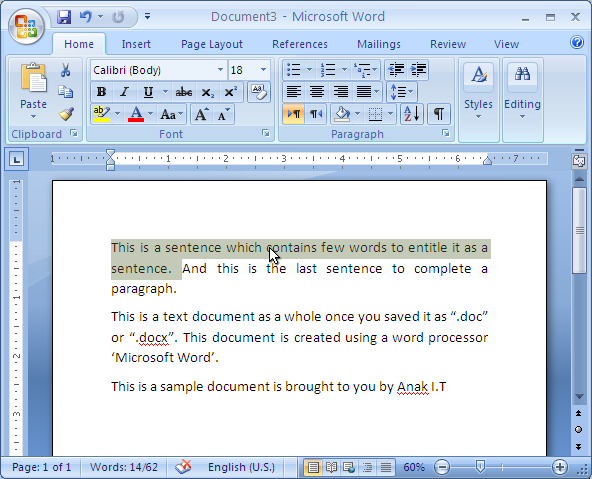
To select a Paragraph/Perenggan – triple-click anywhere in the paragraph
Another method of selecting text is by using the selection bar. Selection bar is on your *fikir skajap kiri or kanan* I think and I am sure it is on your kiri/left hand side of the document. (<-- that side). When you place your cursor on that side of the text, your mouse cursor will change to right pointing arrow.
as you can see above... the white/highlighted side is the selection bar. And do you realize? cursor berubah arah macam kana tiup angin dari sebalah kiri at that area. Try and see it on your MS Word.
To select a Line of text – Katik sekali pakai tetikus bahagian kiri text yang kan di highlight
as you can see it highlights sebaris atu saja.
To select a Paragraph/ Perenggan – Katik dua kali arah bahagian kiri perenggan yang kan di highlight
And last but not least is to select the Entire document – Katik tiga kali arah selection bar atau takan ctrl(on your keyboard) and katik sekali di mana mana arah selection bar atu.
Atu ta saja dulu for now. Hope it will benefit you or anyone you share this with and may inspire you in any ways. (= feel free to comment. Kalau salah tolong betulkan. Kalau ada pertanyaan jangan malu untuk bertanya, InsyaAllah ANAK IT will try the best of the best to help.
Sekian.

2011/01/13

FOSS - CCleaner


Salam Anak IT readers =)
The FOSS (Free and Open Source Software) for today is.......................... *drumroll*.................. *masih drumroll*........ CCleaner~ my favorite FOSS :)
So, what is CCleaner? It is a free cleaning tool for Windows OS. It is small with big *masih ada drumroll* capabilities and also very light =) it is also easy to use and a *pacahi drum kai pisau cukur* must-have tool for Windows OS. Download it for free at http://www.piriform.com/ccleaner or if malas kan copy paste click here. If you feel that it is useful you may have choice to donate or buy the software with priority support.
It has 3 category: Cleaner, Registry and Tools. For Cleaner, it cleans up your temporary files, cookies, clipboards etc. which is usually needed by the machine once but haven't been wiped off from the machine. Registry cleaning fixes any problems found on the registry while Tools cleaning deals with the software installed on the machine. This is the screenshot of the sofware:

To use Cleaner, simply click on the Analyze button and it will scans your machine for the junk files.

After the scanning is complete, click on the "Run Cleaner" button. Straight forward right? ;)

For Registry cleaning, click on the "Scan for Issues" button.

Sudahnya abis scanning, tekan punat *hahaha* "Fix selected issues..."

You will be asked either you want to backup your registry or not. To be on a safe side, just back it up and then follow the instructions.

Tools~ This is my favorite part. It has 3 sub-functions: Uninstall, Startup and System Restore. Yang Uninstall atue you know la apa ia but ;) but the most interesting part is the "Startup" feature. Usually the machine loads very slow after switched on. This is because of some programs being loaded at windows start-up. This software gives you freedom on choosing which program you want to be enabled during start-up and which programs you want to disable or even delete it from the start-up list =)

Semoga memberi manfaat arah kitani semua serta rakan-rakan dan saudara-mara tidak lupa adi beradi insyaAllah.
Sekian. Wassalam.

2011/01/07

Go Green With Solar Energy

"Mengapa keta atue parking arah tangah-tangah lautan atue kan? Ngam-ngam bawah lampung lagi tue..."
The reason is...

Charging a handphone with solar panel
Salam Anak IT readers...
I would like to expose an energy efficient technology called SOLAR PANEL =) tau jua biskita tue kalie apa binatangnya huhu so na payah panjang ceta for today la k ;)
Advantages:
  • Can be used anywhere, inda payah cari plug karan rah dinding
  • UNLIMITED power source (renewable)
  • Silent - bukan hingar portable generator
  • No pollution
  • Minimum maintenance
Actually banyak plang lagi its advantages... It also carries disadvantages such as expensive (short-term) and may not be reliable on bad weather or even at night... The good thing about it is the fact that it is renewable in a way that it can be used rapidly unlike fuel, abis dipakai abis tah tue... For a long-term power source, solar energy might benefit us hugely... Its just that we have less access to these kind of power "gadget", ada tapinya inda banyak kalie...
Here are examples of charging/using a laptop with solar energy:

Click on the image to read further

I think that is it for today. If you have extra ideas, knowledge, skills and experience on today's topic, post it through comment =)
Sekian, wassalam...