2011/01/18

Selecting Text


Salam Anak IT reader(s),
Here I would like to share some brief or common knowledge on methods of selecting text or as you may usually say it ‘highlighting text’ in Microsoft Word using your… mouse!

YEAYYYY!!! DRAG AND HIGHLIGHTTTT!! *dramatic*

No no no no no papoy! That’s not what I am going to talk about. It is not wrong though =) That, I can say is the most fundamental method of selecting text in word (= It would be rather tiring if you drag and highlight most of the time. No? Especially when you are dealing with pages of document to modify *cough* melawakan assignment punya report *cough* then again there are a lot of ways to select text in document and here is one of the many way.
So, without further ado… Here is the first method…
but before proceeding, senyum and buka MS Word... below is a sample text document that I am going to use throughout this article.
Now... we are ready to continue...
-take note on the position of my cursor/mouse pointer/arrow throughout the article-
To select a Word /Perkataan – double click on the word you want to highlight
as you can see above. That is a result of double clicking the word 'sentence' in the paragraph.
To select a Sentence/Ayat – hold the ctrl key and click anywhere in the sentence you want to select and the result of it is somewhat like what i have below...
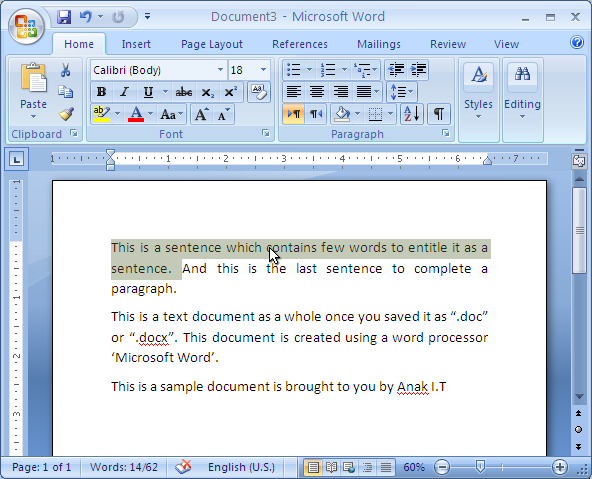
To select a Paragraph/Perenggan – triple-click anywhere in the paragraph
Another method of selecting text is by using the selection bar. Selection bar is on your *fikir skajap kiri or kanan* I think and I am sure it is on your kiri/left hand side of the document. (<-- that side). When you place your cursor on that side of the text, your mouse cursor will change to right pointing arrow.
as you can see above... the white/highlighted side is the selection bar. And do you realize? cursor berubah arah macam kana tiup angin dari sebalah kiri at that area. Try and see it on your MS Word.
To select a Line of text – Katik sekali pakai tetikus bahagian kiri text yang kan di highlight
as you can see it highlights sebaris atu saja.
To select a Paragraph/ Perenggan – Katik dua kali arah bahagian kiri perenggan yang kan di highlight
And last but not least is to select the Entire document – Katik tiga kali arah selection bar atau takan ctrl(on your keyboard) and katik sekali di mana mana arah selection bar atu.
Atu ta saja dulu for now. Hope it will benefit you or anyone you share this with and may inspire you in any ways. (= feel free to comment. Kalau salah tolong betulkan. Kalau ada pertanyaan jangan malu untuk bertanya, InsyaAllah ANAK IT will try the best of the best to help.
Sekian.

2011/01/13

FOSS - CCleaner


Salam Anak IT readers =)
The FOSS (Free and Open Source Software) for today is.......................... *drumroll*.................. *masih drumroll*........ CCleaner~ my favorite FOSS :)
So, what is CCleaner? It is a free cleaning tool for Windows OS. It is small with big *masih ada drumroll* capabilities and also very light =) it is also easy to use and a *pacahi drum kai pisau cukur* must-have tool for Windows OS. Download it for free at http://www.piriform.com/ccleaner or if malas kan copy paste click here. If you feel that it is useful you may have choice to donate or buy the software with priority support.
It has 3 category: Cleaner, Registry and Tools. For Cleaner, it cleans up your temporary files, cookies, clipboards etc. which is usually needed by the machine once but haven't been wiped off from the machine. Registry cleaning fixes any problems found on the registry while Tools cleaning deals with the software installed on the machine. This is the screenshot of the sofware:

To use Cleaner, simply click on the Analyze button and it will scans your machine for the junk files.

After the scanning is complete, click on the "Run Cleaner" button. Straight forward right? ;)

For Registry cleaning, click on the "Scan for Issues" button.

Sudahnya abis scanning, tekan punat *hahaha* "Fix selected issues..."

You will be asked either you want to backup your registry or not. To be on a safe side, just back it up and then follow the instructions.

Tools~ This is my favorite part. It has 3 sub-functions: Uninstall, Startup and System Restore. Yang Uninstall atue you know la apa ia but ;) but the most interesting part is the "Startup" feature. Usually the machine loads very slow after switched on. This is because of some programs being loaded at windows start-up. This software gives you freedom on choosing which program you want to be enabled during start-up and which programs you want to disable or even delete it from the start-up list =)

Semoga memberi manfaat arah kitani semua serta rakan-rakan dan saudara-mara tidak lupa adi beradi insyaAllah.
Sekian. Wassalam.

2011/01/07

Go Green With Solar Energy

"Mengapa keta atue parking arah tangah-tangah lautan atue kan? Ngam-ngam bawah lampung lagi tue..."
The reason is...

Charging a handphone with solar panel
Salam Anak IT readers...
I would like to expose an energy efficient technology called SOLAR PANEL =) tau jua biskita tue kalie apa binatangnya huhu so na payah panjang ceta for today la k ;)
Advantages:
  • Can be used anywhere, inda payah cari plug karan rah dinding
  • UNLIMITED power source (renewable)
  • Silent - bukan hingar portable generator
  • No pollution
  • Minimum maintenance
Actually banyak plang lagi its advantages... It also carries disadvantages such as expensive (short-term) and may not be reliable on bad weather or even at night... The good thing about it is the fact that it is renewable in a way that it can be used rapidly unlike fuel, abis dipakai abis tah tue... For a long-term power source, solar energy might benefit us hugely... Its just that we have less access to these kind of power "gadget", ada tapinya inda banyak kalie...
Here are examples of charging/using a laptop with solar energy:

Click on the image to read further

I think that is it for today. If you have extra ideas, knowledge, skills and experience on today's topic, post it through comment =)
Sekian, wassalam...

2010/12/10

Green IT Certification


"CompTIA's Strata Green IT certificate is designed to enhance an IT professional's experience, knowledge, and existing IT credentials to incorporate emerging technologies shaping the global green IT industry today. IT professionals that pass the Green IT exam validate that they have the aptitude needed to effectively implement and measure green IT programs and investments, including:
  • A specialized knowledge of current IT methodologies
  • The ability to develop, deploy, and calculate true ROI for green IT initiatives
  • Knowledge of cost-cutting power management and IT virtualization techniques
  • Proven understanding of environmentally-sound waste disposal
  • An awareness of global organizations mandating standards and regulations
The Strata Green IT certificate is ideal for IT professionals who have decision making authority over a company's IT infrastructure or work in implementing green IT initiatives such as an IT manager, data center or facilities / operations manager, IT technician, and system or network administrator." -CompTIA

CompTIA Strata - Green IT certificate

For further information on the CompTIA Strata - Green IT, go to CompTIA's website at http://www.comptia.org/certifications/strata/greenit.aspx or simply click here. Those who need some guidance on the certification, you may approach me.
As Anak IT's motto, "Mun rotan ganya sejangkal, jangan mendaluh lautan dalam" encouraging you to improve and further your skills.
Sekian, semoga biskita mendapat inspirasi dan juga manfaat. Wassalam.

"When there is a will, there is a way"

Related articles:

2010/12/09

Change Case in MS Word


Hi readers! Just a brief one.
Have you ever wonder how to change from lower case to upper case or vice versa in MS Office Word? It is really simple. Highlight the targeted word/phrase and then press Shift+F3 keys on your keyboard simultaneously and examine the output. Here are few examples:
First, highlight the text.

Then press Shift+F3. You will see that only the very first letter is changed to uppercase (or capitalised).

When you press the combination keys one more time, all of the selected text will be capitalised.

Try to repeat the process and see what will you get.
Until next time, happy trying~

2010/11/25

Database Basic - C.R.U.D.


Salam Anak IT readers~ Yes... You...
A lot of people (more than one a.k.a two) were asking me what are required actions to be taken by the database when we develop a system and I was like "apakan?..." hahaha but now I understand apa maksud bisdia ane... So here is my BRIEF explaination...
It actually depends on what kind of system are you developing... Does it require any data? If yes, do you need to record the data? Will the data be used in the future? If yes then of course we need to store the data in a place called "database" and the overall system is called "Information System" since we deal with information... Clear? Blur? Samar-samar? We move on...
Maksudnya atue, there are certain system yang memerlukan informasi and ada yang inda memerlukan langsung for example this "My Personal Alarm Clock" program. Click on it if you asked "apakan tue?" =) Banyak lagi sebenarnya system yang inda memerlukan "stored information" and the best example will be hmmm.... Game Solitaire? Calculator? etc. but mostly games yang canggih-canggih masa ane require database to save the user's information (like name, nickname) as well as their latest achievement/level or even weapon used in the game...
So what are the examples of system that requires information? Have you heard about "Student Information System" where it stores students' information? Book Keeping System? Document Management System? Library System? Store Keeping System? Dan yang sewaktu dengannya as long as it deals with data...


Back to their question, there are many actions we could apply when we deal with data. The most basic and crucial actions are CRUD:
  1. Create - you create and store a data into database
  2. Read - then, you read the stored data by retrieving it from the database
  3. Update - if you think you need to change some data, you may update the data stored in the database
  4. Delete - last but not least, mun rasanya inda lagi beguna, you may delete the data by removing it from the database
In order to manipulate the data, you must have at least basic skill on SQL (Structured Query Language). It is a syntax that is required in order to establish a communication between Front End application/software/program/system and the database. If you think you already know how to use SQL, click here to read Khadijah's post on SQL Zoo or else, hmmm click here kalie bisai...
Here are examples of the CRUD's SQL syntaxes:
  • Create - INSERT INTO table_user (name) VALUES ('zul')
  • Read - SELECT * FROM table_user
  • Update - UPDATE table_user SET name='fadly' WHERE name='zul'
  • Delete - DELETE FROM table_user WHERE name='fadly'
There you go... Even though it is not in detail but hopefully tane sama-sama mendapat ilmu yang bermanfaat serba sedikit...
Sekian, wassalam...

P/S: I you feel like ada kan ditambah, give your comments! =)

2010/11/19

Notion Ink's The Adam Release


Salam Anak IT.
Based on my previous article on "The Adam - Android Pad", I mentioned that it might be released on November *liat calendar* yes November but I think it will not come out to market any time soon. The following phrase is taken from Notion Ink's blog:
"We are on time for this and you could hold devices in your hands on or before Christmas (and as hinted earlier, if we miss Christmas, then CES or New Year). Pre-booking will start in early December (if the case id prior). Already received FCC for the chargers!"
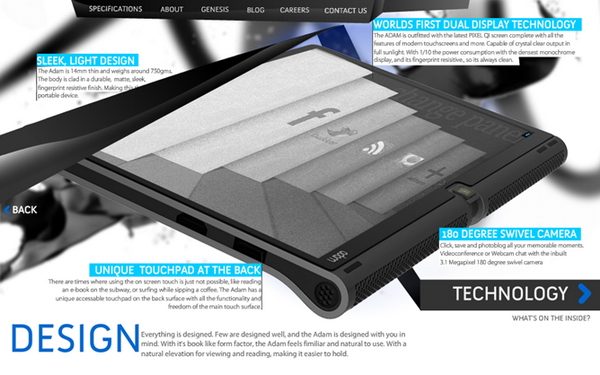
Based on their statement, The Adam will surely be released on December next month. You may visit their blog by clicking here or anywhere here. Bwuahuwhuahuwa =) Anyway here are some of the screenshots of The Adam:


What I only know is that we can pre-book The Adam early December and some sources stated that the price will be less than USD500 (around BND700?...). For those yang ketinggalan atue you may read my previous post regarding this little guy by clicking here, but not here.
Sekian, saja mengupdate about this long waited Android Tablet =) wassalam...

2010/11/13

FOSS - K-Lite Codec


Assalam,
It's been a while since I posted on anak.it. So today I'm going to introduce you K-Lite Codec. Ok.. gerenti ramai orang confuse sikit apa guna nya if kana install kan ke dalam laptop or desktop. Well K-lite Codec ani is basically a collection of audio and video components for Windows [1]. Still confuse? Andang nya tuu.. Aku pun awal-awal confuse.. First time aku membali laptop, kana install kan k-lite codec ani.. tapi inda ku tau apa guna nya.. then aku format laptop ku.. then baru ku realise ada guna nya...
So.. Let me explain.. Pernah kah biskita kn membuka video dlm format 3GP? RMVB? MKV? OGG? FLV? well.. K-Lite codec will help you to open the file and be able to view it. Its basically upgrade biskita punya video codec supaya dapat buka video dalam format tersebut di atas tadi.
If biskita masih confuse? Mari aku bercerita sedikit pasal ani.. Selalu nya... if computer baru habis format, biskita dapat buka video file under AVI, MPG, MP4 ganya.. so if baik nasib, dapat nampak gambar nya.. tpi if inda baik nasib.. inda ber-gambar langsung.. *Iatah membari garam hati oleh nya tuu..*
To solve this problem, biskita install K-Lite Codec. That way, you can view semua video format and its free!!
If biskita mau download.. click here.
Basically, K-Lite codec ani ada 4 jenis. Which are Basic, Standard, Full and Mega. Aku recommend Mega pulang.. K-Lite Mega Codec ani is the complete package of video format yang dapat di lihat lah... Even aku menggunakan K-Lite Mega Codec.
And for those yang ada udah dalam computer nya, kalau boleh constantly update lah K-Lite Codec biskita. Most of the update ani mengusai loophole aka Errors of K-Lite Codec yang version lama. Biskita inda pulang sadar ada error atau inda tu tapi ada banar nya...
K-Lite Codec ani saja bukan untuk video, tapi ia boleh digunakan untuk mendangar lagu jua..
If you dont feel like using K-Lite Codec, dont worry. There's another software for updating your video and audio codec as well. To be precise, there are tons of software that update your video and audio, but the most common that I see is "VLC Media Player".
If mau mendownload VLC... click here.
I think that is all for now. I hope this article gave you an extra knowledge on K-Lite Codec and what it does. If you have any question regarding this article, please do not hesitate to click "Miana Kan Tue?" at the top of this page. We will try our best to reply your question(s).
Thank you!
Sekian,
Wassalam..

2010/10/10

ICT Competency Program - Government Subsidised


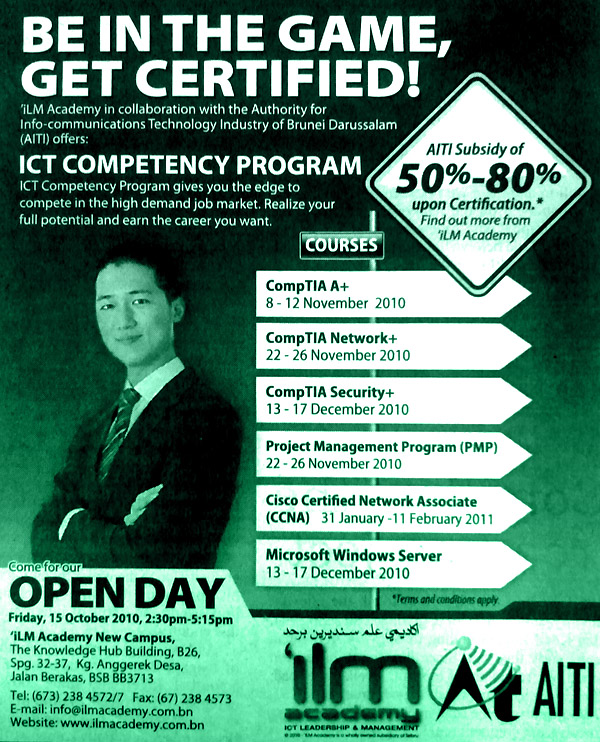
"The Authority for Info-Communications Technology Industry of Brunei Darussalam (AITI) will subsidise training for Bruneians and permanent residents on ICT basics and more advanced courses as it signed yesterday deals with three local ICT companies hired to conduct the training.
ICT awarded the contracts to AT e-Knowledge Solution, HAD Technologies Sdn Bhd and iLM Academy following a signing ceremony at the agency's office in Berakas yesterday.
The training is under AITI's ICT Competency Programme aimed at training Brunei's citizens on ICT basics, multimedia applications and other ICT-related skills in order to create a pool of highly skilled manpower and ultimately ensure Brunei's human resource is well-versed in ICT. The programme also aims to upgrade the knowledge of ICT experts.
Under the ICT Competency Programme, AITI will be subsidising 50 per cent to 80 per cent of the training fees of eligible participants, subject to the training course taken. The subsidies will be provided upon successful completion of the course.
AITI is targeting job seekers without ICT skills for the training."
Read further... (The Brunei Times)

2010/10/06

Types of Viruses


  1. Resident Viruses
    • A terminated-and-stay resident virus permanently attaches to the host computer and operates in memory (RAM). It attempts to load before other mechanisms that attempt to analyse, detect and identify its purpose and origin and can bypass, interrupt or manipulate basic operating system functions.
  2. Stealth Viruses
    • A Stealth virus hides the modifications made to files and boot records by modifying and forging the results of calls to functions, therefore programs believe they are reading the original file and not the modified file. A good anti-virus software will probably detect a stealth virus due to the fact that a stealth virus attempts to hide itself in memory when a anti-virus software is launched.
  3. Macro Viruses
    • Certain applications contain embedded scripting or "macro" languages enabling users to automate long series of operations as single shorthand actions. A macro virus targets these applications by containing code that replicates and replaces other macros to launch the virus payload when common functions are called
  4. Slow Viruses
    • A Slow virus is a difficult virus to detect due to the fact it only modifies and infects files when they have been modified or copied. Therefore the original file will not be infected by the actual copied file. A good way to protect yourself against slow viruses is by using an integrity checker or shell.
  5. Direct Action Viruses
    • An aggressive form that replicates and takes direct action when triggered by some condition, date or event. The direct action virus typically resides in system folders or the root directory path where it can be readily accessed and activated and carry out its tasks when the system boots up.
  6. Revisiting Viruses
    • A Revisiting virus is a worm virus and attempts to copy itself within the computers memory and then copy itself to another linked computer using TCP/IP protocols. The Morris Worm virus in the late 1980's was the first major virus threat to hit the Internet.
  7. Retro Viruses
    • A Retro virus attacks the anti-virus software designed to delete it. The retro virus usually attempts to attack the anti-virus data files such as the virus signature store which disables the ability of the anti-virus software to detect and delete viruses. Otherwise the retro virus attempts to alter the operation of the anti-virus software.
  8. Armored Viruses
    • A Armored virus attempts to protect itself from anti-virus software by trying to make anti-virus software believe it is located somewhere else. Therefore the Armored virus has made itself more difficult to trace, disassemble and understand.
  9. Overwrite Viruses
    • A virus can partially or completely delete information contained in the files it infects, even replacing portions of application code with its own payload. Viruses of this kind are generally easy to identify with anti-virus software, as they generally tent to alter end-user and system applications in noticeable and identifiable ways.
  10. File Infector Viruses
    • The traditional virus is a file infector that targets executables to cause direct or indirect execution of its payload. Most viruses fall under this category and are further classified depending on what is targeted and the actions taken during the infection process.
  11. Companion Viruses
    • A Companion virus creates a companion file for each executable file the virus infects. Therefore a companion virus may save itself as scandisk.com and everytime a user executes scandisk.exe, the computer will load scandisk.com and therefore infect the system.
  12. Phage Viruses
    • A Phage virus is a very destructive virus that re-writes a executable program with it's own code, rather than just attaching itself to a file. Therefore a Phage virus will usually attempt to delete or destroy every program it infects.
  13. Polymorphic Viruses
    • A polymorphic virus is an encrypted virus that hides itself from anti-virus through encrypted (scrambled) data and then decrypts itself to beable to spread through the computer. The thing that makes it hard for anti-virus software to detect polymorphic viruses is that the virus generates an entirely new decryption routine each time it infects a new executable file, making the virus signature different in each signature.
  14. Multipartite Viruses
    • A Multipartite virus attempts to attack and infect both the boot sector and executable files at the same time.