2010/02/18

How To Handle Missing/Corrupted File?


Assalamu'alaikum wbt...
Have you experienced a sudden dead blue screen in Windows XP? Then after you restart your computer, it is saying something like a file is missing or corrupt?
I've been facing such "cheerful" events haha just yesterday it happened to me again. Missing or corrupted hal.dll... Based on my experience, sometimes it is due to improper booting up. In special cases, the file itself buat hal. So miana tue? Logically, we would just replace the file with the unaffected file. But, if you can't even access the operating system, how are you going to do it? Yetah masanya I would directly interact with my best buddy named "Live CD". Live CD allows you to run the operating system WITHOUT having to install it first in you harddisk.
  • To learn more on Live CD, go to this wikipedia.
  • You may get the list of available Live CD here.
Ubuntiu 9.04 (well it is now 9.10). I only use it as Live CD
After you get yourself a preferable Live CD (I recommend you to use Ubuntu), insert it into your tray and then restart your machine.
You need to make sure that you have selected your CD-ROM drive as primary boot device. When the first screen appears, press Delete key on your keyboard immediately to access the BIOS configuration. This might be different on other machines. Certain machines use F12 key instead of Delete key. It depends on the manufacturer.
BIOS Setup...
Browse for "boot" word,
Change the first boot device to your CD-ROM drive, save changes made and leave the BIOS setup.
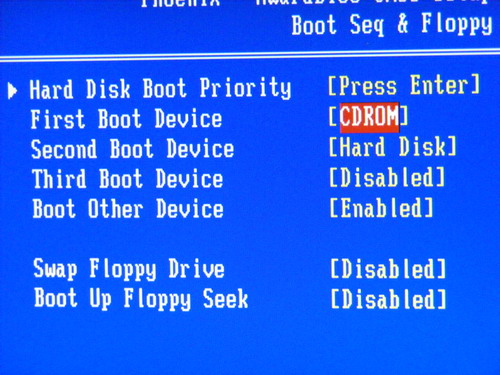
Restarting the machine again.
Upon successful, you will be brought to Ubuntu's menu whether to try it as Live CD or to install it into your harddisk. Choose the Try Ubuntu option.
It will load Operating System files from your CD. Starting from now, you could not eject the Live CD from your CD-ROM drive.
Walaa~ Welcome to Ubuntu Operating System.
Go to Place>Computer and go to your windows drive. Browse to windows/system32 folder.
But, before that, I need to download new hal.dll to replace the corrupted hal.dll (if it surely is corrupted)
I went to dll-files.com and download the file
Once the download is completed, open the downloaded archive file
Extract it to desktop temporarily
Back to the folder, look for the corrupted file
Kindly back the file up before you replace it with the new file.
Then, replace the corrupted file with the downloaded file. The system will ask you again to confirm the replacement of the file. Just select "Replace".
After you replaced the file, turn off the Ubuntu Operating System
Shut down~
You will be prompted to remove the Live CD from your CD-Rom drove
Remove the Live CD
And do another restart
Its getting close now... Hopefully...
YEaH! It is back to normal...
Thank you Ubuntu. You saved my "Windows" LOL
- The End -

2010/02/16

Hard Disk - IDE or SATA?


This is my 1st article for anak.it… I’m honored for anak.it for giving me the chance to give a contribution to it. So... here it goes…
Inda kita pernah terpikir kan membali hard disk external untuk menyimpan data biskita? Seperti document-document kraja, gambar, lagu, movies, series and etc… Sekali kan membali... ada kana bagi choice… sama ada kita mau hard disk yang IDE atau SATA? Apa tah biskita buat tu? Sama ada pilih IDE atau SATA? Apa yang bagus? IDE atau SATA? Bisai atau inda membali saiz Hard disk basar? Walaupun kita tanya arah penjaga kadai, tatap jua decision arh kitani…. So, cemana tah nie?
Pernah terasa dilemma cemani? To be honest, I’ve even experienced this kind of dilemma a few years back… maybe all the people have as well… so I’m going to write an article about the difference between IDE and SATA, and my recommendations on what kind of hard disk to get nowadays…
Mari tah kitani melihat gambar Hard disk IDE sama SATA dulu ye…

Hard disk IDE

This picture was taken from here

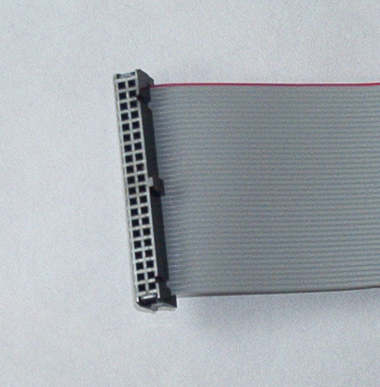
Cable IDE

This picture was taken from here

IDE power cable

This picture was taken from here

SATA hard disk

This picture was taken from here

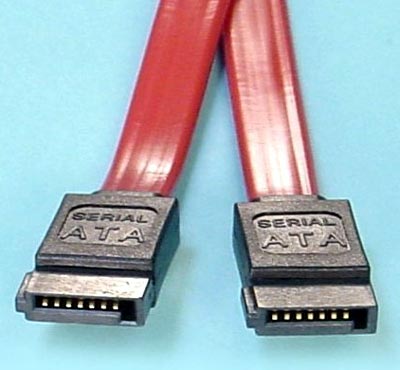
SATA cable

This picture was taken from here

SATA power cable

This picture was taken from here
Can you see the difference between IDE and SATA? Well... the hard disk cable and the hard disk itself is different… and for performance-wise SATA is faster than IDE. Pasal SATA model baru daripada IDE… hehehe… okay... That doesn’t really explain why it is faster than IDE...
IDE’s transfer rate is 100MB/S, meaning how fast you can access your files in your computer… To be put in a much simpler term. If biskita kan mentransfer movie dari hard disk kita ke arah kawan biskita, then hard disk kita is IDE… berapa lama kita mentransfer 5 GB or more ke arah kawan biskita? Sometimes the hard disk cannot even support such high capacity data, which results in you having to transfer it one by one. How do I know? Well... I learned it from experience...
Few years back, I transferred 15GB worth of movies/series to my friend’s external hard disk. I leave it alone for it to finish and went to get some rest... when I woke up... It wasn’t moving… So yeah… the data is too large for the hard disk to handle... I have to transfer it one by one.
Sekali, pasal SATA lagi... SATA’s transfer rate starting at 150MB/s. eh wait... did I mention about “starting”. Yes it true... starting at 150MB/s. the current SATA specification detail data transfer rate are as high as 6.0GB/s per device, depending on the hard disk’s RPM though… the higher the RPM, the higher the transfer rate is, while IDE’s max transfer rate are 100MB/s.
My recommendations for getting a new hard disk is……. *drum roll*….. SATA. Because of the high transfer rate it is advisable to get SATA. Data capacity are rising from 300mb to I don’t know. Well all I can say that it is getting bigger. And if you get an IDE hard disk, it is so hard to look for the external hard disk casing because nowadays most hard disk being sold is SATA. And the very latest laptops nowadays are using SATA hard disk.
Owh yeah, if you are planning to get a SATA hard disk for desktop biskita, please check whether motherboard kita support atau inda ah…. If your desktop are new… well... most probably.. ada pulang SATA port arah motherboard biskita tu.
If you are planning to get a hard disk, the size capacity is 1TB which means 1000GB... remember… hard disk ani sensitive sikit ni… gugur saja hard disk ani… rusak tia… menangis tua wah tu hehehe... and hard disk ani ada jua nyawa nya… if you plug in your hard disk... and you hear a clicking sound... and your hard disk is 2 years old… backup your stuff… all your datas… your hard disk is at its end already.
Ok… that’s the end of my article for now. I hope that you all gain a bit more experience on hard disk. Until next time… Sekian… Wabillahi taufiq walhidayah...

2010/02/14

Audacity


First of all, I would like to thank Anak IT’s founder for making me part of contributors. Even though the article editor interface is not that easy to learn, but it is an honor for me to give contribution to Anak IT.P/S: Jan lupa lanja ah hehe
For my first article, I would like to share with you guys about a software that I usually work with for audio editing. It is called Audacity. It is an open source software a.k.a FREE to use. For those yang memerlukan this software untuk edit mp3 or wav, you may go to http://audacity.sourceforge.net/download/ and download it based on your Operating System. It is now widely used in education in most of multimedia courses around the globe for learning audio editing.
Currently, Audacity works with these Operating Systems:
  • Windows (xp/vista/7)
  • Mac (OS X)
  • Linux
Audacity's User Interface
I use Audacity to:
  • Trim a song or memanggal-manggal lagu untuk jadikan short ringtone
  • Bagi effect to any audio file especially fade-in and fade-out effect
  • Combine tracks into a song
  • Removing noise (hiss sound)
  • Basarkan the volume of the song
Effects available in Audacity
Here are further elaborations on its built-in effects:
  • Amplify - Membasari volume lagu
  • Bass Boost - Membasari bunyi bass or labuk-labuk
  • Change Pitch - Menukar suara jadi Chipmunk or Low-tone
  • Change Speed - Melajukan or memperlahankan lagu
  • Change Tempo - I think kurang labih sama macam Change Speed
  • Click Removal - Membuang "click" and "pop" sounds?
  • Compressor - What I can tell is that it reduces the "quality" unrecognisably
  • Echo - Bagi effect macam dalam gua
  • Equalization - Ala-ala equalizer dalam keta or arah set karaoke
  • Fade In - Make the sound timbul perlahan-lahan
  • Fade Out - Make the sound hilang perlahan-lahan
  • FFT Filter - Usulnya macam Equalizer jua but this one has more controls
  • Invert - I think... Hmmm swapping the right channel to left channel and vice versa?
  • Noise Removal - Buang bunyi noise "ssssssssss" or bunyi aircond
  • Normalize - Kurang labih macam Amplify but this one control the frequency supaya inda "pacah"
  • Nyquist Prompt - It requires us to code-in something but I won't bother since it doesn't "taste" so useful
  • Phaser - Making the sound goes kiri ke kanan and kanan ke kiri (only in Stereo mode and only works with Stereo Speaker)
  • Repeat - "Copying and pasting" the highlighted area with "number of times to repeat" feature
  • Reverse - Terbalikkan bunyinya
  • Wahwah - Bagi bunyi "UFO" effect haha bunyinya macam Phaser effect but its a bit faster
You may experiment the effects on your own and try to analyse what each effect does to your audio file (mp3, wav, aif, au, ogg). I've produced many tracks with this software (to be precised, "combination of softwares which INCLUDES Audacity" hehe) and you may download one of my samples below:
MenjunjungDuli.mp3 Produced in 2006
- End -

2010/02/09

FileZilla FTP Client


Salam Anak IT. FileZilla FTP Client is one of the most popular FTP client available on the internet. It is used to upload and download files to/from server (usually web server). Click here to read further on FTP.
You may download FileZilla FTP Client for free on their website http://filezilla-project.org/ or simply clickhere if you would like to have a test drive. Once installed and opened, the following window will appear:
Then you may go to File>Site Manager or simply press CTRL+S keys on your keyboard.
To connect to the FTP Server using your account (if you have one), enter the given hostname (e.g websiteku.info) or it can be the Server's IP Address (if you know it). The default port for FTP is 21. Choose "Normal" for Logontype, enter your username and password then click on Connect button. If you have entered valid FTP account information, you will be connected to the server and ready to transfer files from your computer (client) to the server or vice versa.
Hope it gives you basic understanding on FTP (File Transfer Protocol). You may contact me if thing goes wrong with your FTP-ing attemp. Sekian.

2010/02/07

Sehari Sepatah Kata


Sehari sepatah kata:
PENGDRIVE
Contoh penggunaan ayat:
Admin: "bos. do u have notes DB yg latest? i mean yg bukan from cd..."
Azarina: "ada, dalam pengdrive"
Admin: "PENGdrive?"
Azarina: "au. pengdrive"
Sekian.

2010/02/06

Local Bandwidth Meter


Salam Anak IT.
Today, I will "reveal" one of the must-know tools I used for network-related troubleshoot. Well, not exactly "troubleshooting" perhaps more into "checking".
How do you feel when you drive your car, your speed meter is not working? Hahahaha you will surely feel "pelahan jua mutuka ani ah misidis saja" but the speed meter is actually 180kmph? Or maybe the other way round... This only goes to those who always look at their speed meter while driving.
So, for those who are not really care about their speed meter, it is just like MOST of us when we browse the internet. Would you actually check your internet bandwidth speed right before you open up your internet browser? Hehehe napa takidum? "Of course la inda kan bhapa jua ku cek".
It might not be as useful as it sounds but particular people like "us" would DEFINITELY check the bandwidth for certain cases. "Haha yeka?.. Untuk apa saja?" Have you ever wonder when suddenly your internet is not as swiftly as it used to be? Well maybe ada urang download torrent or streaming videos but how are you going to check for that? Nda jua kan masuk dalam mutuka then liat speed meter nya? Bwauhwuhauhwa one good tip is check your router if the "active" link from other network user kalap-kalap dengan pantasnya and inda merunggai.
As you can see at the bottom of this page, there is a button named "SPEED TEST" where it will lead you to http://speedtest.net/ website and that server is not located in our country. There is a service provided by TelBru's BruNet named "speedometer". You need to enter their address "http://www.brunet.bn" from your web browser and then look for "speedometer" button on the right hand side. It would not be working properly for web browsers which do not have flash player properly installed. For people like us, it is "assassinating" our precious time especially when the browser doesn't have flash player.
So, for those who are using e-speed connection or any local Internet Service Provider, you may type "202.160.12.27" directly on your web browser or simply click here. Only a small group of people know about its existence. It is not very "word-friendly" and "luan-sanang-kan-ingati" since it is an IP address but for us, it is a must to memorise it (well we are already immune to remember a lot of IP addresses especially 202.160.8.2). Hopefully BruNet will not put the service out of action in the near future as it might be useful especially for some anak-anak IT kitani. Sekian.
My first test...
Second/re-test...

2010/02/05

Anti-Virus? Barang mainan kanak2?


Salam Anak IT.
My first question would be, "what is your anti-virus?" and it goes with "does it genuine or patched/cracked?". Well, based on my research, for the past few years, most people in Brunei would probably use "cracked" anti-virus. Due to certain virus and spyware issues happened to us nowadays, the level of security awareness in our country has been increased dramatically and this is when then people usually asked "apa anti-virus mu? ok kah?" hahaha...
Have you ever heard of "rogue anti-virus"? Basically, ianya adalah apa nya urang kitani "talam dua muha" as in "iblis bertopengkan manusia makai jubah putih"? Hehehe luan deep kalie words atue but it is an anti-virus or anti-spyware which contains virus/spyware itself. Yang lebih teruknya, it will download more viruses/spywares into your machine and may lead to corrupting your harddisk. Bad, isn't it?
One of the most famous rogue sofwares available in the internet. It looks professional, right? People with less awareness would probably fall for it.
Another "Antivirus 2010"? Mana satu yang lurus tue? Hahaha read further about it here. There is stated "The most annoying feature of Antivirus 2010 is its ability to crash a computer". Ragat nyanta? Nasib baik inda menanam bomb dalam komputer hahaha
Most of rogue softwares I've met was sourced from "CRACKED" anti-virus/spyware installed into the machine. If you would like to protect your house, would you hire an ordinary worker without paying him/her money for the job or hire a certified security personnel with payment? What I meant is that, in order to protect something valuable, you need to INVEST something into it. Unfortunately, anak kitani ane luan paaayaaahh kan adapt with this kind of "investment". Semuanya kan mau "free".
One day, a person asked me "Jeng, ada antivirus da bomb? Ada crack nya jua? Minta ku. Kan ku pasang arah laptop ku ah" then I replied "Bali bah di kadai ah" and guess what apa ia balas... "MAHAL KALIE AH $35 atu"... So... I imagined if something happen to his/her valuable data due to virus/spyware, I would probably say "I think your data only has a value less than $35 so why don't you buy that lost data arah kadai?"... This is one of the things that I really feel "ish ish ish" about our people. Telling the truth, I've been facing people CRYING on their corrupted harddisk and said "harddisk ku bervirus".
Back to our topic, if you value your data, I STRONGLY RECOMMEND you to use GENUINE Security Software (anti-virus/anti-spyware). In the past, it is hard for us to get the genuine anti-virus since we did not have access to the product but now it is widely available in our country (same goes to genuine Operating Systems) with lots of varieties. Every each day, there is at least one virus/spyware has been created. You would not realise it unless you experience it yourself.
The conclusion is, why bali laptop mahal-mahal if anti-virus yang ori pun payah-payahan kan bali? If you have something valuable, you need to protect it (unless you feel that it does not have any values at all). This article especially goes to those people who approached me asking for cracked antivirus, with LOVE. Sekian.

2010/02/04

Hello World!


"Selamat Datang Ke Programming Laboratory. Tekan 1 untuk Bahasa C++, Tekan 2 untuk Bahasa Visual Basic, Tekan tekan untuk tekan tekan..."
Hello world! *hahaha tarus-tarus* Salam Anak IT.
For those who have done any basic programming, I believe the phrase "Hello World!" is not a new thing for you. But the question is... Why "Hello World!"? Inda dapat word lain kah?
Anyway, the sentence "hello world" was first introduced around 1970's and has been used up until now especially in Programming Language tutorial. The first and the most important part in programming is DISPLAYING TEXT. In real life, you need to speak out or even write on a piece of paper to COMMUNICATE with each other. In cyber world, the most used media for communication is using text.
Anyone using MSN right now? I am pretty sure you would type words using your keyboard in order to communicate with other MSN users unless you are not in a mood to type things and prefer to use your voice through microphone-speaker medium to communicate with them. But, in human-computer communication, can you really do it that way? *pasang microphone then mengeriak "START" basar-basar rah komputer* hahahaha who knows in the future, speech recognition will be applied to control our machine (I heard that it is now has been applied but only to type characters, not controlling the system).
So back to our topic, in order for human-computer to communicate, there must be TEXT just like how we communicate with people. All beginners in programming need to know how to display words in their programs depending on what Application and Operating System they are using.
Here, I will show you how to display "Anak I.T" on different examples of most-used application:
Java:
Javascript:
PHP:
VisualBasic6:
VisualBasic.net:
SQL:
P/S: The coding here is only for demonstration. When you write real coding, DO NOT FORGET to indentyour code. It is the best practice.
Until next time, sekian. Wabillahitaufiq Walhidayah.

2010/02/01

How a picture may affect your design


Salam Anak IT.
"How a picture may affect your design" or actually I could say it "How IMAGINARY picture may affect your design".
If you want to design something, first you must have good imagination how the design would be. But for those yang inda dapat imagine atue miana?
Here I would like to share a basic concept on designing.
  • WHAT is it all about?
  • WHY do you need to design it?
  • WHERE do you want to put the design?
  • WHEN the design takes place?
  • And the most important part is, WHO is your target audience?
If you have compiled everything, you may have certain points which you would like to include in your design.
As example, when I created ANAK I.T's logo, I was thinking on certain points...
  • WHAT is it all about?
    • Aaaaa... It is... mmmm... paaasaaaall.... IT? haha ok any computer related...
  • WHY do I need it?
    • To author the http://anak.it la... every product NEEDS a logo kalie ah... It shows the people the product itself... Mustahil jua keta liksus or even misidis inda ada logo masing-masing...
  • WHERE I will place the logo?
    • Mainly arah http://anak.it which the site's objective is to give anak Brunei kitani basic knowledge on certain computer-related issues...
  • WHO is my target audience?
    • The readers which I BELIEVE, most of them will be computer-literated or the best way to put it "pandai menaip arah MS Word or OpenOffice" or even worse "buka pisbuk tiap ari"
So... Hmmm... It is about computer-related?... Hmmm... Let me see... *liat sekeliling apa yang kena mengena sal IT/Computer*
GOTCHA! I've locked my eyes on something... My DELL LCD Monitor's on/off switch button's symbol... I took a picture of it...
Alright... I got the first point... On/Off Switch button... Every people knows that it is usually used by computer hardware to switch it ON and OFF... *now even mobile phones use the same symbol*... Then... Apa lagi?... *subuk dalam computer* ahahaha I've got my second point... Every machine uses motherboard nowadays... Then... Hmmm... *selak buku komputer pasal Computer System* Alright... ZEROs and ONEs... "Computer only understand 0 and 1" or I called it On and Off... That is the only way how human can interact with computer... It is called "machine language" or in general people named it as "Binary"...
Tapinya kan... Usually every organisation ada motto bisdia sendiri... Should I put it?... "The site's objective is to give anak Brunei kitani basic knowledge on certain computer-related issues" so it is basically a learning place kah?... Since it is mainly for anak Brunei kitani, why not I use Perambahan Brunei as the motto which is related to learning?... Oh! I got it...
When I compile everything, I have these points with me to be included in the logo designing development:
  • ON/OFF Switch symbol
  • Motherboard and of course the colour of green
  • Binary
  • Perambahan Brunei as motto
After the development process, here is what I've got,
ANAK I.T's logo
If you remember in my previous post regarding design, the design should not include "I, Me, We, Us, My BF/GF". The logo was created based on the points listed before and bukannya "aku mau cani... yang ani bisai..." . During the development, I've asked certain IT-related people which is also my target audience regarding the logo design and based on their opinions, I've changed certain elements and finished up the logo development process.
Here are some example of my products with given points:
Acara: Pertandingan Akhir Drama Bahasa Melayu...
Tempat: Dewan Bahasa dan Pustaka
The word "DRAMA" makes me imagine a stage or apa nya kitani as pentas. When I further my imagination, I picture a stage of Sekolah Menengah Berakas (back when I was in secondary school) which has red curtain as tutup/buka pentas masa persembahan drama. So, here is what I've done. Around 10 minutes punya kraja including planning/analysis and development processes.
Next,
Acara: Persembahan Malam Juara-Juara Pertandingan Kesenian dan Kebudayaan
Jam: 7:30 Malam
Bertempat: Ruang Legar The Mall Gadong
The points are:
  • Pasal Kesenian dan Kebudayaan
    • Corak Aing Mulih (Kesenian Brunei), warna Hijau (Kebudayaan Islam Brunei), warna Keemasan (Warna Seni Pertukangan Brunei)
  • Acara berlangsung waktu MALAM
    • Dark design
  • Arah Mall Gadong
    • Gambar to be filled at the back of the programme book. The PICTURE shows that the event is held at The Mall Gadong.
Im sorry that maybe arah sini the text for the title may hardly readable since I compressed and resized the image to be viewed on this site but the original is in A4 size paper (Borderless) lipat dua.
Another one,
Acara: Walkaton Hari Guru
Lokasi: Pantai Seri Kenangan
The points will be:
  • Acara Walkathon
    • Tapak kasut
  • Berlangsung di pantai
    • Pasir
Jika dicantumkan menjadi "Tapak Kasut di atas pasir",
Sekian. Wabillahitaufiq walhidayah.