2010/03/31

Alert!!

In this article I will show you how to produce alert box in your site using javascript. Hehehe suspeng? So here are the codes:
Put the code into your site and see what will happen.
Kacang? or Kuaci? Huhuhu. Sekian.

2010/03/28

FOSS - CDex (CD Ripper)


Salam Anak IT.
For today, I would like to introduce one of the FOSS (Free/Open Source Software) named CDex. You may go to their official site here. CDex is technically a CD "ripper" where you convert your favourite Audio CD into digital audio files such as WAV, mp3, au etc.
CDex v.1.51 (Stable version)
As you can see, it is just like any typical CD Ripper where you can rename the audio tracks to be used as its filename as well. CDex provides 5 types of conversion but the major conversions are:
  1. Extract CD Track(s) to WAV file(s)
  2. Extract CD Track(s) to Compressed Audio file(s)
The first one is obviously convert the Audio CD track into WAV file whereas the second will convert it into MP3 file. It took me a while just to figure out how to convert it into MP3 files since "mp3" is not physically STATED there <laugh>kabababababa</laugh>.
Conversion in progress
Note : Remember to select all the tracks (CTRL + A) if you want to rip the whole album or else it will only rip the selected track.
Output : MP3 file
So if you are interested to use this FOSS (Free/Open Source Software), you may click here to download it. Good luck!
Sekian. Wassalam...

2010/03/26

How to check your PHP version


If you run a server or even "virtual" server and would like to check your PHP version, make a new php file (example: cekphp.php) and paste these codes into it.
Run the new php file through localhost (example: http://localhost/cekphp.php) and you will see a list of php configurations.
Thank you.

2010/03/25

Windows Login with RFID


Salam Anak IT readers~
Another continuation from RFID Card and RFID Tag articles. Due to positive feedbacks given by some Anak IT readers, I would like to show you one of my many ways on how do I use my RFID Card/Tag in my daily life.
For today's example, I would like to show you a simple video how I log-on to Windows using my RFID Card/Tag (I actually can use either my fingerprint or my RFID card/tag to log-on to windows or I can configure it as both or "dual-layer-verification" nya omputih). You may download the video here (2.72mb).
I think that is it for today. Semoga ianya dapat menjadikan biskita "gagau ati" serta "gerigitan" untuk mencubanya sekaligus mendorong biskita untuk lebih mendalami ilmu teknologi yang ada pada masa sekarang. Selamat mencuba! =)
Sekian.

Laptop As Backup Server


Salam Anak IT. I'll just post a short and simple article for today.
Any readers who run/maintain a server? If yes, do you have a back-up just in-case your main server beulah? Purchasing another server might sounds good but I would like to share my other alternative.
In office, (becerita ta plang nah...) I have layers of Server Back-Up and one of them is using an extra laptop yang "inda bepakai". It might sound "irrelevant" but as I said I am just sharing my ideas. For this purpose, the laptop needs to run 24/7... But... Ok kah tue? Inda melatup kah?
So far, the longest period that I didn't switched off (not even restarting) the LAPTOP was about 6 to 7 months? Hahaha it is a LAPTOP; not an ordinary PC. For those yang satu kepala with this title, I would like to share certain points with you.
Facts on usage:
  1. Act as a BACK-UP server (at the office)
  2. Also act as SECONDARY Web Server
  3. A tool for me to troubleshoot my office's network from remote location (outside office)
  4. A tool to troubleshoot network locally (within office's building)
Kebaikan:
  • Semua yang tertera di atas
  • It is compact (portable) rather than having another PC for such purpose
  • Less power consumption compared to ordinary PC/Server
  • Only need ONE power cord
Tips & Recommendations:
  1. Make sure you lift the laptop up a little bit for ventilation
  2. Heat is the worse enemy for any electronic devices and so make sure the room is always air-conditioned
  3. Never use Wi-fi connectivity for this purpose.
  4. Secure its FTP access (for Back-Up through FTP)
Well... As I said, nothing much sebenarnya but I appreciate your time for reading this (even if you don't understand) hahaha but yeah... That is another thing that you could do with your extra laptop. Until the next post.
Wassalam...

2010/03/24

RFID Tag


Salammm~
Just yesterday, I post an article regarding RFID Card and guess what, I forgot to mention about RFID Tags as well and so this article could be continuation from previous article on RFID Card.
Basically, RFID Tag has the same function like RFID Card ganya bentuk dan juga warna ganya berbeza. I wouldn't say much for this article but for those who doesn't know about RFID Card, make sure you readthis previous article.
My RFID Card and RFID Tags. I know that i've post my RFID Card in previous article but the one on this picture is a bit "special". I will tell you why.

RFID Tags

Inside the RFID Tag =) Thanks to the sunlight, I could "X-Ray" this RFID Tag

Just an ordinary RFID Card

The "special" part is that I could easily "X-Ray" this RFID Card =)
So, hopefully you can differentiate between RFID Card and RFID Tag especially the component inside them. As for the reading range, the RFID Card may beat RFID Tag but RFID Tag is more ACCURATE than RFID Card. That is based on my experience and not from Technical Research. For those yang ada idea or extra points untuk dikongsikan mengenai RFID, you may go here ;)
Wassalam.

2010/03/23

RFID Card


Assalamu'alaikum wbt...
RFID (Radio Frequency Identification) adalah salah satu teknologi TERKINI yang digunakan khusus bagi mengenali identiti individu yang menggunakannya. If sekiranya biskita kan mau tau lebih lanjut pasal RFID, click kemari pakai mouse biskita.
Apa yang ingin disampaikan buat hari ini adalah khusus untuk RFID Card or nya urang kitani "Kad RFID". Ianya bertindak as "Identification data sender" and it contains uniqe identification. Just imagine IC kitani, urang lain inda kan pernah dapat Nombor Kad Pengenalan Pintar exactly sama macam Nombor Kad Pengenalan Pintar yang kami ada. Ianya bersifat unik serta "unique" hahaha yang penting nya Nombor Identiti yang kami ada atue, urang lain inda tedapat. Namun begitu, I heard RFID Card mampu diubahsuai dengan menggunakan "RFID Writer" but alum tau how it works. I should have that "RFID Writer" device then I would know hehehe =)
Radio Frequency Identification Card
Pada waktu sekarang, terdapat tiga jenis Kartu RFID yang biasa digunakan:
  1. Low frequency of 125Khz
  2. High frequency of 13.56Mhz
  3. Dual frequency (125Khz & 13.56Mhz)
Actually banyak sebenarnya. Lain lagi yang jenis aktif ataupun pasif tue... The one with battery and the one without battery. Every type of RFID Card will have different price as well. E.g, 125Khz RFID Card would only cost me around seringgit labih (if bali in huge quantity dapat jadi less than seringgit) whereas 13.56Mhz RFID Card might cost me doubled the price of 125Khz RFID Card. Yang dual frequency atue lain lagi harganya tue. If mau murah, bali banyak-banyak hahaha but untuk biskita apa jua kan unless biskita develop RFID-based system then you may invest that much. Imagine biskita punya pintu bilik inda lagi ada tempat masukkan kunci but semua flat and yang ada cuma RFID Reader ganya bepacak sebalah pintu ;) that would be cool but if tutup karan hangat tia~
So... Apa sebenarnya isi kandungan yang terdapat dalam RFID Card ane? Last day, I sacrificed one of my 125Khz RFID Cards for the sake of this article hehehe I wouldn't dare to sacrifice my 13.56Mhz RFID Card since harganya macam harga easi kad huhu =P
Ya ibu-ibu didapur, mula-mula kita cincang halus untuk membangkitkan bau resepi kita pada hari ini

Kemudian kita ceraikan bahagian-bahagiannya untuk digulai dengan tepung secukup rasa

Hahaha I can't cook well and would probably <cough>depending on my future wife to cook foods for me</cough> haha and yeah... Nampak biskita isi kandungannya?

If inda nampak, how about this one? Ada ternampak warna keemasan? If yes, yetah sudah tue RFID chip inside the RFID Card (sebenarnya niiiiiiipis berabis tue but I have to zoom beraaaaaabis jua)
And yeah that was my sacrificial 125Khz RFID Card especially for Anak IT's readers... Hopefully I didn't chop it for nothing =)
Cara penggunaannya is basically swipe the card onto RFID Reader device and it will automatically catch the identification number which belongs to the RFID Card yang biskita swipe. If the identification number is listed in the system's database, then it would give you access to certain thing or else it will give you error message or "Kad RFID biskita jenis murah lagi kuno yang bejual arah kadai biskal and so sistem kami inda dapat menerima kad biskita" dan yang sewaktu dengannya...
For this example, I would like to show you how I used my 13.56Mhz RFID Card when I was visiting iCentre last Friday. Obviously my RFID Card's identification is not registered in their database so I would expect "Haaahahaha inda mauuu~" kind of error or something similar.
RFID Reader @ iCentre (actually consist of 3 layers of security feature; RFID, FingerPrint & Manual Password Numbering Keys)

"Door is closed". In order to enter the building dari belakang, registered RFID users would need to swipe their RFID Card onto the reader.

As you can see, when I swiped my 13.56Mhz RFID Card, the screen berubah into "Verify PIN Card"

The RED light indicator showed up and "No Enroll!" message appeared since I am not registered user. If only my RFID Card is registered into their system, the GREEN light indicator would show up instead and might probably ada message "Bah masuk tah! Buat macam rumah sendiri" or even "Akhir jua datang atue?! Kan solah juma'at dah ne!"
Hopefully you already get an idea how does the RFID Card work. In real life, I use the RFID Card to park my car on the "reserved" parking area at office (bukan dalam upis but perkarangan bangunan upis echewah~). Other than that, I use the SAME RFID Card to access certain restricted room such as Server Room etc. so that only registered personnel may access the area/site/room.
Sekian saja resepi masakan yang dikongsikan untuk hari ini. Hingga bertemu di hari yang akan datang pada hari dan waktu yang sama, sekian. Wassalam. Selamat mencuba =)

2010/03/21

Photoshop Alternative - Sumo Paint


Salam Anak IT.
Today, I want to share one of graphic tools I am using which is an alternative to Adobe's Photoshop. Most of you might already know about GIMP (especially to Mac users) but now I am introducing you to another "Photoshop Alternative" called Sumo Paint. Sumo Paint has an ability to be used ONLINE and it contains a lot of useful features which you also can have in Adobe's Photoshop. It is free for online usage but if you do not want to use it online and prefer to use it on your offline machine, you may download the PRO version of Sumo Paint for US$19/year. I only use Sumo Paint for certain occasion and so I personally will only use it's online feature but who knows if I might invest it in the near future =) hehe
Sumo Paint's official site. As you can see, the thumbnailed pictures were made from Sumo Paint. Well it depends on individual's creativity. So click here to learn more about Sumo Paint or here to start drawing your first art with Sumo Paint.

The panels on Sumo Paint. A little bit familiar with Adobe's Photoshop, am I right? I've created a 3D effect on the text "http://anak.it" =)

How I made the text's 3D effect

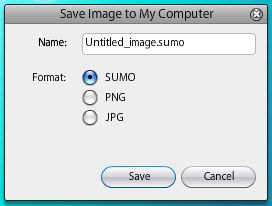
You are given options whether to save it on Sumo Account (which you need to register) or simply save the file into your machine.

You may save it as SUMO file (same like PSD file in Photoshop) or you can save it directly as PNG type or JPG image file.

It actually SAVE it on my desktop! hahahaha just in-case I need to modify it again in other time. Another good thing is that you can store the file into your pendrive and open it from other computer (ofcoz mesti ada internet la tue)

Tadaaa~ the final product created with Sumo Paint for mmm less than 10 minutes?... (including getting to know what does each tool do hahaha)
So... Go Nuts With Sumo Paint! huhuhu~ Sekian. Wabillahitaufiq Walhidayah.

Where is TechTV? Dead?


Have you ever heard of "TechTV"? Yes? No? Well it WAS actually a TV program featuring news, tutorials, tips regarding technology. When I was still "young" (hahaha about mmm 10 years ago?), TechTV was the MUST-SEE channel in my list (Well other than AnimeS like Gensomaden Saiyuki and others on that time hahha KLASIK! Not to mention SlamDunk or even Cooking Master<laugh>Gyahgyahgyahgyah</laugh>). If i'm not mistaken, it was on Astro's channel 14. From TechTV, I've learnt new things regarding technologies and got some useful tips on computing. It was like an "edutainment" for me and unfortunately... It is now "dead"... You may read further facts on TechTV here.
The TechTV show hosted by Chris Pirillo
However, the former TechTV's popular host; Chris Pirillo, is still active doing informal tutorials on youtube and so I still have a place to watch "a-little-bit-similar" of TechTV show hahaha and yes he is a GEEK.
Would you believe Chris Pirillo was on Anak IT? <laugh>Bwuahuwhuahwa</laugh>
Anyway, for those who would like to watch his news, tutorials and thoughts on computing technology, you may proceed here. Hopefully you will get more knowledge on ICT from him. Alright then... Until next time~
P/S: I wonder if ada local Bruneian yang mau buat program cemani but in "Bruneian" way... But still... Our local people would rather watch Astro rather than their own local TV channel... *sigh*

2010/03/18

Portable Applications in your Pendrive


P/S : Dear readers. For around these weeks, most of Anak IT members will be having difficulties on finding time to publish articles due to giving more concentration on their assignments. Semoga mereka dan abiskita serta semua Anak IT berjaya dalam bidang yang diceburi. Aminnn... New Contributors who would like to contribute articles are welcome. Kindly follow these simple procedures. Thank you for your support! =)