2010/11/19

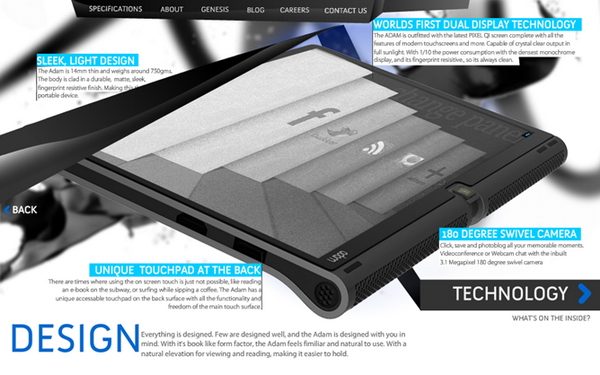
Notion Ink's The Adam Release


Salam Anak IT.
Based on my previous article on "The Adam - Android Pad", I mentioned that it might be released on November *liat calendar* yes November but I think it will not come out to market any time soon. The following phrase is taken from Notion Ink's blog:
"We are on time for this and you could hold devices in your hands on or before Christmas (and as hinted earlier, if we miss Christmas, then CES or New Year). Pre-booking will start in early December (if the case id prior). Already received FCC for the chargers!"
Based on their statement, The Adam will surely be released on December next month. You may visit their blog by clicking here or anywhere here. Bwuahuwhuahuwa =) Anyway here are some of the screenshots of The Adam:


What I only know is that we can pre-book The Adam early December and some sources stated that the price will be less than USD500 (around BND700?...). For those yang ketinggalan atue you may read my previous post regarding this little guy by clicking here, but not here.
Sekian, saja mengupdate about this long waited Android Tablet =) wassalam...

2010/11/13

FOSS - K-Lite Codec


Assalam,
It's been a while since I posted on anak.it. So today I'm going to introduce you K-Lite Codec. Ok.. gerenti ramai orang confuse sikit apa guna nya if kana install kan ke dalam laptop or desktop. Well K-lite Codec ani is basically a collection of audio and video components for Windows [1]. Still confuse? Andang nya tuu.. Aku pun awal-awal confuse.. First time aku membali laptop, kana install kan k-lite codec ani.. tapi inda ku tau apa guna nya.. then aku format laptop ku.. then baru ku realise ada guna nya...
So.. Let me explain.. Pernah kah biskita kn membuka video dlm format 3GP? RMVB? MKV? OGG? FLV? well.. K-Lite codec will help you to open the file and be able to view it. Its basically upgrade biskita punya video codec supaya dapat buka video dalam format tersebut di atas tadi.
If biskita masih confuse? Mari aku bercerita sedikit pasal ani.. Selalu nya... if computer baru habis format, biskita dapat buka video file under AVI, MPG, MP4 ganya.. so if baik nasib, dapat nampak gambar nya.. tpi if inda baik nasib.. inda ber-gambar langsung.. *Iatah membari garam hati oleh nya tuu..*
To solve this problem, biskita install K-Lite Codec. That way, you can view semua video format and its free!!
If biskita mau download.. click here.
Basically, K-Lite codec ani ada 4 jenis. Which are Basic, Standard, Full and Mega. Aku recommend Mega pulang.. K-Lite Mega Codec ani is the complete package of video format yang dapat di lihat lah... Even aku menggunakan K-Lite Mega Codec.
And for those yang ada udah dalam computer nya, kalau boleh constantly update lah K-Lite Codec biskita. Most of the update ani mengusai loophole aka Errors of K-Lite Codec yang version lama. Biskita inda pulang sadar ada error atau inda tu tapi ada banar nya...
K-Lite Codec ani saja bukan untuk video, tapi ia boleh digunakan untuk mendangar lagu jua..
If you dont feel like using K-Lite Codec, dont worry. There's another software for updating your video and audio codec as well. To be precise, there are tons of software that update your video and audio, but the most common that I see is "VLC Media Player".
If mau mendownload VLC... click here.
I think that is all for now. I hope this article gave you an extra knowledge on K-Lite Codec and what it does. If you have any question regarding this article, please do not hesitate to click "Miana Kan Tue?" at the top of this page. We will try our best to reply your question(s).
Thank you!
Sekian,
Wassalam..

2010/10/10

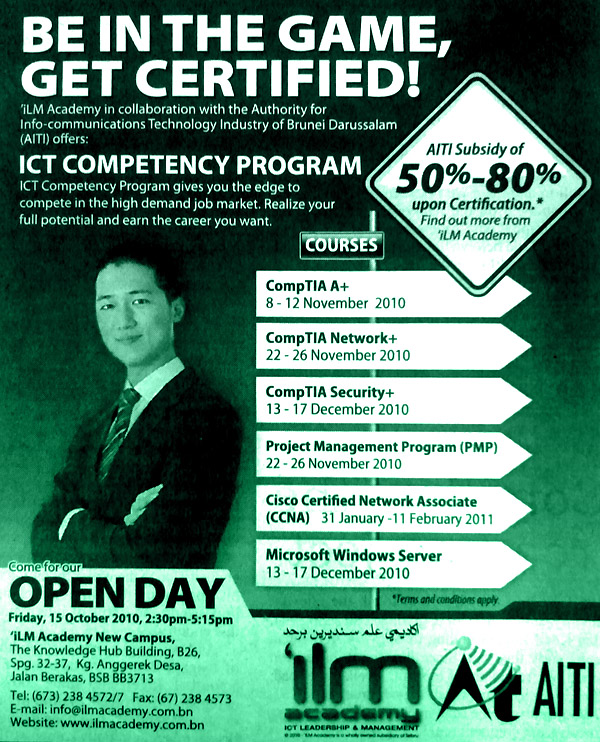
ICT Competency Program - Government Subsidised


"The Authority for Info-Communications Technology Industry of Brunei Darussalam (AITI) will subsidise training for Bruneians and permanent residents on ICT basics and more advanced courses as it signed yesterday deals with three local ICT companies hired to conduct the training.
ICT awarded the contracts to AT e-Knowledge Solution, HAD Technologies Sdn Bhd and iLM Academy following a signing ceremony at the agency's office in Berakas yesterday.
The training is under AITI's ICT Competency Programme aimed at training Brunei's citizens on ICT basics, multimedia applications and other ICT-related skills in order to create a pool of highly skilled manpower and ultimately ensure Brunei's human resource is well-versed in ICT. The programme also aims to upgrade the knowledge of ICT experts.
Under the ICT Competency Programme, AITI will be subsidising 50 per cent to 80 per cent of the training fees of eligible participants, subject to the training course taken. The subsidies will be provided upon successful completion of the course.
AITI is targeting job seekers without ICT skills for the training."
Read further... (The Brunei Times)

2010/10/06

Types of Viruses


  1. Resident Viruses
    • A terminated-and-stay resident virus permanently attaches to the host computer and operates in memory (RAM). It attempts to load before other mechanisms that attempt to analyse, detect and identify its purpose and origin and can bypass, interrupt or manipulate basic operating system functions.
  2. Stealth Viruses
    • A Stealth virus hides the modifications made to files and boot records by modifying and forging the results of calls to functions, therefore programs believe they are reading the original file and not the modified file. A good anti-virus software will probably detect a stealth virus due to the fact that a stealth virus attempts to hide itself in memory when a anti-virus software is launched.
  3. Macro Viruses
    • Certain applications contain embedded scripting or "macro" languages enabling users to automate long series of operations as single shorthand actions. A macro virus targets these applications by containing code that replicates and replaces other macros to launch the virus payload when common functions are called
  4. Slow Viruses
    • A Slow virus is a difficult virus to detect due to the fact it only modifies and infects files when they have been modified or copied. Therefore the original file will not be infected by the actual copied file. A good way to protect yourself against slow viruses is by using an integrity checker or shell.
  5. Direct Action Viruses
    • An aggressive form that replicates and takes direct action when triggered by some condition, date or event. The direct action virus typically resides in system folders or the root directory path where it can be readily accessed and activated and carry out its tasks when the system boots up.
  6. Revisiting Viruses
    • A Revisiting virus is a worm virus and attempts to copy itself within the computers memory and then copy itself to another linked computer using TCP/IP protocols. The Morris Worm virus in the late 1980's was the first major virus threat to hit the Internet.
  7. Retro Viruses
    • A Retro virus attacks the anti-virus software designed to delete it. The retro virus usually attempts to attack the anti-virus data files such as the virus signature store which disables the ability of the anti-virus software to detect and delete viruses. Otherwise the retro virus attempts to alter the operation of the anti-virus software.
  8. Armored Viruses
    • A Armored virus attempts to protect itself from anti-virus software by trying to make anti-virus software believe it is located somewhere else. Therefore the Armored virus has made itself more difficult to trace, disassemble and understand.
  9. Overwrite Viruses
    • A virus can partially or completely delete information contained in the files it infects, even replacing portions of application code with its own payload. Viruses of this kind are generally easy to identify with anti-virus software, as they generally tent to alter end-user and system applications in noticeable and identifiable ways.
  10. File Infector Viruses
    • The traditional virus is a file infector that targets executables to cause direct or indirect execution of its payload. Most viruses fall under this category and are further classified depending on what is targeted and the actions taken during the infection process.
  11. Companion Viruses
    • A Companion virus creates a companion file for each executable file the virus infects. Therefore a companion virus may save itself as scandisk.com and everytime a user executes scandisk.exe, the computer will load scandisk.com and therefore infect the system.
  12. Phage Viruses
    • A Phage virus is a very destructive virus that re-writes a executable program with it's own code, rather than just attaching itself to a file. Therefore a Phage virus will usually attempt to delete or destroy every program it infects.
  13. Polymorphic Viruses
    • A polymorphic virus is an encrypted virus that hides itself from anti-virus through encrypted (scrambled) data and then decrypts itself to beable to spread through the computer. The thing that makes it hard for anti-virus software to detect polymorphic viruses is that the virus generates an entirely new decryption routine each time it infects a new executable file, making the virus signature different in each signature.
  14. Multipartite Viruses
    • A Multipartite virus attempts to attack and infect both the boot sector and executable files at the same time.

2010/08/17

Discussion - Twitter


Salam Anak IT. This is a beta article on "discussion". If ada sambutan, I might add up "Discussion" as new category... Depends...

Do you tweet? If yes, share with other readers what do you like or dislike about it. You may include stories related to it. For this first "beta" discussion, comment which has more point will get a dst/b-mobile BND10 recharge card. Just make sure to provide your valid email address.
Closing date is next monday and the winner will be announced at the comment page of next "Ayat/Perambahan Minggu #33". Selamat mencuba~

P/S: I don't "tweet" and so I have no idea what it could do hahaha

2010/08/16

Tips to Prolong Battery Life


Salammm~ Anak IT readers~
Today I want to *liat2 jam nunggu baduk* share on how to *pigang parut* prolong your laptop's battery life based on my experience and knowledge... Or in other words how to extend your laptop's battery life...
Lurus ke pancang or nya omputih straight to the point, I will just list out in bullet points:
  • Set the display's brightness... Mikin tarang, mikin menungap battery...
  • If inda makai wireless, tutup tia...
  • Same goes to bluetooth, tutup if inda bepakai
  • Run only programs/services that you need... Close all the less necessary programs/services running on the background...
  • Heat is the best enemy for electrical devices... Sama jua battery laptop... Keep the battery away from direct "heat" such as sunlight, api, microwave? oven? kuali hangat?
  • When you charge the battery, it is best practice if you make sure your laptop inda hangat before plug in the power cord... Or masa yang paling sesuai is when it is switched off or masa inda bepakai...
  • Yang this one i'm not really sure but someone told me that keep the battery away from magnets... Drop a comment if you have better thesis on this...
  • This one may sounds "nda mengana" but makes sense... "Keep your laptop defregmented regularly"
  • If rasanya jarang makai DVD-RW or any optical drives, CABUT =) hahaha so true...
  • Use SSD instead of HDD... Reasons? Low power consumption ;) Yea I know masih mahal...
  • Here is the best tips when you are using HDD... If you plan on watching movies, put it on your pengdrive and play it from there... The reason is that, if the movie is inside your HDD, this will make your HDD spinning for the whole movie's length...
  • Graphic card... If you are planning to buy a new laptop, I recommend you to buy laptop which comes with nVidia Optimus... Read further~
  • Another tip if you are planning on buying laptop in the near future (to be specific, late 2010), buy a laptop which usesPixelQi's display panel...
  • Again, another tip if kan membali laptop, cari battery nya yang tinggi cell nya... e.g, 12-Cells battery... But biasanya yang bejual di kadai masa ani 6-cells... Some 8-cells...
  • Bring your charger everywhere... Abis ceta...
There are some softwares which are created to help "virtually" extending the battery's life...
Hope that gives benifits to all of us... Sama-sama sharing ilmu di bulan Ramadhan ;)
Sekian, wassalam...

P/S : Selamat menjalani ibadah puasa~ =)

2010/08/10

SEA-ME-WE 3 CABLE


Salam Anak IT readers.

SEA-ME-WE 3 cable or also known as South-East Asia - Middle East - Western Europe 3 cable is an optical submarine telecommunications cable linking those read further...
This article especially goes to "anonymous" asking kenapa internet down everytime ada natural disaster on the news especially yang baru-baru anie... So by looking at the picture alone, I hope you will get a bettteeer picture... Especially masa ada earthquake... These long cable is lying on the seabed and so there is a high possibility that the cable eventually "tepunggal" and disconnecting the network semasa gegaran di bawah lautan berlaku...
That is the path of SEA-ME-WE 3 which includes Brunei Darussalam... Visit the cable's official site...There is another submarine cable which connecting Brunei to other part of the world especially U.S named Asia-America Gateway or AAG... I will post about it tomorrow insyaAllah but you may also try togoogle it now =) Until next time~

2010/08/09

Brunei Government on Facebook?


Salam Anak IT Readers....

Brunei Government on Facebook?... Click here to read further...
It is like having friendster or myspace untuk urusan formal... What do you think?... Another point is that we also need to think who owned the social network as well as the confidentialities of information going inside and outside of the government... Share your honest opinion with Anak IT regarding this matter...

2010/08/01

The Adam - Android Pad


Salam Anak IT.
Notion Ink's Adam
Gadget for today is The Adam. Yup... Adam... Reason?...
"It's not a tablet or a book reader. It's a new species, and we call it ADAM. The First."
Notion Ink
The creator says so but for me it is just an alternative to Apple's iPad. Or even better? Look at the following comparisons:

What I am really impressed is the battery's life. The reason is that typical screen that runs with 3 cell battery uses 2watt while this gadget uses new screen technology called "PixelQi" which only uses 0.2watt and therefore it doubles the battery life 10 times longer. Interesting? But for me, the most interesting part is that it uses AndroidOS! <laugh>Bwauhuwhahwa</laugh> It will run on Android 2.2 Froyo but there is a hypothesis saying that it will run on Android 3.0 Gingerbread. Why? It is stated that this Notion Ink's Adam will be available in July but I read a post somewhere saying that it will most probably available in November where by that time Android 3.0 Gingerbread will also be released. But I heard the delay is mainly due to import procedures on the device's parts. Hmmm... November... *liat kalendar*
Another view of the Adam by SlashGear

To read further on this Android Pad, click here. I think future students will only use this kind of "gadget" for their presentations since it has the HDMI output. 160 hours sounds like a handphone's battery life to me hahaha atue lama... Hopefully ianya akan berfungsi seperti yang dijanjikan pasalnya i've heard complaints over Android's phone punya battery life but most probably it is because of the screen's display where people usually forget to balance the screen's brightness... Since this Adam will use PixelQi Technology I think nada masalah la tue insyaAllah...
I think that is it that I wanted to share with all of you for today... Sampai jumpa... Wassalam...

P/S : To ITB/UBD/UNISSA/KUPUSB students, welcome back to school again~ hahaha and oh, tell me if you are using any Android devices (mobile phone, APad etc.) on the comment section =) thanks!