2010/05/14

My Personal Alarm Clock


Salam Anak IT.
Today I would like to share my software-based personal alarm clock that I created using simple Visual Basic 6 coding. It was built for my personal purpose but now I just feel like I want to share it with Anak IT Readers... You may download the zip file (consists of the program and MP3 file) here. Here we go...
Facts and Features:
  • Created in 2007 using Visual Basic 6
  • The program size is only about 100kb
  • It uses Alarm.mp3 file for the "alarm" sound
  • Works well with large speaker
  • Of course it needs a speaker... Hahahaha
  • Bebunyi pada tiap-tiap pukul 7 pagi
  • Using 2 ways of "Custom Alarm Time"; Specific Hour-Minute-Second and Hour Selection (From 1am till 12pm)
Cara penggunaan (Specific Hour-Minute-Second):
  1. Taip waktu yang biskita inginkan di dalam format "Jam:Menit:Saat"
  2. Tekan butang "Add" or simply press Enter key on your keyboard
  3. By using this method, the ring will only last about 60seconds+
You will realise that the "Nill" has changed to your requested time, in the following example, it is written as "21:35:00"
Just wait for the time and it will ring the Alarm.mp3 at the time specified. You may use any other MP3 file such as your favourite song or HEAVY METAL SONG supaya tebangun slajur when it rings hahahaha but remember to place your MP3 file in the same folder where the program resides and rename the MP3 file into "Alarm.mp3" with capital A.
Cara penggunaan (Hour Selection):
  1. Simply select the hour and let it be~
  2. Baca doa sebelum tidur
  3. This method WILL NOT STOP THE RING unless you close the program or buang speaker biskita ke sungai (which is good for those yang "tidur mati" hahaha)
Simple? Huhuhu maybe the program is not as "user-friendly" as you expected it to be but it was created for my own personal usage in the first place...
Some useful tips:
  • Jauhkan speaker dari tempat tidur
  • Pasang volume speaker basar-basar biar hingar
  • Taruh gam plastik arah volume speaker so it will FORCE you to "betukang-tukang" membuka balik the tape (where by that time you will be more than awake hahaha)
  • Mun kan mau lebih bisai, replace the default MP3 file with MP3 urang membaca azan or simply record your own voice saying "HOIII WANGGG BANGUUUNNN!!!" or something like "Aku banaaa banaaaaa kannnn kauuuuuuu~" or anything you like...

Sekian, harap ianya akan dapat mendatangkan fa'edah kepada kita semua. Wassalam.

2010/05/12

Test Your Understanding On Computer Network


Without any aids from books and google, I got 62% and I did not pass. Hahahaha... How about you? Find it out yourself here.

2010/05/09

Windows Keyboard Shortcuts


Basic Keyboard Shorcuts for Windows

ShorcutFunction
CTRL+CCopy
CTRL+XCut
CTRL+VPaste
CTRL+ZUndo
DELETEDelete
SHIFT+DELETEDelete the selected item permanently without placing the item in the Recycle Bin
CTRL while dragging an itemCopy the selected item
CTRL+SHIFT while dragging an itemCreate a shortcut to the selected item
F2 keyRename the selected item
CTRL+RIGHT ARROWMove the insertion point to the beginning of the next word
CTRL+LEFT ARROWMove the insertion point to the beginning of the previous word
CTRL+DOWN ARROWMove the insertion point to the beginning of the next paragraph
CTRL+UP ARROWMove the insertion point to the beginning of the previous paragraph
CTRL+SHIFT with any of the arrow keysHighlight a block of text
SHIFT with any of the arrow keysSelect more than one item in a window or on the desktop, or select text in a document
CTRL+ASelect all
F3 keySearch for a file or a folder
ALT+ENTERView the properties for the selected item
ALT+F4Close the active item, or quit the active program
ALT+ENTERDisplay the properties of the selected object
ALT+SPACEBAROpen the shortcut menu for the active window
CTRL+F4Close the active document in programs that enable you to have multiple documents open simultaneously
ALT+TABSwitch between the open items
ALT+ESCCycle through items in the order that they had been opened
F6 keyCycle through the screen elements in a window or on the desktop
F4 keyDisplay the Address bar list in My Computer or Windows Explorer
SHIFT+F10Display the shortcut menu for the selected item
ALT+SPACEBARDisplay the System menu for the active window
CTRL+ESCDisplay the Start menu
ALT+Underlined letter in a menu nameDisplay the corresponding menu
Underlined letter in a command name on an open menuPerform the corresponding command
F10 keyActivate the menu bar in the active program
RIGHT ARROWOpen the next menu to the right, or open a submenu
LEFT ARROWOpen the next menu to the left, or close a submenu
F5 keyUpdate the active window
BACKSPACEView the folder one level up in My Computer or Windows Explorer
ESCCancel the current task
SHIFT when you insert a CD-ROM into the CD-ROM drivePrevent the CD-ROM from automatically playing
Other resources:

2010/05/07

Alert - MSN Spammer (Continued)


Salam readers...
This might be the continuation from my previous article called "Alert - MSN Spammer (Email Version)" and so I will write less for today...
Still remember the "heyyyyy"? Here I will show you another "heyyyyy" examples, not from email but from MSN Messenger... "Enjoy"... Huhu...
First "heyyyyy"

Second "heyyyyy"

Third "heyyyyy"

Again?... From different email?

There are actually more than these... These are those I had a chance to "print screen"...
Same admonition... "BE CAREFUL"...

2010/05/05

Reuse - Laptop Cooling Fan


Salam Anak IT.
Last time I posted an article on "Another way to make use your USB Extension Cable". The objective is to re-use any computer parts or computer related thing yang langsung inda lagi bepakai into something more useful. Today I have another "junk" for that.
It is my laptop's Cooling Fan jenis "portable". Since I seldom use my laptop, my cooling fan ampai-ampai tah ganya... So daripadanya ampai-ampai, tantu digunakan in other different way...
We all know that mostly (or maybe semua) cooling fan yang bejual di kadai atue makai USB cable as its power source's channel/medium... So... I was thinking... Is it possible if tane pakai USB device (usually around 5 volts) ke karan dinding (200+ volts)? Inda melatup ka tue if modify the wire then connect ke socket karan dinding? Hahaha obviously SOMETHING bad would happen... So I didn't try that out like I usually did... Then... I was thinking again... Of another alternative...
Tadaaa~ I saw this plug "ampai-ampai" sebalah my printer... So I smiled hahahaha you know what I was thinking... This converter plug is not an ordinary plug... It converts the current's voltage (and other elements which I am not familiar with since I am not an Electrical personnel) into USB's international standard voltage so that any USB devices can have power supply from any ordinary wall plug's current (lurus ka tue? haha).
The result? I used it as a cooling fan for both internet modem and router in the house. Well maybe not as good as "kipas angin" but just enough to ventilate the devices.
Time malam inda belampung. Bisai dijadikan lampung untuk tidur.

Cooling Fan - Sponsored by: http://anak.it/

Sekian. Wabillahittaufiq walhidayah.

P/S : Good luck for those who are having exams especially those yang from UBD, ITB & UNISSA... Exam fever~ =)

2010/05/02

Replacing new Thermal Grease


Assalam Anak IT Readers,
Do you have a computer? laptop? If ada, brapa lama dah biskita memakai? Setahun? Dua tahun? Have you ever wonder after a certain period of time, computer biskita mikin skajap hangat rasanya? If yes then you need to read the rest of this article..
Pernah biskita melaha Processor biskita? If yes, apa yang biskita nampak in between the processor sama heat sink processor? Something yang usulnya macam chewing gum? Hahaha well that is what we call Thermal Grease.
What does this thermal grease do is basically untuk menulung "menyiruk" panas dari processor naik ke heat sink yang biasanya disimpan di atas processor. If biskita masih "blur" pasal thermal grease, cuba biskita fahami this site.
So... Masalahnya pasal thermal grease ane, ia dapat jadi karing and MALFUNCTION sudahnya lama-lama hahaha as in ia inda lagi tekarih untuk "menyiruk" panas dari processor naik ke heat sink... Then ia menjadi "blocker" ta plang which is panas atue inda naik ke heat sink and BEPARAM arah processor. This actually same goes to video chip, not only processor. I've heard a lot of stories (especially laptop HP) where the motherboard inda lagi dapat dipakai after 1-2 years. This is because of the video chip "kana salai" oleh heat yang ia sendiri produce...
Then... How to avoid this? For my case, I personally need to check on my processor's condition every 4-5 months. Last time I did a check-up and found that my thermal grease is "inda lagi bermaya" nya urang kitani hahaha so I think it is good to share this with you... I will elaborate further on the pictures below:
This is my heat sink... As you can see, the thermal grease (grey compound) karing udah... So I need to replace it with new thermal grease...

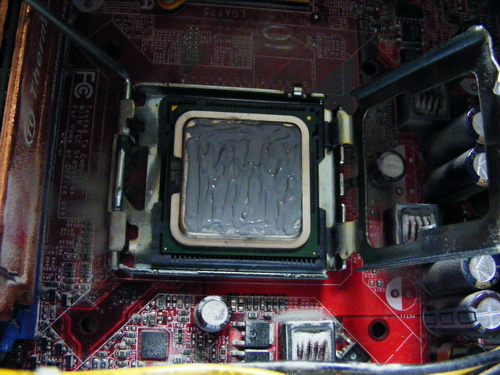
That is my Dual Core Processor... Can you see the thermal past atasnya?

First, remove the current thermal paste from both heat sink and processor (in my case I used minus type screw driver so kira dikikis-kikis sampai licin)

Tadaaa~ hehehe bacilat selajur... And I forgot to take a picture of my processor yang abis bekikis dah...

Then, prepare your Thermal Grease... I used ThermalTake's TG-2 Thermal Grease

This thermal grease can be found arah any kadai computer but biasanya yang bisdia jual atue bukannya jenis "standard" thermal grease... Yang biasa ja... So if you want to buy Thermal Grease, I recommend you to buy any brand from ThermalTake, Cooler Master or even better Arctic Silver (Arctic Silver usually comes with remover as well). Try to look for it arah kadai computer Chong Hok (if na salah la) Kiulap berdepanan dengan C.A Mohammad and sebaris Minuman EasyWay...

Apply the thermal grease on top of your processor (or video chip)

Make sure biskita ratakan the thermal grease. The important point is jangan biskita bagi luan tabal. Nipis is better but jangan jua luan nipis. After you are done, pasang balik the heat sink CAREFULLY and switch on computer biskita seperti biasa.

Oh... Another thing... Jangan lupa buang habuk (dust) rah kawasan berhampiran processor (if rajin clean the entire motherboard). Use a brusher.

There you go... If dapat, try to monitor your cpu's temperature from time to time... You may read this "How to monitor CPU temperature" article...
Sekian, wabillahittaufiq walhidayah, harap maklum.

P/S : This activity requires your concentration and precautions since you are dealing with the "brain" of your computer a.k.a processor. You don't want to spoil the processor and bali baru... Unless harganya 30sen hahahaha ;)

2010/04/29

Reuse your USB Cables


Salam Anak IT.
Do you have an extra of USB extension cable? Yang inda bepakai? Ampai-ampai? Today I will show you one of many ways on how to make use your wasted USB extension cable. I will just let the pictures do the talking after this.
USB Extension Cable

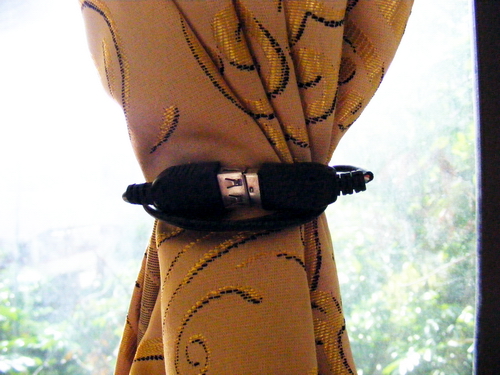
"Pengikat tabir bilik"

Another close-up

Sekian. Until next time.
P/S : For those yang kan share idea lebih bernas untuk re-use any computer parts yang inda bepakai, kindly post it here or you are welcome to be part of Anak IT's contributors =)

2010/04/28

Alert - MSN Spammer (Email Version)


Salam'alaikum Anak IT Readers~ Long time no see~ <laugh>yohohoho</laugh>
Last time, I did post an article regarding "MSN Spammer" but that was for MSN Messenger. Today, I would like to share another MSN Spammer di dalam versi "email".
The MSN BOT is way too genius, not only it can nudge your MSN Messenger but also give out an email (if mulut biskita langap2 a.k.a inda paham, please read this article before proceed). Recently, I've got emails from anonymous (MSN BOTs) inviting me on their network and so on. Here are SOME examples...
As you can see, it says "I remember I promised you" but I do not even know who is this Madison. If its from Dayang Lintuk or Awang Kuripik and bakurapak dalam bahasa Brunei maybe masuk akal jua sedikit... Ane lain pisinnya... "Hey babe" lagi tu <laugh>Bwuahuwhuahwa</laugh>
That is an example yang jenis kan "sharing photo album". Now, examine the following screenshots taken from my inbox...
"heyyyyy"

another "heyyyyy"

"heyyyyy" again...
Same "heyyyyy" from different users? Huhuhu so it is obvious that the invitation came from the MSN Spammer...
Again... BE CAREFUL...

Sekian, wassalam...

2010/04/23

Defend your drives from AUTORUN.INF Malware


Salam Anak IT.
Today I would like to share some useful information on protecting your any secondary storage drives (pendrive, harddrive) from being infected with malware which uses AUTORUN.INF service.
Sebagai mukaddimah, AUTORUN.INF ialah satu fail yang diberi "permission" secara khas untuk membuka apa saja "executable" files yang tersenarai didalamnya. Autorun.inf sering digunakan untuk membuka program melalui CD ataupun DVD. Biasanya "Installation CD" tedapat ne fail ane...
Masalahnya... Ianya sering dipersalah gunakan oleh sebilangan "kaum" dimana mereka menggunakan "permission" tersebut untuk membuka "virus" mahupun "malware" yang bisdia buat supaya infecting other computers, biasanya melalui PENDRIVE...
Have you ever come across where your friend told you that your pendrive is carrying virus/malware/spyware into it? I am pretty sure you have heard of such things especially in college or university. So... Miana gayanya tue? Dibiarkan saja?... Ofcourse the best way is to have an antivirus/antispyware/antimalware implemented on your system and scan your pendrive regularly but what I am going to write is how to minimise the virus/malware impact on your drive which most of these "liau" uses AUTORUN.INF for their operation.
First, open up the drive's folder
Next, we will be creating new folder by Right-clicking anywhere on the white space, go to "New" and choose "Folder"
Rename the folder to "autorun.inf"
After that try to test it on any infected machines which will transfer the virus/malware into any removable drives. It might still copying certain files but it will not run it AUTOMATICALLY and so you have a control whether to delete the file or just let it be there.
If you see the "autorun.inf" folder's Properties (right click on the folder then click on "Properties"), you will see that the folder is automatically set to "Read-only" by the operating system.
That is it for today. I hope you could gain useful information from it. Until then, Assalamu'alaikum W.B.T... Wassalam...

P/S : Please use only GENUINE antivirus. Bukan antivirus main be"cr4ck3d".

2010/04/22

Run anything at Window's Startup


Assalam~
Have you ever wonder how to make your favorite application to run automatically every time you starting up your computer? If you do then you should follow these few easy steps. For this demonstration, I will be using Windows XP Professional but I believe this might also work with other Microsoft's Operating Systems such as Windows Vista/7.
First, go to Start>Programs and then look for "Startup"
Second, right click on the "Startup" and click "Open"
The "startup" folder will appear. This is where you can put any application's shortcut that you want it to run automatically when the windows started up.
As example, I put Mozilla Firefox's shortcut that I copied from desktop
After you are done, restart your computer and see what will happen. Selamat mencuba~
Sekian. Wassalam...

P/S : This method also applies not only to shortcuts but to real file as well. Try to create new text file inside the startup folder and fill the text file with anything you want such as reminder or "To do" list then restart your computer.