Showing posts with label Software. Show all posts

2015/08/25

Machine Learning is What Makes SkyNet, SkyNet


You watched Terminator, right? At least one of the movies? If you havn't, go watch it.


What is Machine Learning?

To answer that, let's start with how we, the human beings, the mighty race, learn anything. If I teach you about how to make additions of any two numbers, you would know how to do after so many practices. So showing you "1 + 1 = 2", and "2 + 2 = 4", etc. You get the idea of how to do additions.

Then when I give you a random 2 numbers, I expect you to give me a sum of these two numbers in return. Let's say "144" and "956". You would give me "1100" as the correct answer. If you get anything else than 1100, please retake your addition tests here.

The above scenario is what we are trying to do with machines. Teach them how to make perfect additions or perfect subtractions or just help us create a formula that gives us the desired outcome.

2015/06/20

Free Monthly Pack of Sound UI by Sonics

Get your free monthly pack of Sound UI from Sonics.io

Throughout the several sessions of Game Development and Design, we have covered how to use the whole Unity3D platform, interface and to build a really simple game out of it.

And just as was mentioned during the sessions, as indie game developers, we also need to switch our hats to become a music or sound composer for the game. Different tunes, different melodies, different sound effects, etc are all important to delivering a quality gameplay. Just imagine playing a flappy bird but with out the sound. It would be less annoying to play isn't it?

The other part is that to find quality sound effects, you would need to check whether its downloadable, royalty free and safe. And there's plenty out there that are not of the three or at least one of them.

Today, I just want to introduce SONICS, a free email subscription service to receive free packs of UI sounds and sound effects, every month. Downloading this free pack, allows you to add into your own library for later use in a game development. Simple sounds that you can use on most games really.

So what are you waiting for? Sign up for SONICS!

2015/06/17

Be Productive While Fasting During Ramadan

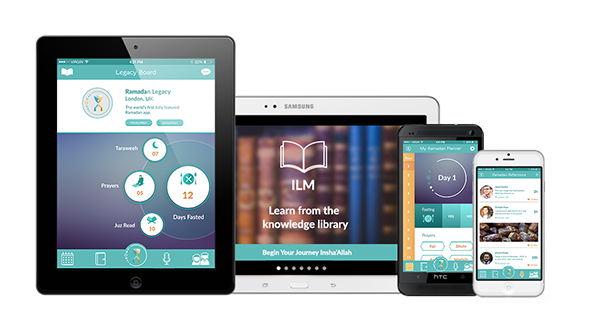
Ramadan Legacy - A Worlds First fully-featured app for Ramadan
Photo courtesy from ramadanlegacy.com
Fasting is coming in really close now. How time flies. Are you prepared for it? How about we add a little bit of IT in it. Let us introduce to you, Ramadan Legacy.

2011/04/12

Full Control in Windows 7


Salam Anak IT.
Have you ever experienced the following?:

Or maybe you can't access certain folders and files especially when you browse old harddisk which has Windows Operating System installed? Follow these simple steps.
Right click on the folder/file you want to access, then click on "Grant Admin Full Control".

A command prompt will appear showing processes take place.

Then, you are done! Easy right? But be sure your user account is part of the administrators in order to make it work.
Semoga mendapat manfaat mun inda banyak pun, sikit jadi ta =)
Sekian, wassalam.

2011/04/03

What's going on (in the background)?


When you hear your computer's fans kick in for no apparent reason there is always a good time to check up on what's going on in the background that is driving the CPU to work hard and thus kicking the fans to start in order to cool the working and heating up CPU. Or sometimes when the computer seems to be acting slow, there could be some application or process that is causing the system to slow down. It's time to take a look at the processes (not to be confused with processors) running on your system
Today's culprit is Finder, which is OS X's file explorer that you use to navigate folders in order to find / open / manage your documents and files.
Finder what are you up to using 99.2 CPU usage?

It was using 99.2% of my CPU core's cycles. I closed the 2 Finder windows and my fans stopped in due time. The reason you want to stop this kind of behaviour is that it slows down your system and also causes a lower battery life as it is processing something in the background. I saw no reason for it to behave this way, I closed the windows. If you are encoding/rendering a video you will expect some application to be using the CPU cycles and thus closing that program will cause that action to fail, thus don't just willy nilly close any application that is using CPU cycles.
To view current CPU usage by processes
  • Mac: Open Terminal and type "top -o cpu"  (without the quotation marks) and press Enter
  • Linux: Open the Terminal / Console and type "top" and press Enter
  • Windows: Press Control + Shift + Escape > Click "Processes" tab
    Windows Task Manager - Processes Tab
    Windows Task Manager - Processes Tab
To close misbehaving applications
  • Mac & Linux: "kill -9 PID"  and if that doesn't work "sudo kill -9 PID" (PID is the number under the PID column in the "top" output)
  • Windows: select the process and click the "End Process" button
Hopefully this will help you kill some misbehaving applications and help increase your battery life when you're out and about.

Written By Timothy Lim

2011/01/23

Write Jawi Easily


Salam Anak IT.
I would like to share a useful software to write jawi named "Maktab", Written by Dennis C. Bemmann (www.bitclick.com). Here is the snapshot:
Click on the image to download the file (jawi.exe)

It shows what you need to press in order to have the jawi letters. For example, if kan mau huruf "Alif", simply press small "a" but if you type capital "A" it will give you huruf "'Ain". The good thing about this is that you do not need to buy a jawi keyboard sticker to be attached on every keys on your keyboard. After you are done with typing, just copy everything and paste it into MS Word, OpenOffice, MSN nick etc.
Simple? Semoga ianya dapat memberi manfaat kepada kitani semua lebih-lebih lagi guru ugama =)
Sekian, Wassalam.

2010/06/26

Microsoft Security Essentials


Salam Anak IT.
Good news for Windows Operating System users.
"Microsoft Security Essentials provides real-time protection for your home PC that guards against viruses, spyware, and other malicious software.

Microsoft Security Essentials is a free download from Microsoft that is simple to install, easy to use, and always kept up to date so you can be assured your PC is protected by the latest technology. It’s easy to tell if your PC is secure — when you’re green, you’re good. It’s that simple.

Microsoft Security Essentials runs quietly and efficiently in the background so that you are free to use your Windows-based PC the way you want—without interruptions or long computer wait times."
 -Microsoft
The key features are:
  • Comprehensive malware protection
  • Simple, free download
  • Automatic updates
  • Easy to use
The software is free to use as long as you use GENUINE Windows Operating System. Download it hereand enjoy this free anti-malware on your system.
Sekian~

2010/06/08

Is Every New OS Secured/Stable?


Salam Anak IT.
If you are a computer "geek", what will you do if you heard any OS developer saying that their new Operating System is released? Get it straight away?... Or wait until everyone is using the OS?...
Here are some advices, mostly based from my personal experience. There are some drawbacks of the new released Operating System that you reeaallllyyy need to consider:
  1. Alum luan stable banar...
  2. Hardware incompatibility "cornflakes"
  3. Poor graphic manipulation
  4. Risk of data loss
  5. Performance kureeeng~
  6. Availability of Security loopholes
  7. Requires to download soooo many patches
  8. Makes the user kambang "aku makai OS baru dah~ wooooo~"
  9. Dan yang sewaktu dengannya
I believe there are many more of these but that depends on which type of Operating System implemented.
I remembered last time when Windows Vista was freshly released, everyone was talking about it... "Bui... Ko makai Vista dah?", "Jeng... Di mana berulih tue ah Windows Vista ah?", "Dapat ko formatkan laptop ku jadi Windows Vista?"... And guess what... In the end, "Bro... nyasal plang ku makai Vista ah...", "Dapat kita downgrade kan my laptop from Windows Vista ke Windows XP?", "Laptopku system-crash ahh!! Miana kan tue?!"... Alum lagi yang jenis penyumpahan tue hahaha...
So, I suggest if there is a new OS release that you want to try out, try it with your secondary or less important machines, not with the machine which you are using to deal with daily activities.
Sekian, semoga mendatangkan manfa'at.
Wassalam.

2010/06/06

CTRL + ALT + DELETE


Salaaammm~
This is especially goes to WINDOWS OS users...
Have you ever experience system freezed? Hang?
If something like that happen to your system, what will you do?
I bet 98% of you probably already know what you will need to do. But this goes especially to the other 2%.
Press CTRL+ALT+DELETE simultaneously at a time!

When the "Windows Task Manager" appears, "End Task" any application with "Not Responding" status.
If masih jua matingal nda mau, takan switch on/off rah komputer biskita batah-batah sampai ia pajah, then takan lagi sekali.

Sekian, wassalam...

P/S: Mun rasanya payah-payahan, switch to Ubuntu, end of story~ <laugh>gyahgyahgyahgyahgyahgyahgyah</laugh>

2010/05/14

My Personal Alarm Clock


Salam Anak IT.
Today I would like to share my software-based personal alarm clock that I created using simple Visual Basic 6 coding. It was built for my personal purpose but now I just feel like I want to share it with Anak IT Readers... You may download the zip file (consists of the program and MP3 file) here. Here we go...
Facts and Features:
  • Created in 2007 using Visual Basic 6
  • The program size is only about 100kb
  • It uses Alarm.mp3 file for the "alarm" sound
  • Works well with large speaker
  • Of course it needs a speaker... Hahahaha
  • Bebunyi pada tiap-tiap pukul 7 pagi
  • Using 2 ways of "Custom Alarm Time"; Specific Hour-Minute-Second and Hour Selection (From 1am till 12pm)
Cara penggunaan (Specific Hour-Minute-Second):
  1. Taip waktu yang biskita inginkan di dalam format "Jam:Menit:Saat"
  2. Tekan butang "Add" or simply press Enter key on your keyboard
  3. By using this method, the ring will only last about 60seconds+
You will realise that the "Nill" has changed to your requested time, in the following example, it is written as "21:35:00"
Just wait for the time and it will ring the Alarm.mp3 at the time specified. You may use any other MP3 file such as your favourite song or HEAVY METAL SONG supaya tebangun slajur when it rings hahahaha but remember to place your MP3 file in the same folder where the program resides and rename the MP3 file into "Alarm.mp3" with capital A.
Cara penggunaan (Hour Selection):
  1. Simply select the hour and let it be~
  2. Baca doa sebelum tidur
  3. This method WILL NOT STOP THE RING unless you close the program or buang speaker biskita ke sungai (which is good for those yang "tidur mati" hahaha)
Simple? Huhuhu maybe the program is not as "user-friendly" as you expected it to be but it was created for my own personal usage in the first place...
Some useful tips:
  • Jauhkan speaker dari tempat tidur
  • Pasang volume speaker basar-basar biar hingar
  • Taruh gam plastik arah volume speaker so it will FORCE you to "betukang-tukang" membuka balik the tape (where by that time you will be more than awake hahaha)
  • Mun kan mau lebih bisai, replace the default MP3 file with MP3 urang membaca azan or simply record your own voice saying "HOIII WANGGG BANGUUUNNN!!!" or something like "Aku banaaa banaaaaa kannnn kauuuuuuu~" or anything you like...

Sekian, harap ianya akan dapat mendatangkan fa'edah kepada kita semua. Wassalam.

2010/04/16

Online Photo Editor


The print screen image you see above this text is from pixlr.com, an online photo editor hosted by netfirms.com. It was suggested to me the other night and I decided to check it out, so now I've decided to give a short review about it. There are some pros and cons of using this online photo editor which I would like to discuss. First of all, the pros of using it:
1. It is pretty user-friendly
2. It's like an online version of Adobe Photoshop
3. Shortcuts that you would normally use for photoshop can be used in here too, e.g. ctrl+z for undoing mistakes or ctrl+m for curve adjustment.
4. You can create your own brush, like such
5. You can change the language to the desired language, except Malay.
6. It has the Tilt-Shift effect which is not included in Adobe Photoshop (I'm not quite sure about the upcoming Adobe Photoshop CS5 though)
7. Every basic function is there and you can just skim through the page to find it.
That's basically all the pros I can figure out for now. The cons, however, are:
1. You MUST have access to the internet to use this online photo editor.
2. The Lasso tool is only limited to two, which are Free-hand and Polygonal Lasso tool
3. There is only a limited number of effects you can use (probably to decrease slow loading of the page)
4. The brush you create is only limited to a number of shapes, unless you can find brushes in .pbr format to load into the editor.
5. The texts are also limited to that offered in the online photo editor text options.
6. If you have slow internet connection, you'll experience some lags in processing the commands you entered.
In conclusion to this short review, I'd just like to state that, with all the pros and cons, I think that it's quite alright to use this online photo editor, especially if you don't want to take up memory space in your laptop/desktop. This would be good practice as well for beginners of photo editing because of user-friendliness. I might be wrong on some points that I've stated earlier, but do try it out and see if you like it.
You won't get anywhere without experimenting in life.

2010/03/21

Photoshop Alternative - Sumo Paint


Salam Anak IT.
Today, I want to share one of graphic tools I am using which is an alternative to Adobe's Photoshop. Most of you might already know about GIMP (especially to Mac users) but now I am introducing you to another "Photoshop Alternative" called Sumo Paint. Sumo Paint has an ability to be used ONLINE and it contains a lot of useful features which you also can have in Adobe's Photoshop. It is free for online usage but if you do not want to use it online and prefer to use it on your offline machine, you may download the PRO version of Sumo Paint for US$19/year. I only use Sumo Paint for certain occasion and so I personally will only use it's online feature but who knows if I might invest it in the near future =) hehe
Sumo Paint's official site. As you can see, the thumbnailed pictures were made from Sumo Paint. Well it depends on individual's creativity. So click here to learn more about Sumo Paint or here to start drawing your first art with Sumo Paint.

The panels on Sumo Paint. A little bit familiar with Adobe's Photoshop, am I right? I've created a 3D effect on the text "http://anak.it" =)

How I made the text's 3D effect

You are given options whether to save it on Sumo Account (which you need to register) or simply save the file into your machine.

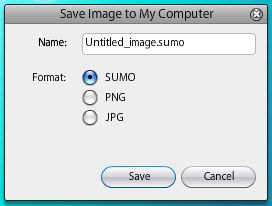
You may save it as SUMO file (same like PSD file in Photoshop) or you can save it directly as PNG type or JPG image file.

It actually SAVE it on my desktop! hahahaha just in-case I need to modify it again in other time. Another good thing is that you can store the file into your pendrive and open it from other computer (ofcoz mesti ada internet la tue)

Tadaaa~ the final product created with Sumo Paint for mmm less than 10 minutes?... (including getting to know what does each tool do hahaha)
So... Go Nuts With Sumo Paint! huhuhu~ Sekian. Wabillahitaufiq Walhidayah.

2010/03/18

Portable Applications in your Pendrive


P/S : Dear readers. For around these weeks, most of Anak IT members will be having difficulties on finding time to publish articles due to giving more concentration on their assignments. Semoga mereka dan abiskita serta semua Anak IT berjaya dalam bidang yang diceburi. Aminnn... New Contributors who would like to contribute articles are welcome. Kindly follow these simple procedures. Thank you for your support! =)

2010/03/06

2010/02/18

How To Handle Missing/Corrupted File?


Assalamu'alaikum wbt...
Have you experienced a sudden dead blue screen in Windows XP? Then after you restart your computer, it is saying something like a file is missing or corrupt?
I've been facing such "cheerful" events haha just yesterday it happened to me again. Missing or corrupted hal.dll... Based on my experience, sometimes it is due to improper booting up. In special cases, the file itself buat hal. So miana tue? Logically, we would just replace the file with the unaffected file. But, if you can't even access the operating system, how are you going to do it? Yetah masanya I would directly interact with my best buddy named "Live CD". Live CD allows you to run the operating system WITHOUT having to install it first in you harddisk.
  • To learn more on Live CD, go to this wikipedia.
  • You may get the list of available Live CD here.
Ubuntiu 9.04 (well it is now 9.10). I only use it as Live CD
After you get yourself a preferable Live CD (I recommend you to use Ubuntu), insert it into your tray and then restart your machine.
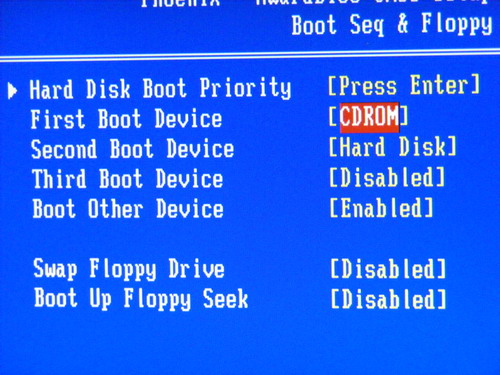
You need to make sure that you have selected your CD-ROM drive as primary boot device. When the first screen appears, press Delete key on your keyboard immediately to access the BIOS configuration. This might be different on other machines. Certain machines use F12 key instead of Delete key. It depends on the manufacturer.
BIOS Setup...
Browse for "boot" word,
Change the first boot device to your CD-ROM drive, save changes made and leave the BIOS setup.
Restarting the machine again.
Upon successful, you will be brought to Ubuntu's menu whether to try it as Live CD or to install it into your harddisk. Choose the Try Ubuntu option.
It will load Operating System files from your CD. Starting from now, you could not eject the Live CD from your CD-ROM drive.
Walaa~ Welcome to Ubuntu Operating System.
Go to Place>Computer and go to your windows drive. Browse to windows/system32 folder.
But, before that, I need to download new hal.dll to replace the corrupted hal.dll (if it surely is corrupted)
I went to dll-files.com and download the file
Once the download is completed, open the downloaded archive file
Extract it to desktop temporarily
Back to the folder, look for the corrupted file
Kindly back the file up before you replace it with the new file.
Then, replace the corrupted file with the downloaded file. The system will ask you again to confirm the replacement of the file. Just select "Replace".
After you replaced the file, turn off the Ubuntu Operating System
Shut down~
You will be prompted to remove the Live CD from your CD-Rom drove
Remove the Live CD
And do another restart
Its getting close now... Hopefully...
YEaH! It is back to normal...
Thank you Ubuntu. You saved my "Windows" LOL
- The End -