Showing posts with label FOSS. Show all posts

2011/02/13

FOSS - TeraCopy


Salam Anak IT readers.
Today's article will be another FOSS (Free and Open Source Software) and the selected FOSS for today is Teracopy - "Copy your files faster". Here is the screenshot:
TeraCopy is a compact program designed to copy and move files at the maximum possible speed, providing the user with a lot of features:
  • Copy files faster. TeraCopy uses dynamically adjusted buffers to reduce seek times. Asynchronous copy speeds up file transfer between two physical hard drives.
  • Pause and resume file transfers. Pause copy process at any time to free up system resources and continue with a single click.
  • Error recovery. In case of copy error, TeraCopy will try several times and in the worse case just skip the file, not terminating the entire transfer.
  • Interactive file list. TeraCopy shows failed file transfers and lets you fix the problem and recopy only problem files.
  • Shell integration. TeraCopy can completely replace Explorer copy and move functions, allowing you work with files as usual.
  • Full Unicode support.
  • Windows 7 x64 support.
- Taken from Teracopy's website
I have been using Teracopy since the past mmm 2-3 years? The only thing is that it can only be used in Windows OS but yea I just prefer using Teracopy rather than Windows built-in file/folder operation controller. Just try it now and experience it yourself. Try to copy big files and compare it with the regular Windows built-in operation controller. You may download it from here. If rasanya inda tepakai, simply uninstall it =)
Semoga mendapat manfaat dan kebaikan ;) aminnn...
Sekian, wassalam.

2011/01/13

FOSS - CCleaner


Salam Anak IT readers =)
The FOSS (Free and Open Source Software) for today is.......................... *drumroll*.................. *masih drumroll*........ CCleaner~ my favorite FOSS :)
So, what is CCleaner? It is a free cleaning tool for Windows OS. It is small with big *masih ada drumroll* capabilities and also very light =) it is also easy to use and a *pacahi drum kai pisau cukur* must-have tool for Windows OS. Download it for free at http://www.piriform.com/ccleaner or if malas kan copy paste click here. If you feel that it is useful you may have choice to donate or buy the software with priority support.
It has 3 category: Cleaner, Registry and Tools. For Cleaner, it cleans up your temporary files, cookies, clipboards etc. which is usually needed by the machine once but haven't been wiped off from the machine. Registry cleaning fixes any problems found on the registry while Tools cleaning deals with the software installed on the machine. This is the screenshot of the sofware:

To use Cleaner, simply click on the Analyze button and it will scans your machine for the junk files.

After the scanning is complete, click on the "Run Cleaner" button. Straight forward right? ;)

For Registry cleaning, click on the "Scan for Issues" button.

Sudahnya abis scanning, tekan punat *hahaha* "Fix selected issues..."

You will be asked either you want to backup your registry or not. To be on a safe side, just back it up and then follow the instructions.

Tools~ This is my favorite part. It has 3 sub-functions: Uninstall, Startup and System Restore. Yang Uninstall atue you know la apa ia but ;) but the most interesting part is the "Startup" feature. Usually the machine loads very slow after switched on. This is because of some programs being loaded at windows start-up. This software gives you freedom on choosing which program you want to be enabled during start-up and which programs you want to disable or even delete it from the start-up list =)

Semoga memberi manfaat arah kitani semua serta rakan-rakan dan saudara-mara tidak lupa adi beradi insyaAllah.
Sekian. Wassalam.

2010/11/13

FOSS - K-Lite Codec


Assalam,
It's been a while since I posted on anak.it. So today I'm going to introduce you K-Lite Codec. Ok.. gerenti ramai orang confuse sikit apa guna nya if kana install kan ke dalam laptop or desktop. Well K-lite Codec ani is basically a collection of audio and video components for Windows [1]. Still confuse? Andang nya tuu.. Aku pun awal-awal confuse.. First time aku membali laptop, kana install kan k-lite codec ani.. tapi inda ku tau apa guna nya.. then aku format laptop ku.. then baru ku realise ada guna nya...
So.. Let me explain.. Pernah kah biskita kn membuka video dlm format 3GP? RMVB? MKV? OGG? FLV? well.. K-Lite codec will help you to open the file and be able to view it. Its basically upgrade biskita punya video codec supaya dapat buka video dalam format tersebut di atas tadi.
If biskita masih confuse? Mari aku bercerita sedikit pasal ani.. Selalu nya... if computer baru habis format, biskita dapat buka video file under AVI, MPG, MP4 ganya.. so if baik nasib, dapat nampak gambar nya.. tpi if inda baik nasib.. inda ber-gambar langsung.. *Iatah membari garam hati oleh nya tuu..*
To solve this problem, biskita install K-Lite Codec. That way, you can view semua video format and its free!!
If biskita mau download.. click here.
Basically, K-Lite codec ani ada 4 jenis. Which are Basic, Standard, Full and Mega. Aku recommend Mega pulang.. K-Lite Mega Codec ani is the complete package of video format yang dapat di lihat lah... Even aku menggunakan K-Lite Mega Codec.
And for those yang ada udah dalam computer nya, kalau boleh constantly update lah K-Lite Codec biskita. Most of the update ani mengusai loophole aka Errors of K-Lite Codec yang version lama. Biskita inda pulang sadar ada error atau inda tu tapi ada banar nya...
K-Lite Codec ani saja bukan untuk video, tapi ia boleh digunakan untuk mendangar lagu jua..
If you dont feel like using K-Lite Codec, dont worry. There's another software for updating your video and audio codec as well. To be precise, there are tons of software that update your video and audio, but the most common that I see is "VLC Media Player".
If mau mendownload VLC... click here.
I think that is all for now. I hope this article gave you an extra knowledge on K-Lite Codec and what it does. If you have any question regarding this article, please do not hesitate to click "Miana Kan Tue?" at the top of this page. We will try our best to reply your question(s).
Thank you!
Sekian,
Wassalam..

2010/06/19

FOSS - Blender


Salam Anak IT.
Today's FOSS (Free and Open Source Software) will be Blender.
No... Not THAT blender... But THIS Blender...

Based from their offcial website, "Blender is the free open source 3D content creation suite, available for all major operating systems under the GNU General Public License".
For those who are already familiar with 3DMaxStudio, Maya 3D, Cinema 4D, you might want to try this out.
Here are some Blender's screenshot examples:


There are some short good movies created with Blender. One of them is Big Buck Bunny. I also found a good trailer here.

Looks realistic? Again created with Blender. More at Blender Art Gallery.

Download Blender now here and see if you can think in X,Y and Z axises =) enjoy~

2010/04/18

FOSS - Notepad++


Assalam~
Today, I will introduce you another useful FOSS (Free/Open Source Software) brought to you by Actifed - Ubat damam warna pink dari Klinik Kesihatan Sg. Hanching.
If biskita selalu deal with text (programming kah or even blogging kah or simply suka taip surat kinta), apa software yang biskita pakai? Notepad? MS Word? Do you really comfortable using it? For those yang ganya menaip cerita atue maybe no problem but for those yang creating programs or developing a site might found them really hard in some cases.
So here... Some of you might already know it but kepada sesiapa yang alum tau atue, today's FOSS ialah Notepad++. Sama macam notepad biasa tapinya ada Plus2x gyahahaha. For further information, you may visit its official site here. Click here to download the software by clicking "Download Now!" button and try it out.

There are wide varieties of language available in Notepad++ such as HTML, CSS, PHP, JavaScript, Java, C++ dan yang sewaktu dengannya.

Apa yang membuatkan software ane "bisai" digunakan, it uses colour codes to represent particular prefixes for each language so that it is easy for us to determine which is which. This software also provides "TAB" feature for multiple files to be opened at the same time.
If you need to open another new window of Notepad++, go to Start>Run or press Window+R on your keyboard and type the following code:
notepad++.exe -multiInst
Then click on "OK" button. Walaaa~
The multiple window could be useful especially when you want to open different program where each program has multiple files.
I think that is all I wanted to share with all of you. If you have any difficulties or questions regarding Notepad++, please let me know by clicking "Miana kan tue?" at the top of this page.
Sekian. Wassalam...

2010/03/28

FOSS - CDex (CD Ripper)


Salam Anak IT.
For today, I would like to introduce one of the FOSS (Free/Open Source Software) named CDex. You may go to their official site here. CDex is technically a CD "ripper" where you convert your favourite Audio CD into digital audio files such as WAV, mp3, au etc.
CDex v.1.51 (Stable version)
As you can see, it is just like any typical CD Ripper where you can rename the audio tracks to be used as its filename as well. CDex provides 5 types of conversion but the major conversions are:
  1. Extract CD Track(s) to WAV file(s)
  2. Extract CD Track(s) to Compressed Audio file(s)
The first one is obviously convert the Audio CD track into WAV file whereas the second will convert it into MP3 file. It took me a while just to figure out how to convert it into MP3 files since "mp3" is not physically STATED there <laugh>kabababababa</laugh>.
Conversion in progress
Note : Remember to select all the tracks (CTRL + A) if you want to rip the whole album or else it will only rip the selected track.
Output : MP3 file
So if you are interested to use this FOSS (Free/Open Source Software), you may click here to download it. Good luck!
Sekian. Wassalam...

2010/03/21

Photoshop Alternative - Sumo Paint


Salam Anak IT.
Today, I want to share one of graphic tools I am using which is an alternative to Adobe's Photoshop. Most of you might already know about GIMP (especially to Mac users) but now I am introducing you to another "Photoshop Alternative" called Sumo Paint. Sumo Paint has an ability to be used ONLINE and it contains a lot of useful features which you also can have in Adobe's Photoshop. It is free for online usage but if you do not want to use it online and prefer to use it on your offline machine, you may download the PRO version of Sumo Paint for US$19/year. I only use Sumo Paint for certain occasion and so I personally will only use it's online feature but who knows if I might invest it in the near future =) hehe
Sumo Paint's official site. As you can see, the thumbnailed pictures were made from Sumo Paint. Well it depends on individual's creativity. So click here to learn more about Sumo Paint or here to start drawing your first art with Sumo Paint.

The panels on Sumo Paint. A little bit familiar with Adobe's Photoshop, am I right? I've created a 3D effect on the text "http://anak.it" =)

How I made the text's 3D effect

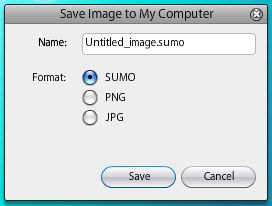
You are given options whether to save it on Sumo Account (which you need to register) or simply save the file into your machine.

You may save it as SUMO file (same like PSD file in Photoshop) or you can save it directly as PNG type or JPG image file.

It actually SAVE it on my desktop! hahahaha just in-case I need to modify it again in other time. Another good thing is that you can store the file into your pendrive and open it from other computer (ofcoz mesti ada internet la tue)

Tadaaa~ the final product created with Sumo Paint for mmm less than 10 minutes?... (including getting to know what does each tool do hahaha)
So... Go Nuts With Sumo Paint! huhuhu~ Sekian. Wabillahitaufiq Walhidayah.

2010/03/18

Portable Applications in your Pendrive


P/S : Dear readers. For around these weeks, most of Anak IT members will be having difficulties on finding time to publish articles due to giving more concentration on their assignments. Semoga mereka dan abiskita serta semua Anak IT berjaya dalam bidang yang diceburi. Aminnn... New Contributors who would like to contribute articles are welcome. Kindly follow these simple procedures. Thank you for your support! =)

2010/03/06

2010/02/14

Audacity


First of all, I would like to thank Anak IT’s founder for making me part of contributors. Even though the article editor interface is not that easy to learn, but it is an honor for me to give contribution to Anak IT.P/S: Jan lupa lanja ah hehe
For my first article, I would like to share with you guys about a software that I usually work with for audio editing. It is called Audacity. It is an open source software a.k.a FREE to use. For those yang memerlukan this software untuk edit mp3 or wav, you may go to http://audacity.sourceforge.net/download/ and download it based on your Operating System. It is now widely used in education in most of multimedia courses around the globe for learning audio editing.
Currently, Audacity works with these Operating Systems:
  • Windows (xp/vista/7)
  • Mac (OS X)
  • Linux
Audacity's User Interface
I use Audacity to:
  • Trim a song or memanggal-manggal lagu untuk jadikan short ringtone
  • Bagi effect to any audio file especially fade-in and fade-out effect
  • Combine tracks into a song
  • Removing noise (hiss sound)
  • Basarkan the volume of the song
Effects available in Audacity
Here are further elaborations on its built-in effects:
  • Amplify - Membasari volume lagu
  • Bass Boost - Membasari bunyi bass or labuk-labuk
  • Change Pitch - Menukar suara jadi Chipmunk or Low-tone
  • Change Speed - Melajukan or memperlahankan lagu
  • Change Tempo - I think kurang labih sama macam Change Speed
  • Click Removal - Membuang "click" and "pop" sounds?
  • Compressor - What I can tell is that it reduces the "quality" unrecognisably
  • Echo - Bagi effect macam dalam gua
  • Equalization - Ala-ala equalizer dalam keta or arah set karaoke
  • Fade In - Make the sound timbul perlahan-lahan
  • Fade Out - Make the sound hilang perlahan-lahan
  • FFT Filter - Usulnya macam Equalizer jua but this one has more controls
  • Invert - I think... Hmmm swapping the right channel to left channel and vice versa?
  • Noise Removal - Buang bunyi noise "ssssssssss" or bunyi aircond
  • Normalize - Kurang labih macam Amplify but this one control the frequency supaya inda "pacah"
  • Nyquist Prompt - It requires us to code-in something but I won't bother since it doesn't "taste" so useful
  • Phaser - Making the sound goes kiri ke kanan and kanan ke kiri (only in Stereo mode and only works with Stereo Speaker)
  • Repeat - "Copying and pasting" the highlighted area with "number of times to repeat" feature
  • Reverse - Terbalikkan bunyinya
  • Wahwah - Bagi bunyi "UFO" effect haha bunyinya macam Phaser effect but its a bit faster
You may experiment the effects on your own and try to analyse what each effect does to your audio file (mp3, wav, aif, au, ogg). I've produced many tracks with this software (to be precised, "combination of softwares which INCLUDES Audacity" hehe) and you may download one of my samples below:
MenjunjungDuli.mp3 Produced in 2006
- End -

2010/02/09

FileZilla FTP Client


Salam Anak IT. FileZilla FTP Client is one of the most popular FTP client available on the internet. It is used to upload and download files to/from server (usually web server). Click here to read further on FTP.
You may download FileZilla FTP Client for free on their website http://filezilla-project.org/ or simply clickhere if you would like to have a test drive. Once installed and opened, the following window will appear:
Then you may go to File>Site Manager or simply press CTRL+S keys on your keyboard.
To connect to the FTP Server using your account (if you have one), enter the given hostname (e.g websiteku.info) or it can be the Server's IP Address (if you know it). The default port for FTP is 21. Choose "Normal" for Logontype, enter your username and password then click on Connect button. If you have entered valid FTP account information, you will be connected to the server and ready to transfer files from your computer (client) to the server or vice versa.
Hope it gives you basic understanding on FTP (File Transfer Protocol). You may contact me if thing goes wrong with your FTP-ing attemp. Sekian.